Have a feature request or suggestion? Post your idea here!

Publicação

5 seguidores Seguir
0
Avatar

Rekordbox App in iOS sync problem

Hi there,

i cant export any of my analyzed tracks and prepared playlist in RekordBox on Mac to my connected iphone 6 with Rekordbox App. Both app's is latest versions (4.2.5 on Mac, and 2.1.2.1 on iphone)

Rekordbox on mac is successfully connected to my iphone, i can see it on 'Devises'. But when i launch Sync Manager i cant chose iPhone on Devices to start Syncing my playlists.

What i do wrong?

Alexander Romanov Respondido

Comentário oficial

Avatar

That's not the correct procedure, that's why!

Fist, you'll need both your phone and computer to be on the same network. Then, with your rekordbox mobile app open, tap the menu, then tap Connect to Computer.

Open rekordbox in EXPORT mode and click the little connection icon beside Devices in the tree on the left:

Next, if it connects, you'll see this window pop-up, asking to confirm the connection:
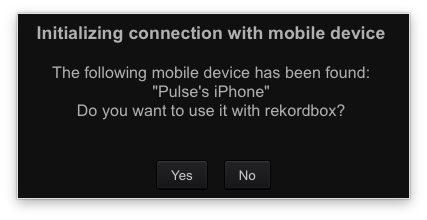
Click Yes and your device will appear in the tree on the left:
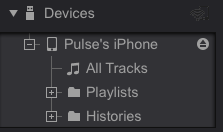
Drag and drop tracks or playlists from your collection to the phone and away you go!

Don't forget to click the EJECT button before closing rekordbox or the app.

Pulse
Ações de comentário Permalink

Publicação fechada para comentários.

3 comentários

0
Avatar

Pulse, 

I have followed these instructions, disabled the firewall, read several other post on this forum, watched and followed the directions of youtube videos posted by Pulse.  Still no luck wrt resolving the same issue with connecting my rekordbox mobile device to rekordbox on my Mac.  

Are there other troubleshooting procedures that can or should be attempted after following these instructions, in addition to disabling the firewall that will make the  connection work?

jay coats 0 votos
Ações de comentário Permalink
0
Avatar

Have you selected "Connect to computer" in the app?

DJ Hetman 0 votos
Ações de comentário Permalink