
Right click on the track, on the bottom menu select 'remove from playlist'. Don't select 'remove from collection' or the track is deleted from RB
Ações de comentário

Hi Guys, I'm using Rekordbox 4.2.5 and still don't see how I can remove some tracks from the Play list any thoughts?
Thanks
Publicação fechada para comentários.
Right click on the track, on the bottom menu select 'remove from playlist'. Don't select 'remove from collection' or the track is deleted from RB

Yes
Sorry guys, it doesn't give me the option... the menu says...
Load
Import to Collection
Analyze Tracks
-
-
-
and last...Show in Folder
No Delete Tracks or Remove Tracks

It sure does... within your playlist, right-click on a file and you'll see this:
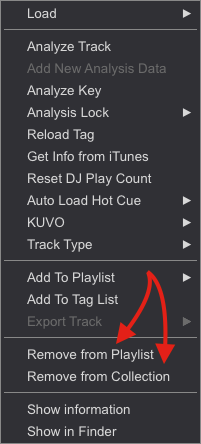
When you say "Import to collection" I know you're not browsing on your playlists - are you possibly looking at the playlists on an export device?
Got It... Yes it works Thanks so much. I was trying this via "Explorer" mode. Now via 'Collection" mode it shows Remove Track from Collection.
Yet another problem though.. some tracks dosnt seem to Analyze in full its half way Analyzed. My guess was the file may be corrupt and downloaded once again however still the same issue. Any thoughts?
Thanks
Duhan
The data files associated with that particular song may be kept in the cache - try changing the file name or location before re-importing it and see if it analyses. If it does not analyse after that, it could be there's something else about the file itself which is problematic.

Hi, it will be posible to do an option to aditionaly delete the tracks from hard drive when i delete track from playlist or colection?
Cause i do my playlists and after i need to search for tracks that i don't whant it to delete from Hdd and is it little bit anoying! :|
we can hope for this kind of future option?
thanks
Already in the list, thanks for the feedback.

@bushu, I had the same problem with deleting multiple tracks, but I found out a simple workaround. (it works when you have your music stored in the same folder) https://youtu.be/2TMRMv6BHvw

