
Sorry, you'll have to tell us which player you're using and which firmware version is on the hardware.
Ações de comentário

Hi,
I have patched my unit with latest upgrade but the problem still remain.
If I select the track with "track search" button sometimes the track info (waveform) disapear from the screen.
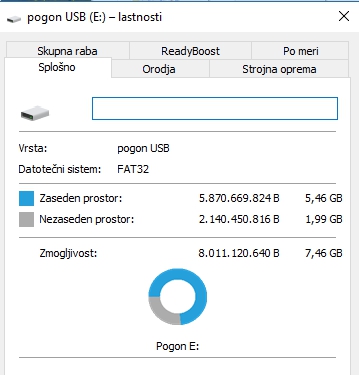
Also I get the info that usb key is full but is maybe 1/4 used. I use sony usb stick and Transcend JF V33 key..
is something wrong with unit or usb key?
Publicação fechada para comentários.
Sorry, you'll have to tell us which player you're using and which firmware version is on the hardware.
The software version is 2.20 (XDJ-RX)
The problem is when I select the track with "previous/next" button. Then I set some cue point and then I delete some of them.. I got USB FULL error (but is 1/4 full)..
After this error the next song "waveform" is not displayed on the screen
Here I have post a video on youtube.. at 2:00 you can see that error:
https://youtu.be/jOVmhg9LLM4?t=120
It seems to me the problem is more with the contents of your USB drive (or the drive itself). You say you have two different drives, does the same problem occur with both drives?
I saw in the video you had an 8305 Unsupported error; that happens if the filetype can't be played due to an error in the codec. Do you know which file specifically couldn't be loaded and are you able to load it if you browse to that track directly (rather than pressing the track load buttons)?
The problem occurs with both drives (Sony or Transcend).. Randomly i got USB FULL but this happen only if I select song with previous / next button and if "set" or "reset" cue point..
If you want I can share those song (mp3) but it happen randomly each time with othe song..
If you need some additional test or screenshoots let me know..
regards
How do you have those drives formatted?
The keys are formatted with PC as FAT32
I'll escalate this to a ticket with our support team as it certainly should load tracks properly and without a "drive full" error regardless of how it's loaded.


