Have a feature request or suggestion? Post your idea here!

Publicação

4 seguidores Seguir
0
Avatar

I want to remove from RKB Collection all tracks that don't belong to any playlist...

Hello:

I want to remove from my RKB Collection (in the computer) a lot of tracks that are,  or not included in certain playlists, and I don't use anymore. It will be great if I can differentiate easily which tracks from the Collection are included in playlists (tracks I'll want to keep) and tracks that are not included in any playlist (which I'll want to remove). 

In my opinion one gap in the software is that when you click on a folder, you can't see all the tracks included in that folder (playlists inside it), so you can "select all" and mark them, so you can determine, from all tracks in the collection, which ones belong to playlists. I know we can go to every track and see in what folder > playlist they are included, but one by one.

I just want to remove from RKB Collection all tracks that don't belong to any playlist. That will make my Collection lighter and faster, easy and faster to back up, less amount of HD on the computer, etc.

Thanks

Arturo Monge

Comentário oficial

Avatar

Unfortunately there isn't a way to do what you're asking, and in my frustration of trying to figure out a workaround, I'll be sending a writeup to the rekordbox team to ask for an improvement to this feature.

So here's the workaround...

  1. Open rekordbox and go to your Collection view.
  2. Open the My Tag configuration window on the right: 
  3. Scroll to the bottom and create 3 new tags:
    - In collection
    - In a playlist
    - Not in a playlist
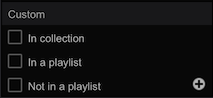

  4. Select every track in your collection (CTRL+A Windows / Command+A Mac)
  5. Check the box beside In collection
  6. Go through each playlist, select all tracks in that playlist
  7. Check the box beside In a playlist
  8. After all playlists have had their tracks tagged, create a new intelligent playlist
  9. Name the intelligent playlist Not in a playlist
  10. Set the criteria for: My Tag > does not contain > In a playlist and click OK
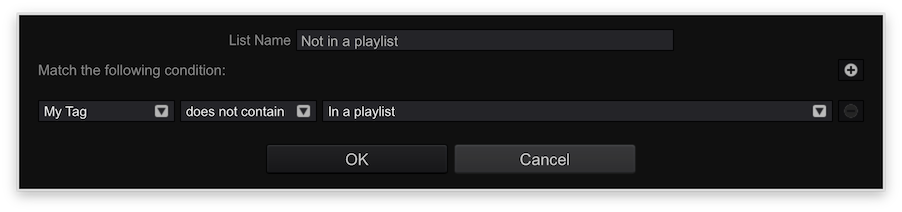
  11. The playlist will be filled with tracks which are NOT in any playlists. Select all the songs in that intelligent playlist.
  12. Check the box beside Not in a playlist
  13. Click on the Collection to go back to your full collection list
  14. Click the Track Filter button above the collection:
  15. Tick the checkbox to enable the tag filter, and click the Not in a playlist tag:
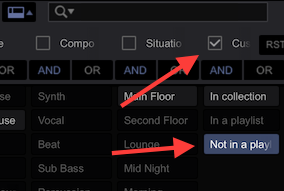
  16. All of the tracks now showing in your collection window are not in a playlist.

You can do one of two things...

  1. Select all of the tracks and delete them. This will only remove them from your collection. If you leave them in a general folder (eg. Music\October) and then you import the parent folder again (the Music\ folder), it would add them to the collection again.
  2. Right-click on those files one at a time, and select either Show in Explorer (Windws) or Show in Finder (Mac), then delete the file, close the window, then delete the entry from the collection in rekordbox.

So currently, this isn't a quick / easy way to find the songs not in a playlist, nor is it easy to physically delete the song directly from within rekordbox (although this feature has previously been requested).

Pulse
Ações de comentário Permalink

Publicação fechada para comentários.

3 comentários

0
Avatar

Pulse this is a major faff workaround for something so basic.

Also having to delete tracks from computer one by one is like cutting a large lawn with a pair of scissors! At least in the interim if you are going to have to delete them one by one implement a keyboard shortcut for this. 


Colesy 0 votos
Ações de comentário Permalink
1
Avatar

I have another workaround addition after the 16th step that makes u not need to manually delete everything

So after all ur tracks show up that aren't added in playlists
u select them all go to info window where u see all the tracks their info
then u type in album: oooooooooooooo and apply
so now when u search in ur computer for oooooooooooooo it will show all tracks that are marked with oooooooooooooo
and u select them all and delete them

BROwtfg 1 voto
Ações de comentário Permalink