Have a feature request or suggestion? Post your idea here!

Publicação

7 seguidores Seguir
0
Avatar

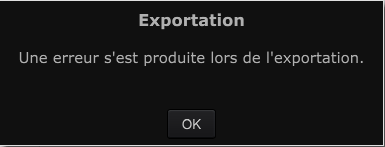
Rekordbox Export Mode - Error on export

Now that i'm using USB more at home (with a NXS2 setup), I'm relying more on the export function.  It's frustrating when I export my entire collection that it randomly errors. I spent hours exporting and seeing where it left off and then searching for the file only to find the reason.  For example, one file had a ";" in it, which caused the error.

There are other MP3s that I ripped myself probably 10 years ago that errorred as well as they have two underscores in the file name something like "3 Drives on a Vinyl -- Greece 2000 __--__ HJ vinyl rip.mp3" . 

It's a long tedious process to figure out what RB doesn't like.  Pulse - can you post what things to search for that will upset Rekordbox.  There are characters that the mac Journaled OS supports but obviously FAT32 doesnt -- which is why there is an error.  I'd like to scour my colletion first before attempting to export again. It's about 50 gigs (5000 tracks) so i'd be nice to see a list of non-compliant files first rather than doing it the way I've been doing it. Thanks


DJ Chase Respondido

Comentário oficial

Avatar

For issues with macOS 11.5 and rekordbox 6.5.2, please - we are aware of this issue; please post all conversation here.

For all other users with export issues, either create a new topic with details specific to your problem or  file an inquiry ticket here and our support team will gather some additional information to assist you in resolving this issue.

Pulse
Ações de comentário Permalink

Publicação fechada para comentários.

15 comentários

0
Avatar

Why don't you just format your USB drive as HFS+?

Erik Minekus 0 votos
Ações de comentário Permalink
0
Avatar

@Harry > We don't have a list of things that will break the export, but I think it's fairly safe to say there are certain characters, such as a slash (either way), a colon, semi-colon, ampersand, dollar sign (as a leading character), etc. which can throw off the operating system, never mind applications, and those should be scrubbed from your filenames.

The double-underscore shouldn't be an issue, I wonder if that was simply a problem of the total file & path length exceeding 256 characters?

Mac's OS's are a little more forgiving about filenames and characters than Windows is, so yeah, HFS+ may be one option, but the best fix is to clean the filenames.

Pulse 0 votos
Ações de comentário Permalink
0
Avatar

It would be great to at least throw an explicit error and not go through all our collection and try to figure out playlist by playlist which song could cause this error.

seriously

hazer 0 votos
Ações de comentário Permalink
0
Avatar

That it would, but alas, it is not. Unless you find an export log in your Documents folder, the only way to find it (currently) is to dig.

Pulse 0 votos
Ações de comentário Permalink
0
Avatar

I had to connect to this forum through a private navigator if not I had a blank page when I clic on "new post". The authentication didn't work on smartphone too.

I think you have a problem with handling sessions.

Whatever, the problem does not come from my filenames. It is internal to rekordbox.

This is my case study, imagine I have 3 playlists: A, B and C.

When I have this error it stop the exporting of playlist A. So I checked all the filenames on the playlist A but every single file was right.

Then, without doing any modiciation I exported all the three playlist again.

I had the error again, but this time playlist A was successfully exported, the error occured exporting playlist B.

So yeah, I found the solution, but it's very odd. Export again, and again, and again, even if I have the error until all my playlists are exported.

The problem is yours. I never had this error with rekordbox 5.2.

This is shamefull for a company who overpriced their product, and knowing that the well known standalones depends on this function.

hazer 0 votos
Ações de comentário Permalink
0
Avatar

Re: your login, please clear your browser's cache, clear the cookies for:

*.pioneerdj.com
*.zendesk.com
*.gigya.com

...and allow cookies for 3rd party sites.

The export issues are either related to your USB device not performing properly and writing the data as expected, or the files it's trying to export from rekordbox may have some issues.

We have asked our engineers to provide additional information in the export log when this occurs but we are still waiting for it to be implemented.

Pulse 0 votos
Ações de comentário Permalink
0
Avatar

Hi everyone I'm having the exact same issue. The usb is FAT32 and I've tried multiple drives including SSD.

I keep on getting an export error message without a logical explanation.

It happens randomly when I export the whole collection and also using sync manager.

The weird thing is it's sometimes ok when I sync individual playlists again and again.

It's very unpredictable and there are no strange characters in the filenames.

Can the engineers please look into this as a priority as there should be an export log showing why the export failed.

Looking forward to hearing your thoughts.

Thanks.

Christopher Iyer 0 votos
Ações de comentário Permalink
0
Avatar

@Christopher > There is an export error log - look to see if one exists in the rekordbox folder within your user's Documents folder.

Pulse 0 votos
Ações de comentário Permalink
0
Avatar

Hi everyone,

Firstly can I just say that I love this forum, I literally come on here to fix all of my rekordbox issues! I have just recently had this EXACT same problem start happening to me after I upgraded my MIXED IN KEY to the new version so I could use the cue points integration with rekordbox. Anyway that was a massive fail too but since then a few of my files were renamed and changed in MIK which I then fixed up but for some reason this same export error is STILL happening. I then realised that there were random songs in my collection that werent analyzed so I was pinpointing these as I went to correct them. I believe all my tracks are fixed up now and all cleaned and if I atttempt to export each playlist using the method - right click export playlist to hardrive - it works fine but whenever i use the sync manager, it works for a bit then stops then the next time might work a little bit more but then still ends up with an error?

I have changed my hard drives (which are samsung T5 and T7) 3 times aswell incase it was that but its still happening! 

I always used the sync manager for my library which is 9500 songs and never had a problem. Since Covid ended and I've been back to my club gigs it has been such a hassel because I have been having to use the right click export method and I either don't end doing all my playlists or I have updated something and forgotten to export it again since that and its sooo annoying!


PLEASE HELP :( :( :(

Lanagadzhis 0 votos
Ações de comentário Permalink
0
Avatar

Well, for starters, don't use the Sync Manager. I hate that thing - never recommend anyone use it.

It could be that you still have songs which are missing or not analysed causing the sync / export to fail. I'd check the collection for that by sorting by the analysis column (typically to the left side of the collection view).

Pulse 0 votos
Ações de comentário Permalink
0
Avatar

@pulse  If we don't use sync manager, how do you recommend we sync certain playlists to the USB? Thanks


DJ Chase 0 votos
Ações de comentário Permalink
0
Avatar

I am now having the exact same issue - however, there's a kink in this!

If I export the playlist to an old USB stick (like a Kingston 32G) or one of my mechanical external HDs, there's no issue with playlist export - all of the tracks copy over. If I export the playlist to a freshly scrubbed Samsung SSD (MS-DOS FAT, Master Boot Record), the export fails, and maybe two tracks from 15 tracks in the playlist get copied over. 

I've tried this on different versions of Rekordbox, including 5.8.2, 6.5.1 and 6.5.2 on my MacBook Pro 2019

However, I never had this issue prior to the last update of Big Sur, 11.5, which makes me think there might be a connection.

While I'm glad that I can at least get a playlist onto my Kingston USB for a gig this weekend, I'm also super annoyed at this apparent glitch.

Any insight would be great.

David Stone 0 votos
Ações de comentário Permalink
1
Avatar

Update - I reformatted the Samsung SSD to HFS+ (or Mac OS Extended - Journaled) at Master Boot Record level (do not use GUID!) and the playlist export worked flawlessly in Rekordbox. Thankfully, CDJs recognize HFS+ in this manner:

https://faq.pioneerdj.com/product.php?c=136&lang=en&p=CDJ-2000&t=faq

So, the lesson here is: Rekordbox 6 running on Mac OS 11.5 Big Sur is very touchy when it comes to higher capacity drives using MS DOS FAT. I will still have an emergency backup on the Kingston thumbdrive, but happy and relieved to see that i'm not completely lost at sea here!

Hope this helps anyone reading this.


David Stone 1 voto
Ações de comentário Permalink