Have a feature request or suggestion? Post your idea here!

Publicação

3 seguidores Seguir
0
Avatar

DDJ-RB issues

Hi,

I had my DDJ-RB set up to my Macbook (OS10.10.5) and my hard-drive collapsed. I have had a new hard-drive installed and I am now running on 10.9.4.

I have imported iTunes and Rekordbox (Version 4.5.0) and everything is all good on that front. However the controller itself is not working.

When I connect the controller to my Mac all the buttons light up as normal and then go off. However the dial (to select tracks) doesn't work, nor do the load buttons. 

I have dragged a track into the the grid to play but the controllers Cue buttons don't work, I can only get the track to play by clicking the cue button on the screen.

Also the only audio its playing is through the headphones. Any help would be greatly appreciated. 

Rob McGeechan

Publicação fechada para comentários.

5 comentários

0
Avatar

Perform the following checks.

Reload Audio MIDI settings.
(1)Connect DDJ-RB to your computer and turned it power on.
(2)Open [Applications] folder, [Utilities] folder and [Audio MIDI Setup.app].
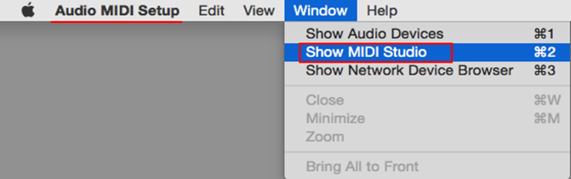
(3)Open [Audio Devices] window. Confirm that [Audio MIDI Setup] is displayed on Menu bar.
Click [Window] and choose [Show MIDI Studio] or [Show MIDI Window]. (The displayed name depends on OS version.)
image

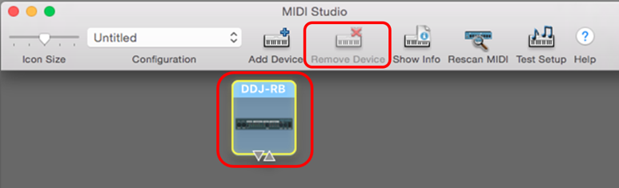
(4)[MIDI Studio] window opens up, click [DDJ-RB] icon. The icon turns to blue color, click [Remove Device].
"DDJ-RB" icon disappears and comes back again.
image

(5)Close [Audio MIDI Setup] and turn DDJ-RB power off.
(6)Turn DDJ-RB power on and run DJ Application.

きりぼー 0 votos
Ações de comentário Permalink
0
Avatar

Hi

I've followed your instructions and that hasn't worked. In fact I'm no not even getting sound from the headphones.

I've also upgraded to OS 10.10.5 Yosemite.

Rob McGeechan 0 votos
Ações de comentário Permalink
0
Avatar

Sorry for the delayed response.  Have you got this sorted yet?  

Mark Gallo 0 votos
Ações de comentário Permalink