Comentário oficial

In case anyone is still wondering if this was fixed, yes -- in firmware 1.23, but there has also been a 1.30 update as well, so hopefully these issues are resolved!
Ações de comentário

They do not work properly. Example I have a list with 250 songs, 50 marked as red, 50 orange, etc ... When searching from the rx2 filter does not correspond to what I have selected. It is difficult to explain ... But basically it does not filter the songs correctly by color .... IF it does for stars ... by the way it would be a good suggestion that you could also look for 4 and 5 stars at the same time for example.
Xdjrx2 1.2 rekordbox 5.0.2
In case anyone is still wondering if this was fixed, yes -- in firmware 1.23, but there has also been a 1.30 update as well, so hopefully these issues are resolved!
Publicação fechada para comentários.
Did you export the songs to USB from within EXPORT mode or PERFORMANCE mode?
Export mode...i don't know how export in performance mode...please help me in export performance mode....i can't see sync manager in performance mode.Only i can see in export mode
Okay, that's fine - there's no sync manager in Performance mode, but some users have discovered that you can still export playlists, but there is a bug where MyTag data is not exported. I was wondering if perhaps this was the same case for the colors.
Can you elaborate on how the filter is not being correctly applied?

i think that i have the same problem.
For example if i tag a track with the color tag "green" i can find it in the right color folder in the first menu; but if i use the track filter in a folder (also in the green folder in first menu), with the "green Icon" selected, i have 0 releated song in the folder.
Instead if i use the track filter in the folder with the "yellow icon" selected i can find all the track that have the color tag "green".
So it's seems that the color folder in the first menu contains the right personal color tag used in rekordbox but when i use the track filter the color icon are different than the right color tag.
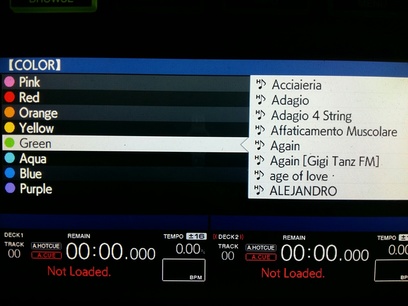
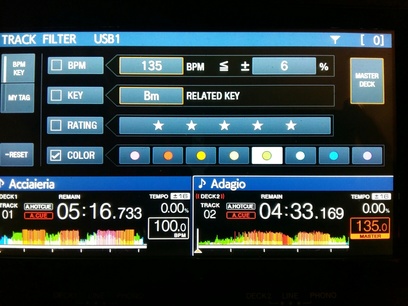
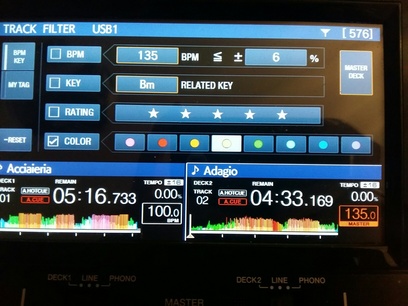
I was going to say -- those photos make it look like the colour icons are all over the place! Thanks, I'll pass this along to the product team.
Thanks!
I tried to explain the problem with more photos to the team too, my request are the numbers #43106 and #42516.
Thanks for the work ;)
I closed my ticket and linked it to the 42516 ticket, and you'll also see I merged 43106.
Can you let me know why you created two different tickets? Just trying to understand the user process!
Yes ...it is the same problem...
i wrote the first request to the italian support but having no response in 48 hours i tried to explain the problem to international support.
@Alessio > It's all the same place, no need to do that in future. ;)

Hello all,
Thanks to your reports, XDJ-RX2 engineers found they are bugs and will fix them in a future update.
Thank you for your kind patience until any update is ready.
Best regards,
CRM, Pioneer DJ

The colors are simply mapped in the reverse order on the XDJ-RX2 compared with those in Rekordbox. Purple (on XDJ-RX2) is Pink on Rekordbox, Blue is Red etc
@Marcus Mac ,Creo que lo solucionarán en próximas actualizaciones, de momento uso el filtro de estrellas....
@Pulse ,Por cierto, no se puede seleccionar el filtro de búsqueda de 5 estrellas y también el de 4 estrellas, o 5 o 4 estrellas pero no se pueden seleccionar ambas, sería posible para el futuro también?
@Marcus > See above; this will be fixed in a future update.
@Ren3martin > No, it's only whichever star rating you select, but I think a suggestion has previously been made to ask for an option allowing > = < matching, which would allow " > 4 star" to show 4 or 5 star tracks, for example.


