Have a feature request or suggestion? Post your idea here!

Publicação

2 seguidores Seguir
0
Avatar

Pioneer XDJ-R1 Cue Buttons

I have tried both Virtual DJ and the remote box software and on both cue buttons for CD's, USB and MIDI I hear both tracks at the same time, cannot just hear left or right when selected?

Any ideas?

Parry McCutcheon

Publicação fechada para comentários.

8 comentários

0
Avatar

Sorry, I'm not 100% sure what the issue is -- I understand you're having a problem with the headphone cueing, but you're saying you're having a problem both in stand-alone mode as well as while using the R1 as a controller?

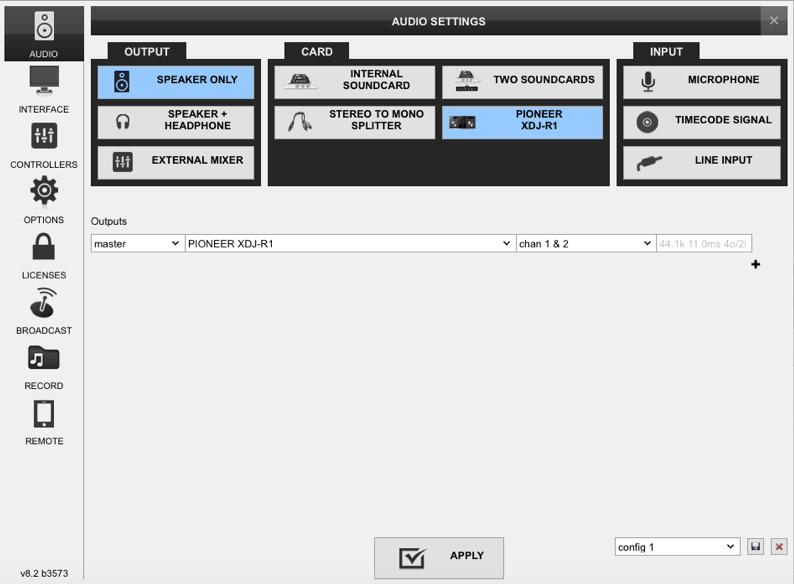
If the problem is only while connected to a computer, chances are you haven't configured the software properly for headphone output. Please post a screenshot of your settings within VDJ.

Pulse 0 votos
Ações de comentário Permalink
0
Avatar

Only with the controller, Virtual DJ is fine stand alone. Once the MAC is connected to the Pioneer Controller signal from the MAC only comes through channel 1. Headphone cues is of course the same, both coming through at once. Also the pioneer display for both decks does not show any information of the track in deck 1 or 2 ?

I have attached settings image below

Parry McCutcheon 0 votos
Ações de comentário Permalink
0
Avatar

Did notice in settings, changed to speaker and Headphone and that fixed the channel issue but still no track information displayed, headphone cue is still an issue, the track playing is the only track I can hear through both headphone cue buttons, both on the controller and the virtual dj programme. I cannot control virtual DJ volumes from the desk and if I click on the headphone cue buttons in Virtual DJ (not the desk) it switches between tracks even with both volumes down? 

Parry McCutcheon 0 votos
Ações de comentário Permalink
0
Avatar

Your output is set to "Speaker Only" - you need to change that to "Speaker + Headphone"!!

And no, you won't see track information in the displays, VDJ doesn't send it, sorry.

Pulse 0 votos
Ações de comentário Permalink
0
Avatar

Thanks for the reply

Yes I did that and it worked, however how can I get the desk to work the volume and other controls, currently I can only control the volume sliders in Virtual DJ, the desk volume controls don't control virtual DJ where they did originally?


Thanks

Parry McCutcheon 0 votos
Ações de comentário Permalink
0
Avatar

Thanks, where would I check the mapping?


Parry McCutcheon 0 votos
Ações de comentário Permalink