Have a feature request or suggestion? Post your idea here!

Publicação

4 seguidores Seguir
0
Avatar

Rekordbox doesn't recognize tracks in playlist of HDD

Hi,

I'm placing this question on behalf of two costumers of me. They both have bought recordbox at our store but are experiencing some problems with it.

Whenever they make a playlist with tracks from a HDD, the next time the HDD is plugged in it won't recognize the tracks in the playlist (as if the files are missing). At the same time the HDD self is recognized and the tracks can be found in the Rekordbox explorer.

I hope you can provide me with a solution for the problem, so I can help my costumers use their HDD with playlists.

Kind regards,

BS Netherlands

BS Help

Comentário oficial

Avatar

@BS Help >I'm assuming these are Windows users and  chances are the hard drive is connecting with a different drive letter, thus the original location within rekordbox is unavailable.

Please ask the users to map the drive to a letter (eg. X:\) using the Disk Management utility and then do a mass-relocate (select all tracks, right-click on the first missing track, select Relocate, find the file indicated at the top of the window, then when prompted, use the same location to find all other missing files).

Pulse
Ações de comentário Permalink

Publicação fechada para comentários.

5 comentários

0
Avatar

Seems to me either the HDD needs to be synced with the internal library or something. If they had the idea of making the external HDD the master music library they have to make sure it will always get the same drive letter (M:, for example).

If they do not use the HDD as the master location of the music, they should make sure it always syncs. You can find settings for this option in preferences, advanced on the Database tab.

ShonkaiDJ 0 votos
Ações de comentário Permalink
0
Avatar

I have the exsact same problem, but i use MAC.


Roger Pettersen 0 votos
Ações de comentário Permalink
0
Avatar

@Roger > Check that the volume itself doesn't have a different assignment; it may have the same name as another drive, but the system assigned it a different volume name when the drive was mounted to the OS.

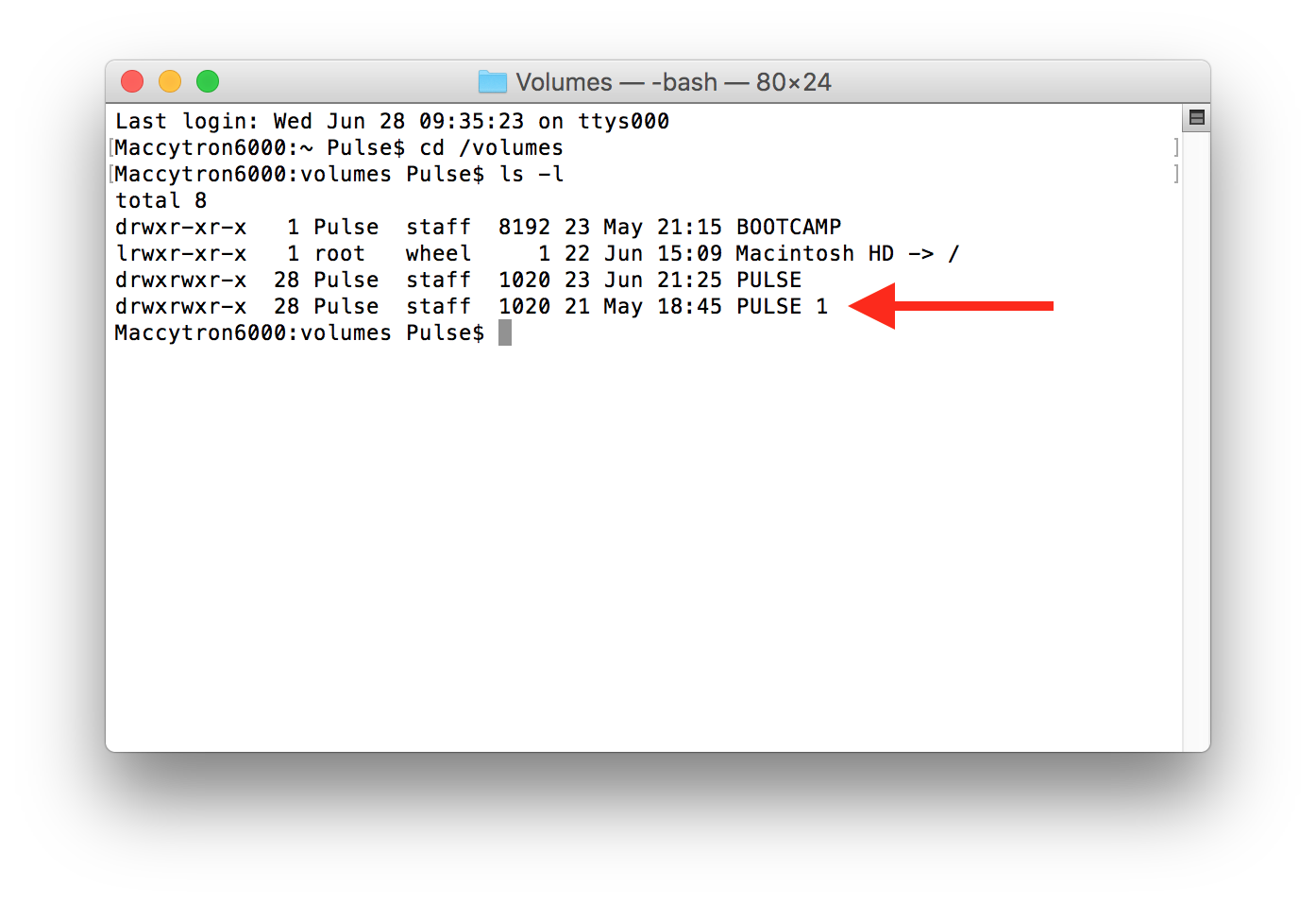
Easiest way to find the names is to open Terminal, and type these two commands:

  • cd /volumes
  • ls -l

(those are lower-case L's)

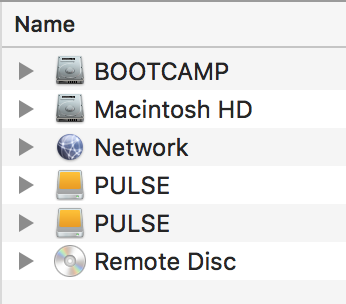
Here you can see I have two external hard drives, both named PULSE connected to the computer:

According to the Finder, they look the same... but if I show the same information from the terminal:

You can see that one of them is mounted as PULSE 1, meaning to the system, it has a different path.

Check that the drive has not mounted under a different path from the original path to the files within rekordbox.


Pulse 0 votos
Ações de comentário Permalink
0
Avatar

Thank you very much, this was spot on.

Roger Pettersen 0 votos
Ações de comentário Permalink