Have a feature request or suggestion? Post your idea here!

Publicação

4 seguidores Seguir
0
Avatar

Rekordbox won't select DDJ-RB ASIO

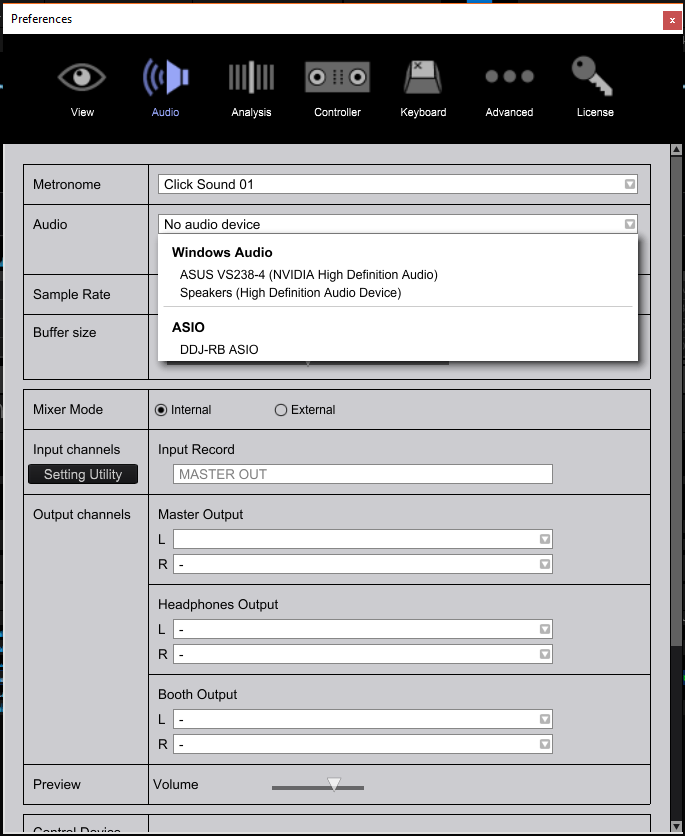
As title says when I go under audio settings rekordbox will not let me select the DDJ-RB ASIO option.  When selected the program will freeze momentarily for about 1 or 2 seconds and will return to no audio device.

I have tried uninstall everything and reinstalling.  I have also tried doing a complete shut down and power up between each step.  The board is brand new out of the box so I have no idea what could be happening.  It has the most current firmware.  The only other ASIO I have present is the one for fl studios.  I have gone through the article regarding driver downloading and that has not been able to help me.

The board itself is fully functional. 

Kent Pham Respondido

Comentário oficial

Avatar

@Kent > I'll ask you to file an inquiry ticket here and our rekordbox support team will be able to gather some additional information to further assist you in resolving this issue. Thanks!

Pulse
Ações de comentário Permalink

Publicação fechada para comentários.

13 comentários

0
Avatar

Hi yes, I have gone through every single one of those instructions regardless if they related to my issue.

Kent Pham 0 votos
Ações de comentário Permalink
0
Avatar

With the DDJ-RB connected, do you see it listed at the bottom of the Audio tab of the Preferences?

Can you open the DDJ-RB Setting Utility and tell me what it says on the About tab?

Pulse 0 votos
Ações de comentário Permalink
0
Avatar

Hi there,

My problem seemed to have resolved itself on its own.  To answer your question though, the Control Device information did indeed display DDJ-RB as it should and my unitily, driver, and firmware were all up to date just as your screenshot shows.

The board started working after my friend tried connecting my board to his computer with rekordbox.  When it worked on his computer we tried again on my computer and rekordbox no longer had a problem connecting to my board.

Anyways thanks for commenting and helping out

Cheers

Kent Pham 0 votos
Ações de comentário Permalink
0
Avatar

Hey,

So the problem has returned.  I am now having the same problem as described in the original message.  I tried plugging it into another computer like last time to see if it would resolve itself again but it did not this time.  

Following up with your questions, my menu's display the same data which you have shared in your screenshots.


Kent

Kent Pham 0 votos
Ações de comentário Permalink
0
Avatar

@Kent > Can you post a screen shot of your system devices window with the audio and MIDI devices toggled open?

Pulse 0 votos
Ações de comentário Permalink
0
Avatar

These are all the tabs AI could find that had something to do with DDJ-RB

Kent Pham 0 votos
Ações de comentário Permalink
0
Avatar

I wonder if it's perhaps that your computer is not delivering enough power to the DDJ-RB through the USB port. I see that your "software devices" lists the DDJ-RB with a leading "2" - that would indicate to me that you've previously connected the RB to another USB port, as Windows tends to "index" the devices and create multiple registry entries for each device / port combination.

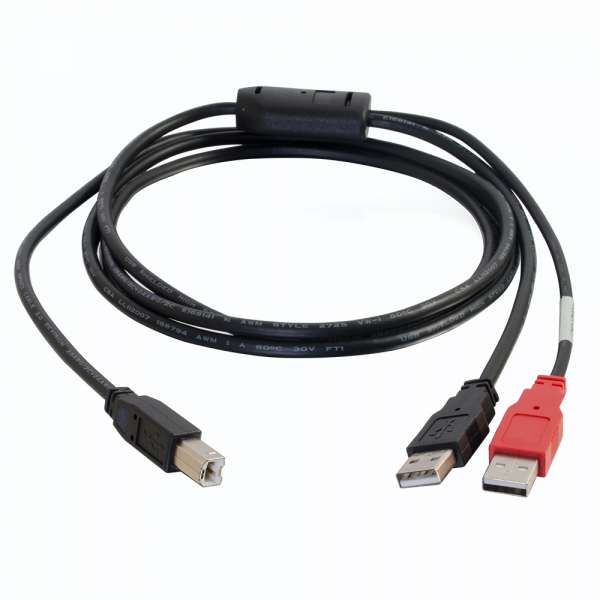
So first, try a different USB port, and if that doesn't work (and you know the hardware works properly because another computer can load it just fine), you may need to purchase a "Y" cable like this:

Pulse 0 votos
Ações de comentário Permalink
0
Avatar

Hmm I had suspected that might have been the problem.  Prior to using the RB I was using an SB2 which had no problems loading up with the ports I've attempted using with the RB.  I had it originally connected to a usb extension which I thought might have been limiting the power being delivered to the board so I moved to a port directly on the pc hence why there are two iterations of the board in software devices.  I just had a go at trying other usb ports but they don't seem to be making a difference.  I'll see if I can get my hands on that Y cable you recommended above.  In the mean time let me know if you think of anything else that could be causing the issue.

Kent Pham 0 votos
Ações de comentário Permalink
0
Avatar

Hey so after doing some digging around, according to my motherboard, the usb are providing the 500 mA's that the board asks for so in terms of power it should be getting enough.  I'm pretty sure what I have here is a software issue and not hardware.  If it wasn't getting enough power it wouldn't make sense that the board would start working for a few days and then stop again.  Can you think of any software conflicts that might occur?

Kent Pham 0 votos
Ações de comentário Permalink
0
Avatar

Just because your motherboard can supply 0.5A (which is the standard for USB2), that doesn't mean it's actually delivering that current.

Pulse 0 votos
Ações de comentário Permalink
1
Avatar

I don't mean I spec'd it to see how much it can output. I probed the USB that the RB was plugged into to see how much it was outputting.

In any case I have a development in the problem.  Rekordbox now exhibits the same behavior now when I'm trying to select my computer speakers (Speakers (High Definition Audio Device)).

Whenever I select that Audio output, Rekordbox will freeze momentarily and return to the No audio device option.

When I tried to use the RB with VDJ 8  just to see what would happen, It gave me an error saying that it could not initialize the ASIO for the RB.

Kent Pham 1 voto
Ações de comentário Permalink