Have a feature request or suggestion? Post your idea here!

Publicação

11 seguidores Seguir
0
Avatar

Help! Rekordbox & Firewall

I am using Rekordbox DJ on a macbook pro, and every single frickin' time I open the app, I get the message Do you want the application “rekordbox.app” to accept incoming network connections?.

I click allow each time but it still keeps popping up. I've tried removing it and re-adding it to my allow incoming connections apps in the firewall preferences but to no avail.

I have also tried clicking deny but that doesn't help either. It just keeps popping up every time I open Rekordbox.

Help? :)

cpoynter

Publicação fechada para comentários.

41 comentários

0
Avatar

If I disable the Firewall, I do not get the prompt saying

"Do you want the application “PSvLinkSysMgr.app” to accept incoming network connections?"

However, disabling my computer's firewall just to prevent this one pop up in this one application is not an acceptable solution. Frankly, encouraging users to turn off a major security feature is somewhat irresponsible. Please advise of how to actually fix the problem. Thanks.


smilinggoat 0 votos
Ações de comentário Permalink
0
Avatar

@smilinggoat > It was more a test to ensure that the players were communicating properly, but thanks for the security briefing.

Did you follow the instructions above regarding adding the four applications to the firewall connections, or did you ONLY configure it for the rekordbox app?

Pulse 0 votos
Ações de comentário Permalink
0
Avatar

Sorry, I wasn't trying to be rude! Was just a little surprised is all.

While I don't see the specific four applications listed in the comments above, I have added the following Applications to the Firewall exceptions:

rekordbox 5/rekordbox/Contents/MacOS/

PSvLinkSysMgr

PSvNFSd

rbinit

rekordbox


I am still getting the firewall warning. Thank you for your time in providing support!

smilinggoat 0 votos
Ações de comentário Permalink
0
Avatar

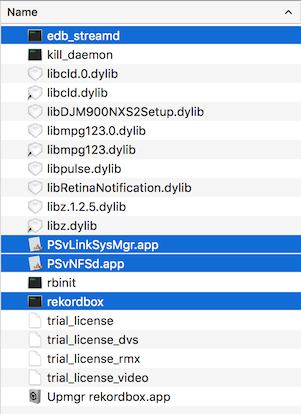
Sorry, I scrolled quick and thought the support article was linked; these are the 4 you want to allow through:

edb_streamd
psvnfsd
psvlinksysmgr
rekordbox

Pulse 0 votos
Ações de comentário Permalink
0
Avatar

I added all of the above to the firewall exceptions and it's still occurring =\

smilinggoat 0 votos
Ações de comentário Permalink
0
Avatar

Do you have any file sharing or other server hosts / tasks running?

Pulse 0 votos
Ações de comentário Permalink
0
Avatar

Is there a solution yet? I'm having the same problem. Tried everything documented. System: MacOS High Sierra, Rekordbox 5.3.0, all 4 item of the screenshot above allowed (additionally rekordbox.app). No files haring running and no additional hosts that I know of.

Lukas Schwitter 0 votos
Ações de comentário Permalink
0
Avatar

Putting my post here as i am experiencing the same issue and adding to the growing frustration amongst users. I am running OSX Yosemite 10.10.5 on rekordbox v4.5.0

I have;

  • Checked this works fine without Firewall (NOT acceptable)
  • Added rekordbox app to firewall (doesnt work)
  • Added all 4 'core' apps as suggested (still doesnt work)
  • I dont have other file sharing/server tasks running

It is worth noting that when I have no rekordbox related apps (or core programs) added to firewall, after running (and accepting the Allow dialogue) rekordbox 'psvlinksysmgr.app' is added to the firewall list as allowed.

And surprise... if you select 'Deny' - the same aforementioned app will be added to the firewall list as denied. But you will still be asked next time! 

Rekordbox is clearly writing permissions to the Apple firewall, but is clearly not reading them. THIS IS PIONEERS ISSUE.

I have seen this in other apps that do not manage firewall settings correctly.

Please can you investigate properly and resolve this because it is incredibly frustrating.

Alex Evans 0 votos
Ações de comentário Permalink
0
Avatar

For those who couldn't find the right solution:

I solved rekordbox continuous requests by simply deleting everithing about it on MacOS firewall list.

After that I run the program and never asked again about incoming connections.

When I checked the firewall after that I found just one new entry automatically added (PSvLinkSysMgr)


Try it!

SIMON 0 votos
Ações de comentário Permalink