Have a feature request or suggestion? Post your idea here!

Publicação

10 seguidores Seguir
1
Avatar

High processor while Rekordbox 4.1 is idle.


Processor fluctuates between 60% to over 300% at time. When high the fans are blowing hard and computer is running hot. Also affecting performance of application itself. I don't have other apps running. This is on a MBP, El Capitan with16GB RAM / 3.0Ghz i7 processor. 


Tracey Love

Publicação fechada para comentários.

15 comentários

0
Avatar

yeah ,, I am experiencing the same . even when the rekodbox is on idling mode .( meaning no tracks loaded ) the dropout meter is spiking. Something is not right . Not only the dropout meter spikes on my laptop  but even on my desktop it is behaving the same. ( spiking 20 to 70 % ) . And sometime it gives a high screeching sound .


mack macky 0 votos
Ações de comentário Permalink
0
Avatar

This has been reported many many times but still Pioneer insists that its more than ok and there is no problem even the computer is spinning like crazy.... :-(

Marek 0 votos
Ações de comentário Permalink
0
Avatar

Also having this issue - right now RB is idle with no tracks loaded yet my MacBook Pro fan is being driven really hard.


Kompiler 0 votos
Ações de comentário Permalink
1
Avatar

Yup, been posted dozens of times.

Just having Rekordbox loaded with no tracks or analysis starts to rev up my fan and CPU usage. I'm always scared that my Macbook will be a melted mess of aluminum and silicone in teh middle of a DJ when I'm actually taxing RB (2-3 decks, effects, etc!).

Pioneer should invest in some outside consultants. As a software person myself, it wouldn't cost more than 2 or 3 CDJs in $$$  to have a third party take a look at look for runtimes or other processes within rekordbox to do a outside analysis.

If you want to really get scared download smcfancontrol for MacOS and watch your CPU temp jump from 50-55 degrees in serato/traktor up to 80-90 degrees in Rekordbox.

DJ Chase 1 voto
Ações de comentário Permalink
0
Avatar

Thanks for the replies gents! I noticed in the screenshot I sent it was analyzing files, what I don't know is why because I didn't add anything new. Even without analyzing files it spikes periodically. I heard a moderator comment about it's normal to have it max out because of multiple cores.. multiple cores aren't there to be maxed out simultaneously! Really trying to like this software, but this problem plus inaccurate grids are not worth my time. Reckordbuddy is taking forever to release his Serato version.. smh! I'm trying to get away from depending on my laptop, but exports to USB aren't accurate either. I don't need it razor thin, just enough to nudge the platter so I don't jack up blends.  

Tracey Love 0 votos
Ações de comentário Permalink
0
Avatar

Try to optimize your Mac following this guide: https://support.serato.com/hc/en-us/articles/202833544-Mac-Optimization-Guide-for-OS-X 

Since I turned off Spotlight Indexing and FileVault Protection I don't have any problems at all with rekordbox dj. Also set KUVO to private if your not using it in a club.

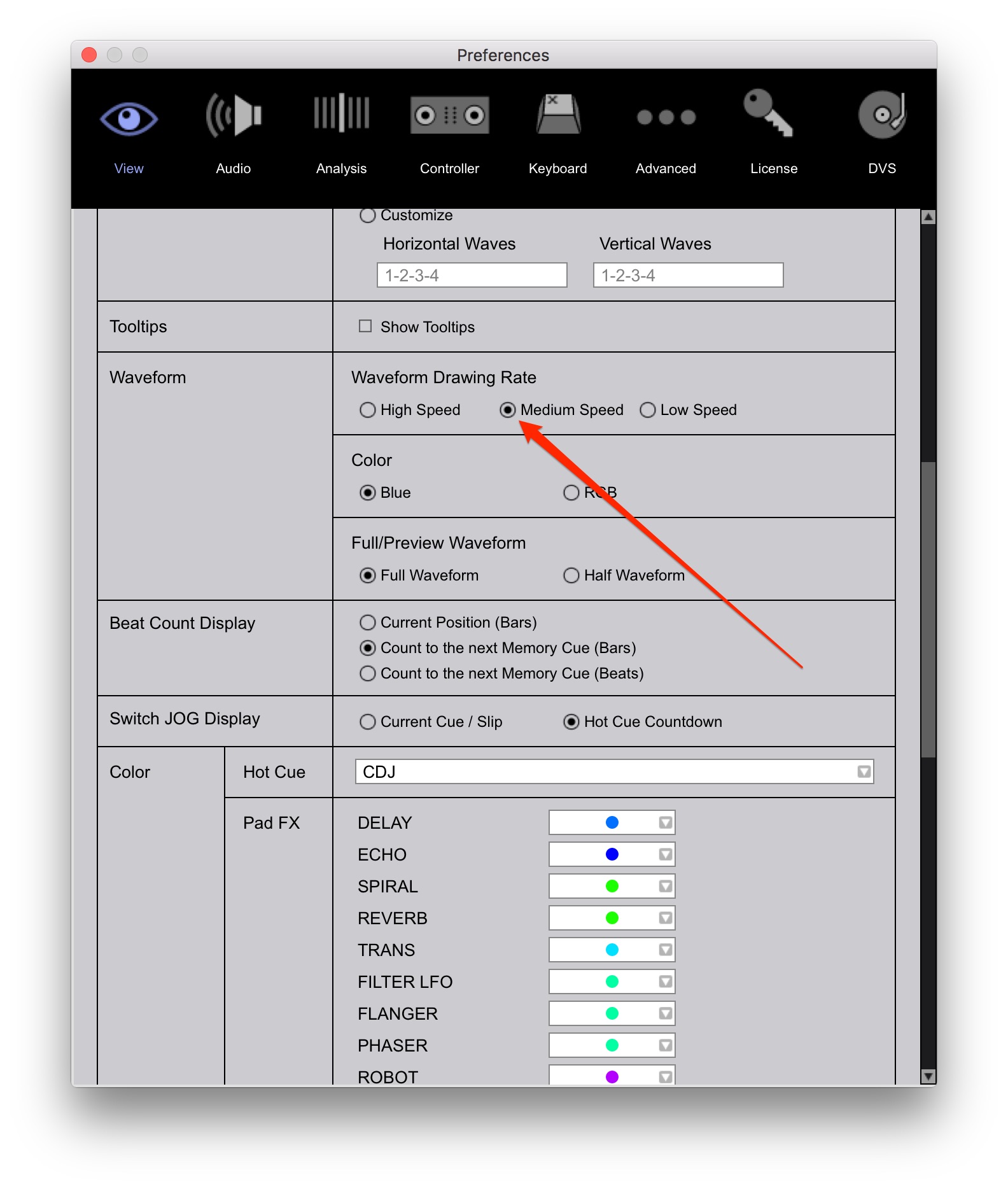
And set the Waveform Drawing Rate to Medium Speed, see picture below.

Hope this helps!

oakstream 0 votos
Ações de comentário Permalink
0
Avatar

Same problem with my computer.  I also have the problem with once I click on the icon to bring it up, it takes forever and sometimes I have to click on it twice before it will come up.  Can I go back to the version before this one because it was better than this one?

Dewayne Winters 0 votos
Ações de comentário Permalink
0
Avatar

Yep, fan goes through the roof for me when analyzing tracks.

Macbook Pro 2015 i7.

Dan Moore 0 votos
Ações de comentário Permalink
0
Avatar

"Idle" and "when analyzing tracks" are two quite different scenarios... :-)

You can't expect the computer to be idling when and analysis is in progress...


@oakstream - for example I never had spotlight indexing enabled, I never used the file vault and I am on ssd - still having these issues even when the computer and RB are doing nothing and its in the export mode, left opened on the table. The indexing itself is more IO related while the observation is more pointing to CPU utilization.

Marek 0 votos
Ações de comentário Permalink
0
Avatar

Marek -

Yes Same. I turned spotlight indexing off on my DJ macbook and have a SSD. I use Serato, Traktor and used Ableton (although not in the last year).  I could never make my fan run as loudly doing anything in either Serato or Traktor while playing as I can just running RB in idle mode.  

That said, in Ableton, with 20 channels of soft synths and  AU effect chains I could reproduce it, but just playing back 2-3 streams of audio with light effects shouldn't bring my MBP to its knees.  Clearly there is a lot of code work that should be redone!  hope this happens fast as I really enjoy using RB and love pioneer products. 

DJ Chase 0 votos
Ações de comentário Permalink
0
Avatar

did some config adviced by pioneer tech team and tonite I am going to try , while at home I had one incident ( cpu max and audio dropout ). had to reboot. It happen the moment I hit the sync button , Maybe my tracks were way beyond to sync and that would have caused it . Anyways , tonite will be my real test with REKODBOX DJ n DDJ SZ,Just like Marek said .  i love RB and only hope it is stable for live performance .

Btw I am going to run a cd continuously on a CMX3000 as a backup if in case the RB crashes . Wish me luck and I will let u all know tomorrow of the outcome .


mack macky 0 votos
Ações de comentário Permalink
0
Avatar

Good luck please post how it went and what tips did pioneer techs give ya ? I did every optimizing possible and I'm still at 60% to 70% CPU but dropout meter is really low and have not had any crashes knock on wood.I love REKORD BOX DJ hope next update fixes this

Scott nations 0 votos
Ações de comentário Permalink
0
Avatar

Disappointingly it crashed again ..  A mix track of 40min was loaded on deck and I was away from the console. The mix track was not analyzed and I had the lock on since the day I added it into the library ( some 4 weeks ago) . The mix track had a very low bpm ( roughly 82bpm) . it was a slow early hour mixtape I made that I usually play for early hours. The music stopped I ran to the console . And what I saw was the dropout meter full at 100% . I am using MSI  i7 5700 HQ 16GB 1 TERA HD. I had to reboot and I straight away switched to SERATO and performed for the rest of the night .Pioneer seriously need to something about this . it is very very very disappointing .

maybe Pioneer r should cut down or able/ disable some feature like the history which I think is causing lot of loading. Maybe this may help to at least bring down the cpu and memory usage.


mack macky 0 votos
Ações de comentário Permalink
0
Avatar

 Dam at least it didnt happen prime time.Maybe mix not being analyzed had something to do with it who knows .Like i said many times before i hope pioneer finds a solution .

Scott nations 0 votos
Ações de comentário Permalink
0
Avatar

hi guys, same Problems since I start with RB in Nov 15. Sometimes it works, sometimes not... I had also contact with the Pio Support, but not really with real succes.

For me, the Software causes kernel panics, because of  high Audio Output. If there are big differences of the gain and you go over the limit, the problems comes.

For the moment, I try with out auto-gain. But I had an issue also with this solution. Now I am very carefully with audio-uutput, specially on each separat channel with TRIM. Don't go to high.

But in the end, It's not the way to work. I need my power for the crowd, not for Pio...

Chris Suter 0 votos
Ações de comentário Permalink