
Does it stop with specific tracks and continue with others? If so, what is the file type of those files?
Ações de comentário

Using rekordbox 4.1 and it has stooped analysing tracks I import. Just stays at 0%. Have also just updated to Windows 10. Don't know if that might be a problem. Any help would be very much appreciated. Thanks in advance.
Publicação fechada para comentários.
Does it stop with specific tracks and continue with others? If so, what is the file type of those files?
No its with all the tracks I'm trying to import. Was working fine up until Thursday last week. The files are wav and mp3.
@Paul > If you sort the tracks by the analysis column, you'll see the tracks which are being analysed pushed to either the top or the bottom of the list. See if you have one file stuck at 0% or multiples.
Next, try right-clicking on one of those tracks and select "Analyse Track." Does it force that one track to complete the analysis?
Can you go to the menu and go to Track > Auto Analysis and tell me if it's on or off?
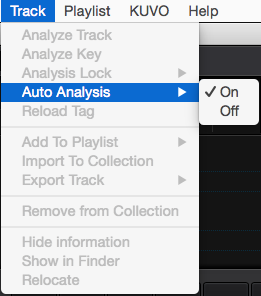
Also, are you in Export or Performance mode (rekordbox DJ)?
I have 4 tracks that I've recently imported that are stuck at 0%. Auto analysis is on and I have tried right clicking and analysing 1 track but still just sits at 0%. It's on performance mode.
@Paul > Are you running rekordbox in Administrative mode? Try right-clicking the icon from your desktop and choose "Run as Administrator," let me know if that completes the analysis in that mode. The next step would be to try a blank database.
Just tried running as administrator and still no joy. What do you mean by a blank database?
Open this article and find the section:
rekordbox has troubles starting / loading tracks / it crashes...
Follow the instructions to rename your database; opening rekordbox after renaming will create a blank database. Try importing one of those problematic songs into the blank database to see if it analyses or not.
On that's great I'll give that a try. Thanks for taking the time to help. It's much appreciated.
Tried that as well and still no joy.
Could you post up one of those audio tracks in a fileshare for me to take a look at?
And presumably you can figure out how to revert to your original database?
I'm sure it must be something to do with changing to Windows 10. It's only after doing that I've had problems. The tracks play fine on it. It just won't analyse them.

I am having the same problem - any news on this one?
@Simon > Are you also running Windows 10?
Yes I am also running windows 10
Thanks, I'll let you know what our engineers say when I've heard back.
Okay thank you

Was this ever sorted? I have exactly the same problem but its not to do with windows 10 as i have had windows 10 for a while now and its been working fine, has just happened suddenly, im thinking it might be because of the new rekordbox update but unsure
Not sure what my original problem was. I got a new laptop not long after it stopped working. That's windows 10 and it workseems perfect. Think it was just my old laptop. Haven't updated yet so can't comment if it's still working after that.

Hi I am experiencing the same problem, I am running the latest version of RB on a macOS Sierra and none of my tracks are being analysed. I am in export mode. Auto Analysis is on. Tried:
Renaming the database
Analysing one file at a time. But no luck.

Same problem on Mac Catalina
RB freezes when I try to analise a new track or changing something on a hold track.
Also freezes when loading a cut sampler...
Guys please fix this! I'm a 10 y old Traktor user and just moving to RB now...

Hi ! If you having problems with analysing tracks, import tracks, etc... try to turn your Wi-Fi of ! I found out By aciddent that the Wi-Fi was causing a conflit with RB
@Miguel > You've posted to a 2 1/2 year old topic; many of these things are no longer relevant due to changes in rekordbox and operating systems. If you have an issue, please post a new topic or please file an inquiry ticket here and our support team will gather some additional information to assist you in resolving your issue.

