
@Patrix > Did you possibly update rekordbox? I wonder if there was a bug with an older version that prevented them from importing.
Ações de comentário

After last update Rekordbox doesn't show any history-playlists from my USB. So when I've played a set on CDJs and plug my USB into my PC again, it says that it loads the history from my USB, but when it's done loading, it doesn't show any history-playlists in the playlist folder of Rekordbox like how it's supposed to do. I've got that USB pretty recent, but I formatted it the right way, So there can't be anything wrong with that. I also checked the history folder in rekordbox, but it was apparently empty... Can someone please tell me if/how I can still obtain the history-playlist from my last set?
Publicação fechada para comentários.
@Patrix > Did you possibly update rekordbox? I wonder if there was a bug with an older version that prevented them from importing.

@Pulse > No, didn't do an update around the year change but suddenly after January 1st, the newest histories were imported.
The old histories were gone like they were imported before but never showed up in Rekordbox. Strange but I'm happy that it's back.
Now, recently after the updates, everything still works like it should so no problems what so ever.
Hmmm... that's an unusual hiccup indeed! Well, fingers crossed it works okay now, but let us know if it comes back.

Hello Guys,
I'm experiencing a similar issue. History appears on my USB, but when I try to import it nothing happens. (Also it used to appear with an exact date before on Rekordbox5, now it's just History 001).
Also interesting that when I select all tracks within the history of the USB, there's an option to add it to a playlist (I assume to a playlist which is on the USB itself and was created by Rekordbox5). I was wondering if I could copy these tracks to a new playlist on the same USB, but the new playlist doesn't come up, however I can add tracks to the old one. Was thinking about a workaround to sync back the playlist to Rekordbox with the added track, maybe it's silly.
I was wondering if it would make any sense to format the whole USB and start using it as a new one with the new Rekordbox. Any suggestions are highly appreciated!
Thanks,
Peter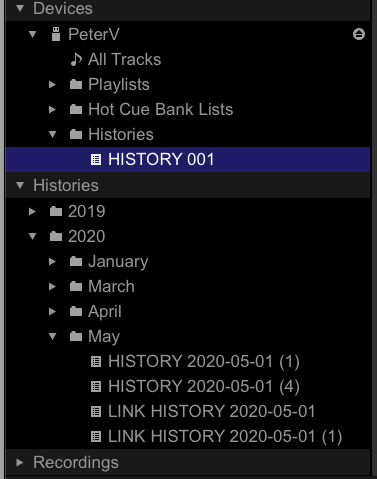
@Peter > The device history won't have a date until it's imported.
@Pulse >
Hello Pulse,
Thank you for the info and getting back, however your response doesn't answer my question on the importing issue.
'Import the play history automatically' is enabled both on Rekordbox 5 and 6, but does not work on Rekordbox 6. Manual import of history (right click-import) neither works on Rekordbox 6.
Could you please get back on this? Do you have any suggestion?
Your answer would be highly appreciated!
Kind regards,
Peter

Bumping this issue, which clearly hasn't been properly addressed.
I'm suffering from a similar problem.
Equipment: XDJ-RX2
Rekordbox version: 6.5.0 rev. 20818-18437-18403
History data is available on the RX2 when playing from my main thumb drive. I can watch as I play, that data aggregate in the history menu. When I remove my thumb drive and reconnect it, regardless of whether or not I've connected it to Rekordbox, all history data is gone.
This is the same thumb drive I've been using prior to having this issue. It has NOT been formatted recently. The one thing I seem to recollect to have happened was, I was farting around in Rekordbox and saw an option to "synchronize" the thumb drive - I went ahead and did that, not entirely know what it was going to do....didn't figure it would be a big deal. I believe after I did this is when I first experienced the problem, but I am not 100% on this.
The history data is 100% available after being automatically imported to Rekordbox, but when I plug the thumbdrive from which that data was just imported, it is not present at all on the RX2.
Any help would be so appreciated! I often play sets from history, and this is really screwing up my process.
Thanks in advance for your help!
The automatic import process removes it from the USB drive. If you want it to remain on the drive, uncheck that preference.

get out of here!!!!
I'll give this a whack!
Thanks!
Seems to have worked!
Thanks again!

 Hey there, I've got a similar issue with the history and couldn't find any solusion so far.
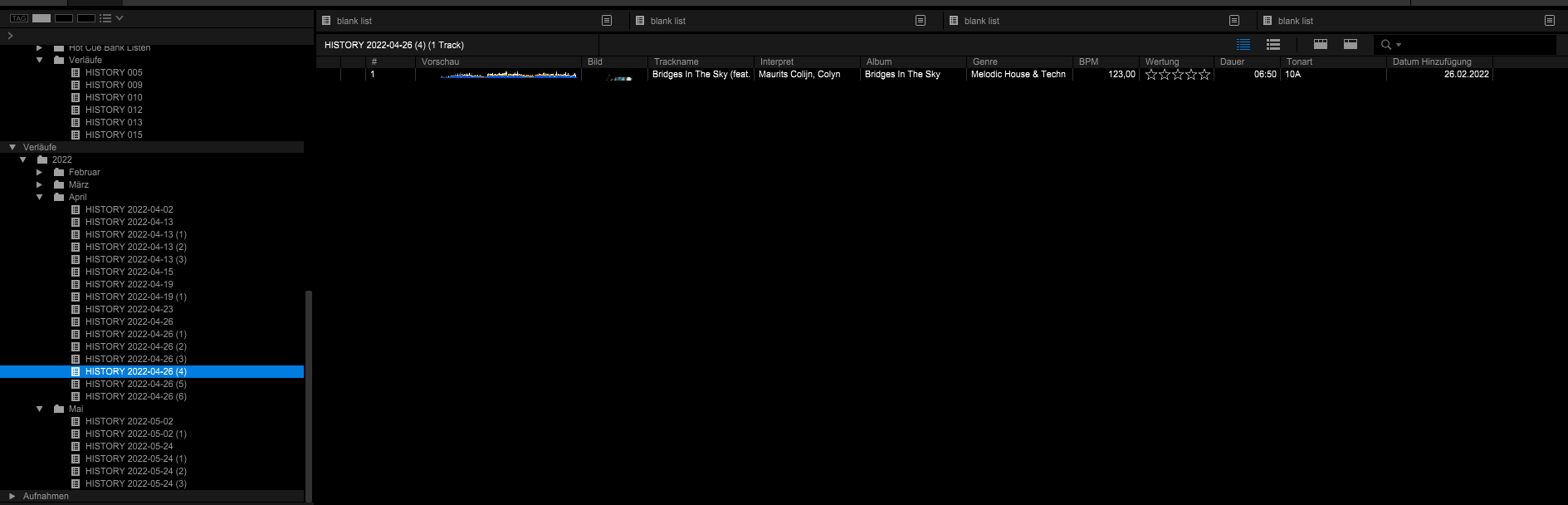
So it seems that sometimes my track history is imported and sometimes it isn't. But what's also frustrating is it's not named after the date i played the tracks but the date i put the stick into my computer and imported the history from it. What's also happening is, that it creates multiple histories of one day with just one track in it! I don't know, it's all pretty messed up which makes this feature almost pointless for me although i'd love to use it to rerecord sets i played.


