Have a feature request or suggestion? Post your idea here!

Publicação

2 seguidores Seguir
0
Avatar

DDJ-SB2

Well, first of all, excuse my english, is not my first language...

Hi, i just got me this DJ controller 2 weeks ago, very cheap & versatile, i am very happy with the product...

The only annoyance is that when i plug the SB2 to the computer i have access to the layers of the controller "HOTCUE 5-8", "ROLL", "CUE LOOP" & "BANK", but when i open "serato intro" then this layers are not accessible any more, not even closing "serato intro", actually i need to unplug the unit from the computer and then plug it again in order to make all this layers work in "Traktor 2"...

So i was setting up a midi map for "Traktor 2" and i came across some "circumstances", maybe some 1 with experience can help me :)...

*Mapping leds:

I was not able to make any button in the SB2 blink... they have "on state", "off state"..... does any 1 know for a fact if the buttons have also "Blinking state"?...or maybe they are able to blink in "serato intro" because "serato" is generating this pulse (on/off)???

*PAD TRANS: (This is the main reason of my post)

After using SB2 with "serato intro", (important: and using all the pad Trans with the "serato intro" in all the decks), i close "serato intro" and i do not unplug the SB2 from the computer, and then i open "Traktor 2" and the buttons of the "PAD TRANS" give a different midi reading than if i just plug the SB2 to the computer and open "Traktor 2" directly, (without opening, and then closing the "serato intro" first).... What tells us that "serato intro" is some how programing the "PAD TRANS" in the SB2, actually, after opening "Serato intro", using inside the pad trans of the 4 decks, closing "serato intro", not unplugging the SB2 from the computer and opening "Traktor 2", it happens that the pad trans works properly in all decks...we can see that the channel volume of the deck i operate the "PAD TRANS" from is going down and up making this tremolo cutting effect... it works with the tempo of the last track i was playing in "serato intro", and u can even change the tempo of the pad trans inside "Trakto 2", exactly the same as u can do it in "serato intro", using the "TAP" key. (and i do not even have the "TAP" key mapped in to "Traktor 2")..... so.....

is clear that "PAD TRANS", Chanel volume and probably the "TAP" key are related inside the SB2 in a native way....

Does any 1 know how this controls are related inside the SB2?, and how to apply what we know to map "PAD TRANS" in to "Trakto2"

How, or in what way is "Serato intro" programing the SB2 so after using "PAD TRANS" in there u can close the application, open "Traktor 2" and see "PAD TRANS" working properly in "Traktor 2"?

Can we program some how the behavior of the "PAD TRANS" (or any other control) in the SB2 sending some Sysex... or something, ... like with some application like Midi-Ox or something?

Thanks in advance friends & Congratulations for the grand Pioneer brand.

Earblock

Publicação fechada para comentários.

6 comentários

-1
Avatar

@Earblock > Here's what my MIDI monitor captured:

As you can see, the data is the same while Serato DJ Intro is running as it was before the program is opened, and Traktor also receives the same data after Serato DJ Intro has been run. 

I'm not clear on what it is you're trying to do or what the problem is, but what I can tell you is what the data tells me -- and that it doesn't change.

Pulse -1 votos
Ações de comentário Permalink
0
Avatar

Hi friend, thx for answering ...

i bet that u did not in your procedure made the pad trans work in "serato intro" with a song playing before closing "serato intrto", this last part is required...

this is the quote extracted from my message:

...(important: and using all the pad Trans with the "serato intro" in all the decks)...

maybe i was not able to explain my self clearly, english is my second language...

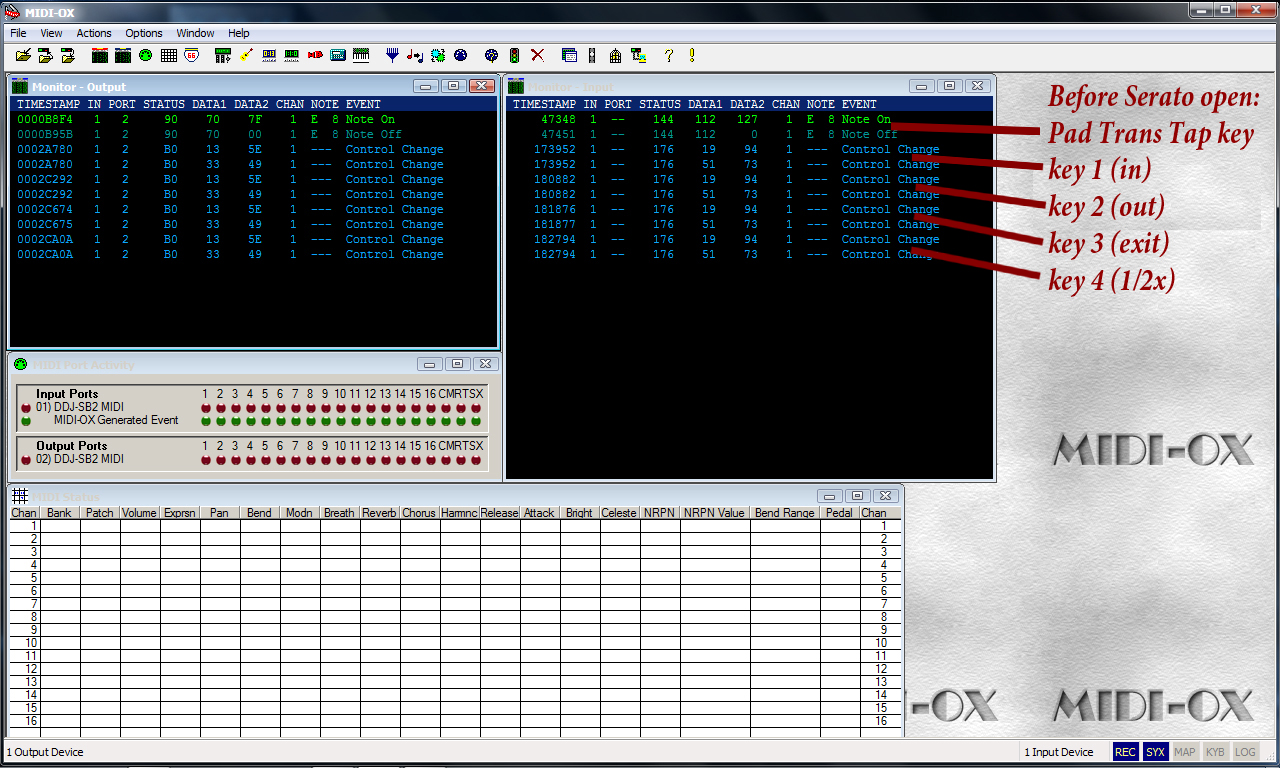
Picture 1:


This is picture 1:

readings of the PAD TRANS TAP Button, (the first 2 values), and then every next values correspond to the 4 keys of the pad trans... key (in)...,key (out)... key (exit)..., key (1/2x)....

note:  it does not matter for how long the key pressed, u only get 2 values per key (in 1 tap of the button)...

Picture 2:


After opening "serato intro", playing a song in deck A and using the 4 keys when the pad trans is pressed and (glowing), i can hear the "tremolo cutting" effect that each key perform at its different speed... (and is here, by pressing the keys what is making a difference after "serato intro" is closed....as u can see in picture 2..., the first 2 values are the pressed of the PAD TRANS TAP Key, the rest of the values is just the first key of the pad, (the key (in))...so as we can see, it does not give us just 2 values like as the beginning, now is giving values non stop until the key is released...

here is picture 3, it corresponds to the readings of the second key of the pad, key (out), after serato intro was opened, then pad trans used there and then closed...(as the last picture, we can see how the readings are different than before opening serato, in the first place,is not 2 values when u press, is non stop values until releasing the button...

Picture 3:
i did not bothered with more buttons...


well, any ways, and again, thx a lot for your answer, come back to me if u wanna try the procedure again and see that the readings are different... maybe u understand why is happening, and if this can be done with other application other than serato intro,

to some how program this 4 keys of the pad trans...

Earblock 0 votos
Ações de comentário Permalink
-1
Avatar

I think you are missing the function of the PAD TRANS...

When you press the PAD TRANS on, it enables a mode where the controller is receiving MIDI signal re: the tempo of the track on that deck. It uses that data to then flip the transformer on and off in time with the track's tempo (depending on the button you have selected in terms of timing).

When I recorded mine earlier, I had used a low-tempo track and I tapped the button rather quickly so there was no repeating data. The longer you hold it down, the longer it will transmit the on/off data.

What you're complaining about seems to be the fact the tempo value is retained by the controller after it has been set by Serato DJ Intro, and then you've quit the application. I don't see this as a big concern given the fact that most DJs won't be switching between applications. Even DJs who are using Traktor aren't firing up Serato DJ first.

As you said yourself, unplugging the controller clears the controller of this issue (by way of removing power and resetting it), so you already figured out a work-around should you find yourself in a situation where you need to switch between DJ applications.

Pulse -1 votos
Ações de comentário Permalink
0
Avatar

first of all... u tell me that i am wrong... then i come with the picture showing u that i was not wrong... and now u accuse me of complaining?...

this is what i call a grate customer service.......

Earblock 0 votos
Ações de comentário Permalink
0
Avatar

You can edit your post, but I still know what you said, and I don't appreciate your attitude or language. Have a nice day.

Pulse 0 votos
Ações de comentário Permalink