
Following which tutorial?
What is the error message?
Ações de comentário

Following the tutorial, I loaded a bunch of tracks into rekordbox, then exported them onto two usb sticks and an external hard drive via macbook.
The tracks are shown on Pioneer CDJs (full information: artist, album, bpm, length, etc.) BUT if I select them for a deck - EVERY SINGLE FILE shows an error message!
Thus: The tracks are on the mediums, can be played on the macbook (doubl-checked) but are NOT running on CDJs!
I didn't have any problems playing on cdjs with mp3s and .wav files saved normally on a usb or an external drive - so it was a huge mess up at my gig last night - another dj who had an extra usb stick (without tracks saved via rekordbox) saved my gig.
What did I miss? Couldn't find information on it on the internet, and followed the tutorials on youtube by fellow DJs.
Any suggestions? Several GB of music is not playing on Pioneer CDJs any more.
Publicação fechada para comentários.
Following which tutorial?
What is the error message?
Tutorial:
"Drag tracks to your playlist on rekordbox -> tracks analyzed automatically -> "export" tracks to your harddrive/usb"
- Didn't work at all. I think the messages shown on the CDJ display were "track error: file not found" - I don't remember the exact wording, because I was busy figuring out a Plan B!
This was odd, because I could browse the tracks according to each category (album or artist or folder...)
At home, all tracks are playing on itunes and rekordbox.
I tried yesterday the "Synch Manager" in addition: Chose device (USB) -> chose rekordbox playlist -> synched - synching is not working -_-
I newly installed rekordbox 4 and analized the tracks through it.
Also, after I close rekordbox and open it again, the tracks in the playlist suddenly have a "locked" sign now.
Is there any step by step tutorial from scratch that I can follow, so this doesn't happen?
When you exported the tracks, did you allow time for the export to complete? If you ejected or removed the USB drive before the export finished, it could be the database was written but the audio files weren't exported.
Is the lock symbol on tracks within your collection's playlists or on your device's playlists?
And can you clarify how the mention of "iOS" comes in (from your post topic), are you using the rekordbox app somehow?
I waited until everything was exported on the usb stick. I played the tracks on the usb stick on the macbook and a windows laptop before I took the usb sticks to the club.
The lock symbol is on the rekordbox interface when I open it on my macbook pro. The files cannot be found. Didn't change anything :(
I have to load every playlist again - which takes so much time.
Where did you play the tracks from? (I know the USB drive, but which folder? Did you go into the Contents folder?)
You say "the lock symbol is on the rekordbox interface" -- where? Can you post a screen shot?
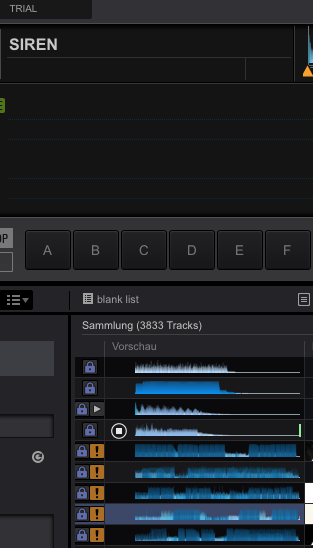
Once I have my tracks analyzed, I EXPORTED them to my usb stick (sync was not working), copied them onto my desktop folder (macbook) and closed rekordbox. When I open rekordbox again, the tracks cannot be found.
Maybe I am doing it totally wrong - I also don't understand why synching is not working.
At the club, the other DJs thought everything was finde, we checked EVERY folder on the usb sticks and not a sigle track could be played. Again, I double checked if they could be played on the laptops at home from the usb sticks, which was working fine.
Whoah, wait, what? "Copied them onto my desktop folder" ?
And that screenshot is too narrow, I can't see what is selected on the left.
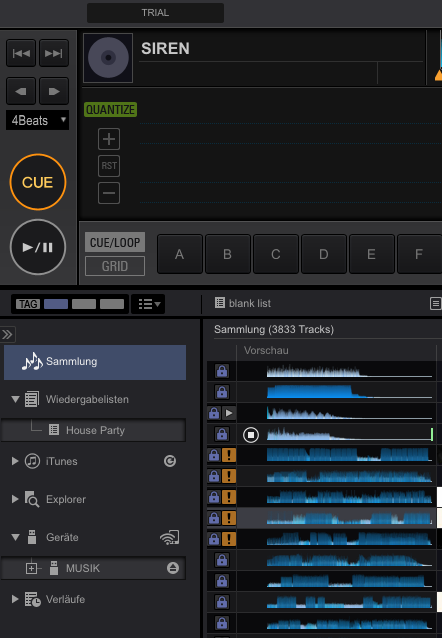
1. I have a desktop folder with tracks.
2. Dragged and dropped the tracks (following the tutorial) to rekordbox 4, which I downloaded from the site directly.
3. Tracks are analyzed automatically.
4. Once done, I tried "SYNC MANAGER", but even though I initiate the synch between rekordbox (playlist folder: House Party) to the usb stick, it says it syncs, but then it doesn't - only one track was moved to the usb, then an error message popped up.
5. I "exported" the tracks to the usb then.
6. Dragged the analyzed tracks also on a second desktop folder, just to see if they are playing if dragged and dropped back.
7. Tracks in original folder, rekordbox analyzed folder, on the usb stick are all playing fine on macbook and windows laptop, also on the rekordbox interface.
8. Tracks are shown on pioneer CDJs with all information, but cannot be found when I select them. They are on the usb sticks and could be played afterwards on the laptops again.
9. The playlist on rekordbox still shows all tracks and infortmation, but when I click on one of them, it says the file cannot be found. :(
What did I do wrong?
When I just copied my tracks on a usb stick without recordbox, I had no problems playing them on cdjs...
A step by step tutorial for dummies would be very helpful. >.<

1. drag tracks into Rekordbox "Collection"
2. create a playlist, and add songs to it (highlight tracks, right click, "add to playlist")
3. plug in a usb (properly formatted)
4. right click playlist >export to >(usb thumb drive)
(a very small progress bar will appear on the bottom edge of the rekordbox window showing its progress... And for nearly 4,000 tracks, it will be about an hour).

Will an Export mode for iOS be included in the future (iPad pro usb c to usb a adapter )?
No, sorry.


