
I'm not sure I understand #2, but the answer to #1 is to check your audio configuration in the settings. Can you please post a screen shot of that page?
Ações de comentário

1) Even after firmware update the problem of sound routing from decks to diffrent channels isn't solved. It sounds only from left channel. How to fix it?
2) ticks (tacts) counter anytimes makes mistakes with markers & sync is not works good
Publicação fechada para comentários.
I'm not sure I understand #2, but the answer to #1 is to check your audio configuration in the settings. Can you please post a screen shot of that page?
Nothing Change after v. 4.1.0 I can't choose external mixer, but internal cann't afford route sound from 2 decks separately 
and 2nd variant

about 2nd problem. Look carefully at the red markers of beats - they are wrong. How to fix it manual?

Today tried with DDJ-SX - all work fine - sound routing is clear from all 4 decks. But another problem: cann't rec - master out level isn't even indicate and rec file with epty wave(((( But it will be another post))
You need to use the 2nd variant - the ASIO drivers. Without that, rekordbox can only address one pair of outputs on the R1. Your configuration is correct showing the ASIO MASTER and the ASIO HEADPHONES outputs for those two outputs.
If you want to record, you have two options - use ASIO4ALL and it will allow you to then record the MASTER output automatically, or use an audio cable from the master output of the R1 and run that to another sound card, open another audio application (like Audacity) and record there. Personally, I'd go the ASIO4ALL route, it's easier.
As for your grids being inaccurate, either go into EXPORT mode and edit there, or pass your mouse over the area with the deck number and you'll see a triangle - click that and select GRID from the drop-down menu. There you'll be able to adjust the grids easily.
1) Unfortunalety the 2nd variant with Pioneer XDJR1 ASIO couldn't fix problem: the sound from one deck (no problem with headphones).
2) Thanks for the GRID menu - It's clear now. This is very easy on SX with slide button!!!
3) About record in automatic mode: I can't choose anything as a recordput out in record menu - how to fix? (srcreenshot below)
Maybe problems with soundrouting depend on additional driver. It was earlier you must instal asio, than asio4all, and then only application

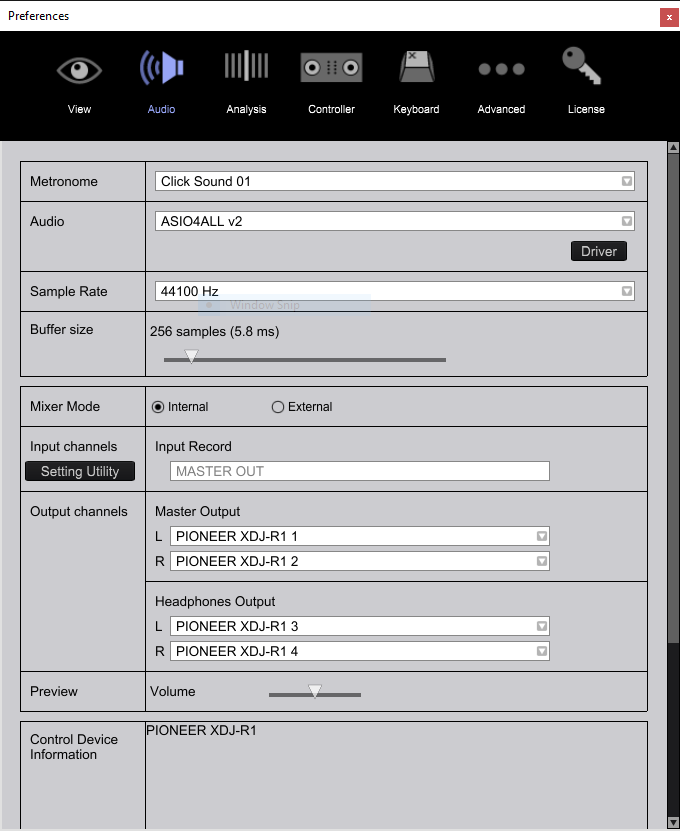
From your initial screenshots, it actually looks like there is a problem with how the drivers are presented to Windows. You may need to reinstall the R1 ASIO drivers. Disconnect the R1, close rekordbox and run the driver installation. Reboot Windows, launch rekordbox and you should see this as the audio config window:

You won't be able to record using that method, but you CAN if you install ASIO4ALL and configure it to output to your XDJ-R1:
I got it. Only after you choose XDJ-R1 as a main sound device (ASIO options in asio application - run when you start recordbox), you will get possibillity to route your sound as you will. And the mixer must be activated as EXTERNAL - so XDJ-R1 not a midi mixer!!!
But unfortunalety how to fix problem with record get any yet(((
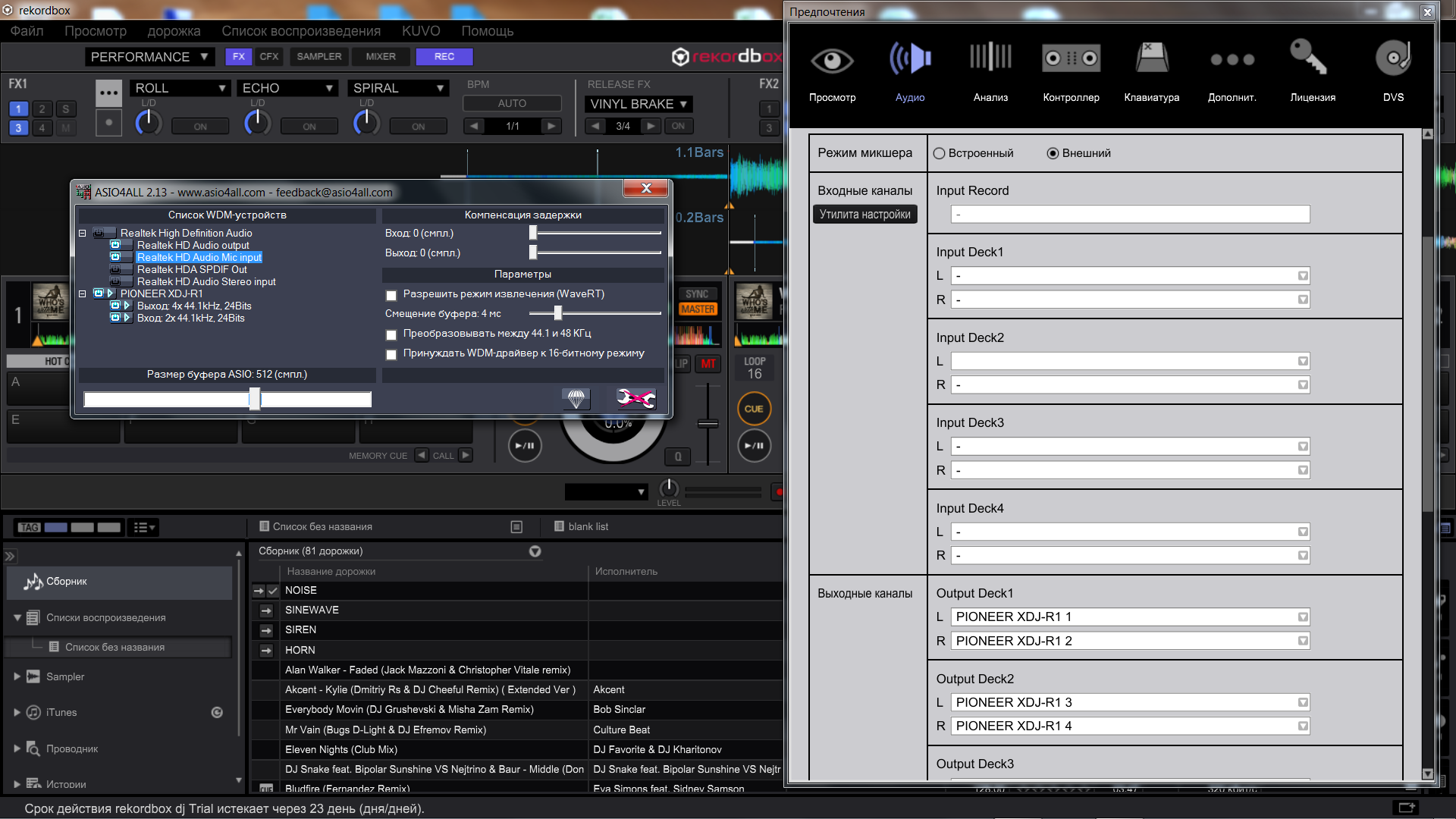
You need to use INTERNAL mode, NOT EXTERNAL.
Thanks a lot, but with External all works fine

Problem with headphones, sound works but very light and annoying i can't hear anything..any one can help please..pioneer xdj-r1
Johny,
Have you made sure to adjust the CUE / MASTER mix knob?
everything work fine just the headphones i was working on it in the night everything was very good working good and in the morning i turned it on and the settings is same but the headphones were working but with slight and very annoying sound
i kno how to do all the setting but the problem is come suddenly
and i try both headphones output same problem and try another headphones same problem
Johnny,
Sorry to hear that, please file an inquiry ticket here and our support team will gather some additional information to assist you in resolving this issue.


