Have a feature request or suggestion? Post your idea here!

Publicação

5 seguidores Seguir
0
Avatar

PLEASE SOMEONE HELP ME! WITH REKORDBOX

Hello I have recently just bought a Pioneer DDJ-RX which comes with free rekordbox licence key and everything. I am having loads of trouble with the software though! 

It doesn't recognise my dj controller when i plug it in using my USB cable which as a result means that I can't use my dj controller at all to work with the software. 

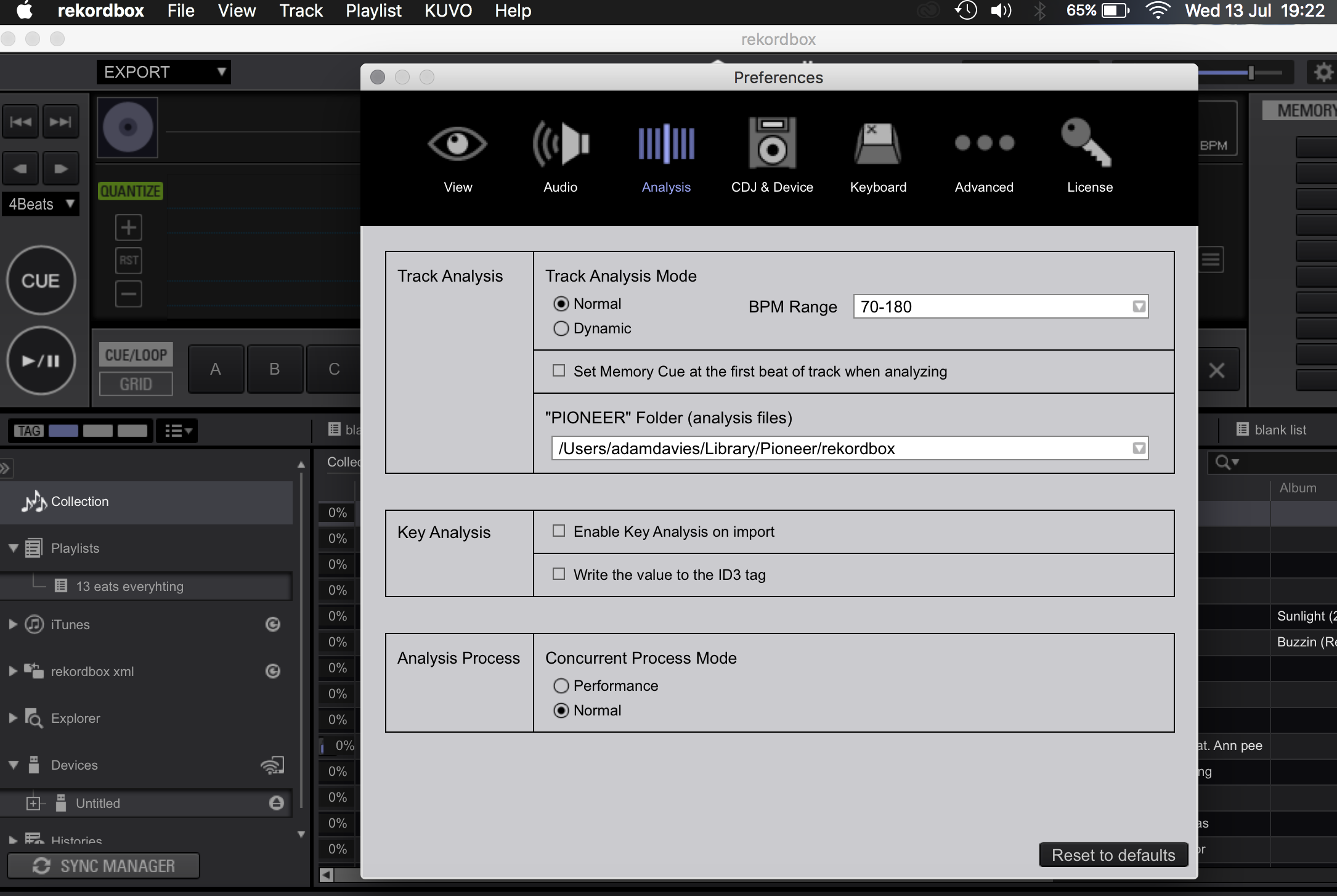
Also I keep on getting various other pop up messages about Rekordbox and the track analysis saying 'rekordbox can not create the analysis file in the folder you specified in the preferences.' 

Please someone help me Im going insane!


Thanks 

adam davies Respondido

Comentário oficial

Avatar

To those who have issues after installing rekordbox 4.2.0:

Please download the previous version 4.1.2 from the link below.

For Mac:
https://www.dropbox.com/s/2rkmk3bjwwaj5li/Install_rekordbox_4_1_2_mac.zip?dl=0

For Windows:

https://www.dropbox.com/s/weu4o9pskrb7yc3/Install_rekordbox_4_1_2_win.zip?dl=0

If you are still having issues after installing 4.1.2, please let us know here.  

Sorry for the inconvenience and thank you very much for your kind cooperation.


Mark Gallo
Ações de comentário Permalink

Publicação fechada para comentários.

15 comentários

0
Avatar

Oh and just to clarify I am using a Macbook pro

adam davies 0 votos
Ações de comentário Permalink
0
Avatar

Hello i am having similar problems too, its cause of the new update rekordbox 4.2, my xdi rx keeps saying its disconnected from my macbook pro while i am trying to mix my songs, which effects the deck in a crazy way, some times the buttons don't work and the tempo and songs goes really high or low on its own, will this be fixed on the new update which is released tomorrow?

Nikkil Binov 0 votos
Ações de comentário Permalink
0
Avatar

Hello Mark 

Thanks for trying to help I have got the software to link with my dj decks, But I am still having loads of trouble with the error message 'Rekordbox can not create the analysis file in the folder you specified in the preferences' what can I do about this? As i am unable to create beat grids and cant beat match anything without this working 

Thanks 

Adam 

adam davies 0 votos
Ações de comentário Permalink
0
Avatar

Can you do two things...

1) With all applications closed, open your disk manager and run first aid or repair permissions.

2) Verify that the folder above exists and look at the permissions to see if you have read + write privileges for it (click the folder, press command+i and look at the bottom).


Pulse 0 votos
Ações de comentário Permalink
0
Avatar

Okay so I cant actually find that folder which is probably where the problem is going to be coming from? But it wont let me change the location of this folder, do you know why??


adam davies 0 votos
Ações de comentário Permalink
0
Avatar

If you moved this database from another computer and didn't set up the EXACT SAME user name, then that's why it's happening. You have two choices:

1) change your user's home folder name to match that shown in the settings

2) change the rekordbox settings to match your current username

The 2nd is easier to accomplish, let me know if you need detailed instructions.

Pulse 0 votos
Ações de comentário Permalink
0
Avatar

Yes please could you do some instructions as I have been trying for ages to get this to work so don't want to mess anything else up

adam davies 0 votos
Ações de comentário Permalink
0
Avatar

1. If you don't know what your OS X username is, read this (applies to most versions of OS X)


2. Go to Finder, from the menu select Go > Go to Folder...


3. In the pop-up window, enter: 

  • ~/Library/Application Support/Pioneer/rekordbox/

(you can copy/paste)


4. Find the rekordbox3.settings file and make a copy of it (⌘+C then ⌘+V)


5. Right-click on the rekordbox3.settings file and select Open With > Text Edit (if Text Edit is not available, click Other then find it on the list of applications)


6. Find the following line:

  • <VALUE name="pioneerDirectory"

Replace the username in the VAL with your current username.

7. Find the following lines and do the same thing:

  • <VALUE name="bridgeImportedLibraryFile"
  • <VALUE name="masterDbDirectory"
  • <VALUE name="SamplerSaveDirectory"
  • <VALUE name="RecordSaveDirectory"

You don't need to change the value for the iTunes library line, that can be modified in the settings of the application.

8. Save the file, quit Text Edit, open rekordbox and try importing a new file, or re-analyse an existing song.

Pulse 0 votos
Ações de comentário Permalink
0
Avatar

You my friend are an absolute legend! What a man! Thank You so much!!!


adam davies 0 votos
Ações de comentário Permalink
0
Avatar

Most welcome - glad you were able to get it working! :)

Pulse 0 votos
Ações de comentário Permalink
0
Avatar

Hello i am having problem with the new rekordbox License key it says its connected to another computer but i am only trying to connected in to one computer.

Angel Warren 0 votos
Ações de comentário Permalink