Comentário oficial
I think this problem is caused by Mac OS X 10.9.x.
Please check the workaround on following URL.
http://faq.pioneerdj.com/product.php?lang=en&p=DDJ-RZ&t=350
This page is for DDJ-RZ but can also be applied for DDJ-RZX.
Hello
I have just brought a Pioneer DDJ RZX. I downloaded the latest 4.2.1 version of Recordbox put in my Codes to get DJ, DVS and Video working. Plugged in my Macbook Air running 10.9.5 and they do not want to work. The RZX says midi mode and RB says Midi controller connected but I can't get anything to work.
Help please!!!
I think this problem is caused by Mac OS X 10.9.x.
Please check the workaround on following URL.
http://faq.pioneerdj.com/product.php?lang=en&p=DDJ-RZ&t=350
This page is for DDJ-RZ but can also be applied for DDJ-RZX.
Publicação fechada para comentários.
More Infos plz?
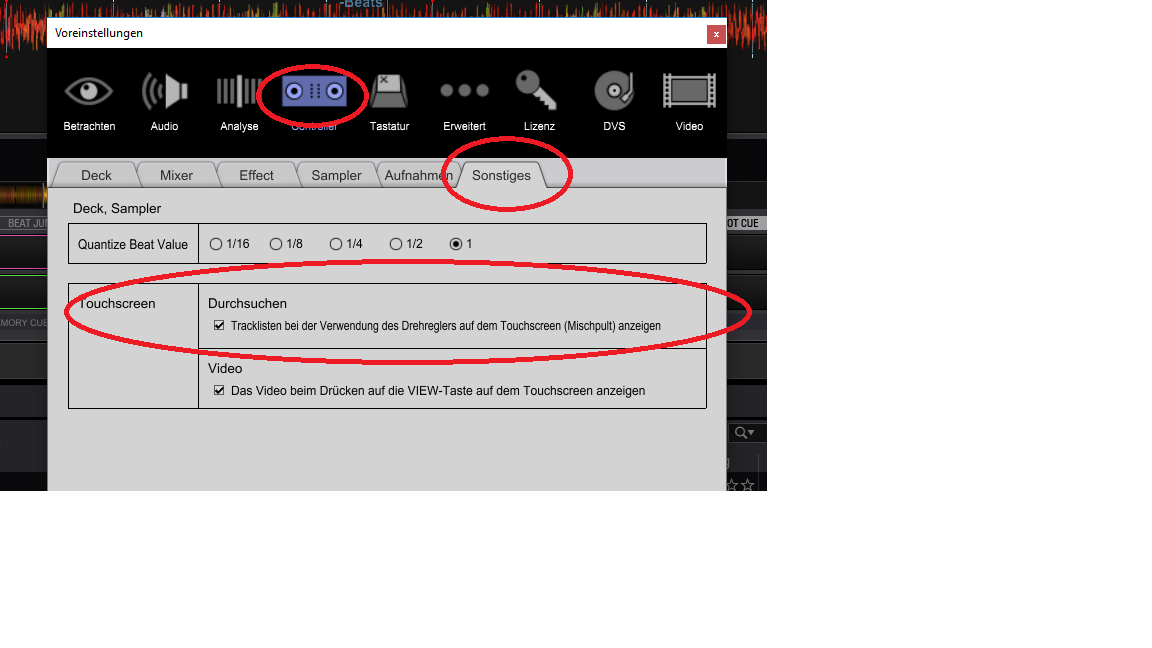
In the Settings there is a Point like "Show the Explorer in the Center Screen" U must activate that to get the Browser to the DDJ.
What more info do you want?
I can't see what you mention
I cant get nothing to work is not a good description of your failure. :D
We dont know what you where trying so far.
In the Settings>Controller>Other there is a Point that says.
Show Tracklist at the Touchscreen if u use the Knob.
And u can make a Setting to press this Knop instead using the silly Load Bouttons to Load a Track to the Assigned Deck. :D

When I plug the RZX in I just get Midi device connected.
I can not see that box below the Beat Value one.
Sorry i dont know what u mean and i dont use a Mac.
The controller and laptop aren't working together. The RZX just says midi control on both screens and the middle one tells me usb is connected. None of the buttons do anything though. Recordbox on my Mac works but doesn't play through the RZX
You must activate the Center Screen as i told you...
When u turn the Konbs under the Center check if the Bar in the Browser is Scrolling on your mac.
RB installed the Drivers for the DDJ?
I can't though as I don't get given that option.
No nothing works on the DDJ.
Yes drivers installed
Hooray fixed that's to the official comment at the top
Hello galvin.
Does the macbook air work well with the RZX?
I have a similar problem .. everything works perfectly, except that on my screens, I have, in the center, usb connected on 4 channels, and on both left & right screens I have the logo rekordbox "midi control" and I cannot manage to remove anything. I tried the answer given below (activating browse mode in the preferences in rekordbox) but it doesn't change anything. thank you in advance
I'm on a pc windows 10. Rekordbox 4.3.0 and driver 1.021
please help me or it will go through the window after 24 hours ^^
Sorry "copy paste" bug :
I have a similar problem .. everything works perfectly, except that on my screens, I have, in the center, usb connected on 4 channels, and on both left & right screens I have the logo rekordbox "midi control" and I cannot manage to remove anything. I tried the answer given below (activating browse mode in the preferences in rekordbox) but it doesn't change anything. thank you in advance
I'm on a pc windows 10. Rekordbox 4.3.0 and driver 1.021
please help me or it will go through the window after 24 hours ^^
You need to enable "Video".
First, make sure you put the rekordbox video serial code, and activate it.
Then, on settings, under Video tab, check that the "enable video" setting is ON.
Here you have more info: https://pdj-ecom-cdn.azureedge.net/-/media/pioneerdj/downloads/other/troubleshooting/troubleshooting_ddj-rzx_002_e.pdf?la=en
It's right that yesterday, everything was working, and I just activated rekordbox video and dvs. Since that, it does work. I just check for "enable video" and it was already ON.
Any other idea ?
I will check the pdf you just posted.
For the moment, I checked eveything on the pdf and nothing solve my problem .. everything looks fine .. and the demo mode on the rzx is like pioneer laughing at me !
Just update the rzx to 1.08 version but nothing change ..
Solved ! It was not my firewall but my antivirus which was blocking rekordbox .. now eveything works great ! thanks for your help