Have a feature request or suggestion? Post your idea here!

Publicação

10 seguidores Seguir
1
Avatar

[Solved] DDJ-RB PC Master Out Not Working

 Morning all,

I see some people are having similar problems but I thought I'd create a new post so I know we're all on the same page.

I have just bought a DDJ-RB Controller. I installed the latest Rekordbox as per instructions then connected the controller to my PC. I loaded a track, set the trim, master and faders appropriately and pressed play. Nothing comes out of my PC speakers. I am able to listen in on headphones, but nothing from the PC speakers. The master volume control has no effect (and is greyed out in Rekordbox)

If I go into settings and select "Speakers (Realtek High Def Audio)" I get sound from my PC speakers, but now nothing in the headphones. The Master volume control now works as expected.

Yesterday, after lots of playing around I saw under the ASIO settings for output "MASTER + Speakers" appeared. I don't know how this appeared or what I did but that half worked (I now had sound from PC speakers and could listen to either deck in headphones but Master volume still had no effect)

Here we are to today and again, the ASIO only gives me "MASTER" in the output options.

Does this thing work as advertised or should I send it back? Pioneer haven't made the best first impression here to be honest.

Running Windows 10 x64

Rick Attfield

Publicação fechada para comentários.

13 comentários

0
Avatar

Just to update this, I've reinstalled my computer sound drivers from the manufacturers website and it's worked twice in a row so far! So that's good. Try that if you're having the same problem. Now to try and fix the crackling sound that appears after 15-20 minutes of mixing...no one told me I'd have to become a software engineer to DJ!

Rick Attfield 0 votos
Ações de comentário Permalink
0
Avatar

@Rick > Try to think about how we are needing to troubleshoot all these varieties of problems which are mostly based on other people's hardware and software! ;)

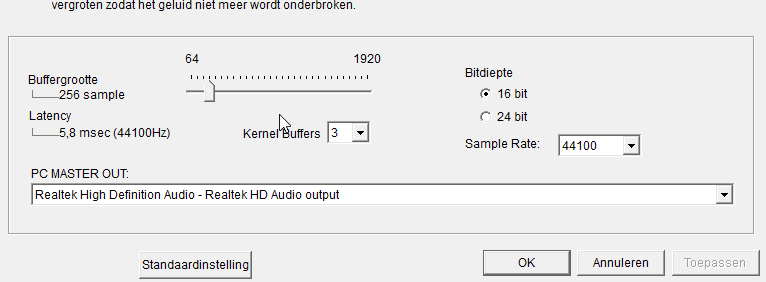
Try changing the buffer size in rekordbox to see if it holds up without audio degradation.

Pulse 0 votos
Ações de comentário Permalink
0
Avatar

Hey Pulse! Yea, sorry I was a little frustrated when I posted these, I'd been googling and tinkering for ages trying to get everything to work! Bit of a nightmare! I'm still getting crackling after about 10-15 minutes of play. I've tried adjusting buffer size as you suggested, went up as far as 1024 but it didn't seem to have any effect. Still getting crackling :( I'm gonna see how I get on with my laptop (I had been using desktop). It's weird because if I close rekordbox and open it again straight away it's like it's refreshed and I get another 15 minutes or so without any problems. I'm guessing my onboard sound in the desktop just can't handle it. Do you think some kind of external sound processing could fix the problem, like a half decent i/o unit or something?

Rick Attfield 0 votos
Ações de comentário Permalink
0
Avatar

What's the spec of the desktop computer, and had you disabled all unnecessary background applications / tasks?

No, I don't think another audio interface would be the answer.

Pulse 0 votos
Ações de comentário Permalink
0
Avatar

Same problem here. I've tried everything just like rick and nothing seems to work. But i cant play those 15 minutes that he earned. I need a solution for these. Its really disappointing.

Gabriel Kutka 0 votos
Ações de comentário Permalink
0
Avatar

I've realized that if y disconnect the usb from the controller ddj rb and I connected to the port again while the music still running on rekordbox, the music start been playing on the pc speakers but just for 5 seconds.

Gabriel Kutka 0 votos
Ações de comentário Permalink
0
Avatar

Windows 10
Crucial MX200 SSD8 GB DDR3 Ram
Asus Z77 Motherboard (using the onboard sound, Realtek HD Audio)
Intel Core i7 3770K
Nvidia GeForce GTX 670 Graphics

I can't say I had closed all background operations, I'll try that now and see how I get on.

Rick Attfield 0 votos
Ações de comentário Permalink
0
Avatar

Also tried on my laptop and had no issues, so that's good at least!

Rick Attfield 0 votos
Ações de comentário Permalink
0
Avatar

I had the same issue. After some trying I found what solved it for me.

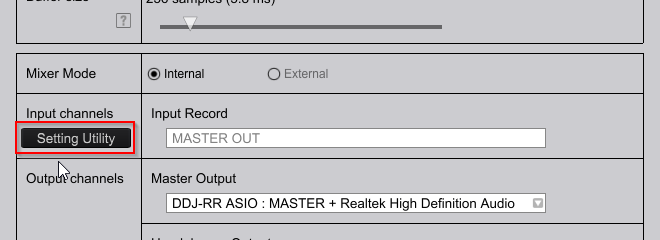
Allthough the PC speakers seem selected, you still need to configure something extra in the "Setting Utility"


This is the ASIO dashboard and with me, there was nothing selected in the PC Master Out Dropdown. I selected my speakrs and it worked fine after it

Wouter Van den Driessche 0 votos
Ações de comentário Permalink
0
Avatar

Hey, I’m having a similar problem. Just purchased a new ddj rb with pioneer dm-40w speakers. I’ve got them all connected up to my Mac which is running the latest os system but the output is only coming out through my Mac and not the speakers. I’ve gone onto preferences on rekordbox and audio only has the option for built in output. Any ideas on how I can change this? Thanks

William Brown 0 votos
Ações de comentário Permalink
0
Avatar

@William > If you're on High Sierra, chances are you didn't disable the driver security before installing the drivers. Please see this guide to disable it, then run the uninstaller from the driver package, then run the installation again.

Pulse 0 votos
Ações de comentário Permalink
0
Avatar

Same Problem , Rekordbox Dj - Pc Master Out Function use only 1/2 hour than Stopped Music.....DDJ-RB....I use latest Realtak Audio Driver.... Latest Rekordbox Dj Software ..... DDJ-RB firmware\Driver - 1.3v.......but Same Problem......

Dj Akki 0 votos
Ações de comentário Permalink