Have a feature request or suggestion? Post your idea here!

Publicação

3 seguidores Seguir
0
Avatar

Connecting Controllers to Rekordbox HELP! (Windows 10)

Pulse,

I am running into trouble with my windows box that frankly I never saw on my MBP's. This is starting to cause issues in performances and I wanted to pick everyone brain to see what I am doing wrong in set up.

First I have varied Pioneer Mixing Units (ie CDJ, XDJ, DJM, DDJ, SP1 and TT)

When I attach the unit to Rekordbox Performance Mode they do not automatically detect. Before Apple released their latest MBP, which I plan on getting after the new year I sold my MBP and purchased a windows 10 box (first mistake). Anyway I have to live with it now until I get my new MBP.

I used to be able to connect my controller and It would auto detect what ever Pioneer Device I had connected.

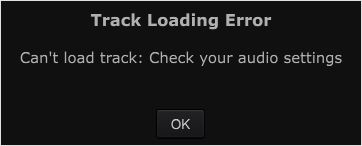
When I now connect it defaults to internal Speakers and shows the unit connected below. When I switch to a given device Rekordbox Craps Out.

I am pretty savoy with computers but have thrown my hands up in the air (thank god for the old way of USB).

Another question is a clear and concise way to install ASIO (across the board) the meaning of it and how to use it. Same with LINK (this manual is Outdated and does not include any of the NEW Pioneer DJ equipment released)

Many thanks guys I am going into the season here in FLORIDA and want to get this hammered out so I can focus on my sets and not F**K around with settings.


Thanks as always!!!

DJ Phil the Thrill

Publicação fechada para comentários.

4 comentários

0
Avatar

If you haven't done so already then you need to install a separate ASIO driver for each of your devices - assuming they all use ASIO.

ASIO drivers are written specifically for each device, to keep latency low.

Having done that, keep Windows from using any of those ASIO devices as default audio. That's done via the Control Panel. Use your computer's onboard audio for that.


GroovinDJ 0 votos
Ações de comentário Permalink
0
Avatar

@Phil > As @Groovin says, if you don't have the drivers installed, you can't just "plug-and-play" as the system won't be able to address the audio interface.

Yes, Windows is more difficult to "just get going" as you can do with a Mac, but Pioneer has actually created special drivers that allow you to use multiple CDJs as a single device by using their custom CDJ ASIO driver! Previous ASIO configurations required you use 3rd party managers (like ASIO4ALL) to aggregate the interfaces together.

Let us know if you have specific issues you're trying to troubleshoot and we'll be happy to assist.

Pulse 0 votos
Ações de comentário Permalink
0
Avatar

Guys thanks for the imput I am attaching some random screen shots...


DJ Phil the Thrill 0 votos
Ações de comentário Permalink
0
Avatar

There appears to be a setting issue or something like it. When I look for instructions on set up I get redirected to Old directions.

I am still not clear how to run ASIO and what it is for.

DJ Phil the Thrill 0 votos
Ações de comentário Permalink