Comentário oficial

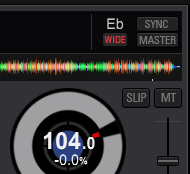
Are you possibly using a hardware controller or DVS? Because there certainly is an option for wide mode:


Ações de comentário
Are you possibly using a hardware controller or DVS? Because there certainly is an option for wide mode:
Publicação fechada para comentários.

I'm using a DDJ-RB but the problems there whether it's connected or not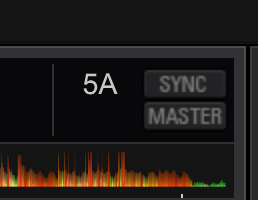
My screenshot was taken with no hardware connected; do you have the DVS plus-pack installed / enabled?
Mine was also taken with hardware connected. I don't have the DVS plus-pack
Anything? It's really unusable like this.
Which version of rekordbox are you using?
4.2.4
I'm just asking so I can escalate to our engineers, as I'm able to change the range regardless of which hardware I have connected (or not).
@Rafa > Following-up to see if you've had the opportunity to test with updated graphics drivers.
I'm using a mac. Graphics drivers are included in the standard updates.
Could I please just have a refund?
@Rafa > Sorry, we do not offer refunds due to the nature of the product, but I'm happy to get you with additional information to resolve this issue. Had you provided me the pertinent information about your system and operating system, I might have been able to offer a different resolution.
I have highlighted the important information in bold from this fix:
If you are using FontExplorer or another font manager, it may have messed around with the default system fonts. Please uninstall that application, and then from the system Font Book application, select 'Restore Standard Fonts' from the File menu. Please note that this will disable non-standard fonts in your system (they are put aside in the Fonts(removed) folder).

