Have a feature request or suggestion? Post your idea here!

Publicação

5 seguidores Seguir
0
Avatar

RB DMX1

Andy Beech Respondido

Comentário oficial

Avatar

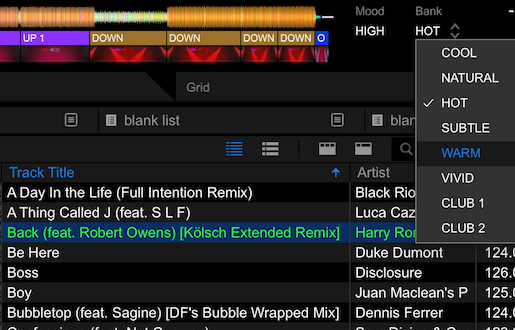
1) Switch to Lighting mode

2) Click the Macro Editor tab

3) Click the Browser tab

4) Select the track you want to edit

5) Change the Bank, to the right of the song waveform.
Pulse
Ações de comentário Permalink

Publicação fechada para comentários.

14 comentários

0
Avatar

Why does the "Phrase Analysis" favour the colour blue?

EVERY song i playback following analysis gives me a predominantly blue lightshow with maybe a very little red and sometimes green output. 

Is there any way of producing a more colourful show without me having to individually edit each macro?

Andy.  

Andy Beech 0 votos
Ações de comentário Permalink
0
Avatar

Hi Pulse.

Thanks for your reply, however your "remedy" still requires me to look at each of my tracks individually. also i cannot make this change whilst playing "live" as it means coming out of performance mode.

After spending more time looking at this issue i have found it to be a major problem.

The reason that 99% of the "Lightshows" created by RB Lighting is that, for whatever reason, 99% of my mp3/mp4 collection are designated MID/COOL. they can be ballads, heavy rock, dance tracks, r&b, punk rock etc etc, they are still MID/COOL........something is badly wrong there with the analysis.

Now whilst i know i can change the BANK to another selection i cannot see a way to change the MOOD and even if i could, this means going through 18,000+ songs one by one. I purchased this to save me time but all it is doing is costing me a huge amount of time.

Also, in the process of looking through the results of the analysis, i keep discovering random tracks where the analysis stop half way resulting in no lightshow and darkness. So far i have been able to re-analyse this tracks successfully but sometimes it is taking 2 or even 3 attempts and then i usually end up with another MID/COOL lightshow.

I was really hoping to utilise RB Lighting this weekend but in its current state it is unreliable and unusable.

Andy Beech 0 votos
Ações de comentário Permalink
1
Avatar

If you have DDJ-1000 or DDJ-XP1, you can switch MOOD/BANK data at PERFORMANCE MODE using controller PAD.

Kanta 1 voto
Ações de comentário Permalink
0
Avatar

I don't have either of those controllers. i have a DDJRZX.........

So now what do i do??

Is something going to be done to improve the analysis as you still have not provided an answer as to why 99% of songs analysed are designated MID/COOL......?

Andy Beech 0 votos
Ações de comentário Permalink
0
Avatar

I do have a Novation Launchpad Mk2.... can i map pads to switch Mood/bank in Performance mode?


Andy Beech 0 votos
Ações de comentário Permalink
0
Avatar

So i have answered my own question (again...) and have mapped a Launchpad to change Mood/Bank etc........


Andy Beech 0 votos
Ações de comentário Permalink
0
Avatar

Yeah, you can map anything do change the banks or switch colours.

As for the mood, mine are all over the map, not sure why you're getting predominantly cool.

Pulse 0 votos
Ações de comentário Permalink
0
Avatar

Hi, I really liked this discussion since I am considering to buy RB-DMX1.

I have basically the same setup of @AndyBeech with DDJ-RZX.

Sérgio

sbherculano 0 votos
Ações de comentário Permalink
0
Avatar

I hear that the RD-DMX1 cannot control moving head positions (programmed static positions). Can someone confirm if this is true? Being that many lighting heads are positioned on trusses, it is crucial to have the ability to be able to program the position of the moving heads to focus on the dance floor. I am currently an avid freestyler dmx user and anxiously awaiting the delivery of my rb-dmx1, but if it lacks this functionality, it will be a major disappointment.

Thanks in advance.

djsvazquez 0 votos
Ações de comentário Permalink
0
Avatar

According what I heard from some colleagues and also read about RB-DMX1 at this moment cannot control the position of moving heads, in addition cannot also handle some effects fixtures.

Look this video of course you have to see it with caution since the guy on the video is fan of Soundswitch :).

https://www.youtube.com/watch?v=A7v6RAEgP9M


sbherculano 0 votos
Ações de comentário Permalink
0
Avatar

I saw that same video Sergio... So according to Andy Beech, it appears that the RB-DMX1 will have some limitations (gobos, zoom, prism), but not positioning, which I hope is resolved in short order by Pioneer. I would hate to see them try to make these changes on a new version of the interface (in typical fashion) ala RB-DMX2. 

djsvazquez 0 votos
Ações de comentário Permalink
0
Avatar

Dear,

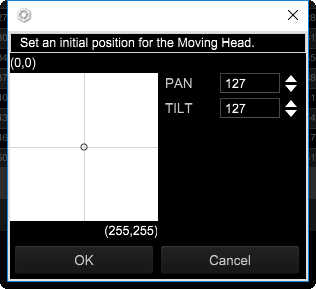
You can set the moving head position to you like as below.

Please open "Fixture Library" screen, and right click on the pink color of the right side.


Kanta 0 votos
Ações de comentário Permalink
0
Avatar

I misunderstood, position is not a problem just effects and effects fixtures as well that are not supported at this moment

Sérgio

sbherculano 0 votos
Ações de comentário Permalink