Have a feature request or suggestion? Post your idea here!

Publicação

5 seguidores Seguir
0
Avatar

static waveform too small on rekordbox 5.2

the static waveform just fills the the superior half and left a black space of the inferior' I tried already in the settings the full or half and larger size boxes and same results

Cesarxavi

Comentário oficial

Avatar

That blank space below is where the lighting scenes are shown.


If you are not using lighting, you can uncheck the Enable Lighting Function box under the Lighting tab in the Preferences, as Spark972 suggested below.

Mark Gallo
Ações de comentário Permalink

Publicação fechada para comentários.

14 comentários

0
Avatar

Did you try by unchecking Enable Lighting Function from Preferences/Lighting ?

Spark972 0 votos
Ações de comentário Permalink
0
Avatar

If your waveform is too small, it could simply be that the audio level of that song is too low. Try running it through an audio editor to boost the overall volume.

Pulse 0 votos
Ações de comentário Permalink
0
Avatar

- Unchecked the "enable lighting function" thanks Spark972 but is the same problem

- checked the  view/layout "phrase (enlarged waveform)" I dont see any changes when is unchecked or checked, nothing happens!!!

- checked the  view/layout "phrase (full waveform)" when is checked black space appears, when is unchecked black space dissapear but waveform is the same small wave, nothing positive occurs

- The audio level is high and clear, the same with my collection.

 - The same with full/preview waveform

Cesarxavi 0 votos
Ações de comentário Permalink
0
Avatar

Go into the preferences and disable the lighting function.

Pulse 0 votos
Ações de comentário Permalink
0
Avatar

The same problem when disabled lighting function

Cesarxavi 0 votos
Ações de comentário Permalink
0
Avatar

Ok I restarted the computer and no luck.

I restarted again and reinstalled rekordbox and restartet, no luck guys

another tip? pleaseee and thanks!!!


Cesarxavi 0 votos
Ações de comentário Permalink
0
Avatar

Go into preferences, check "Enable Lighting Function" and then un-check "Display lighting thumbnail on decks" then un-check the "Enable Lighting Function" again.

Pulse 0 votos
Ações de comentário Permalink
0
Avatar

Hello. I could not enter to the forum yesterday log in issues 

so I did all the last proccedure and nothing changes

Its a BUG!!

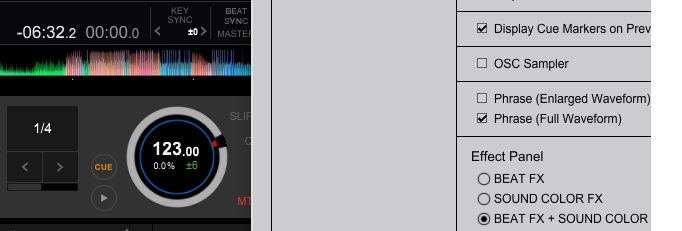
Phrase (enlarged waveform) unchecked

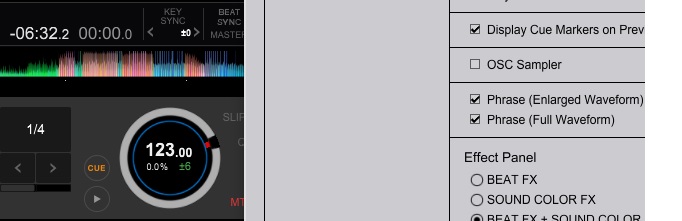
Phrase (enlarged waveform) checked

is the same I dont see any changes

Cesarxavi 0 votos
Ações de comentário Permalink