Have a feature request or suggestion? Post your idea here!

Publicação

3 seguidores Seguir
0
Avatar

Audio Bugs: Rekordbox 5

Running Rekordbox 5.2.2 on OS X 10.13.4, with 2x CDJ2000NXS2s

Firstly, I had to fall back to vers. 4.5.0 to get this setup to work.

Am running trial mode of Performance mode (thank God, cos I won't be paying for it in this state) and have set up a multi-output aggregate device on my Mac so that I can send audio from deck 1 out of one CDJ, and audio from deck 2 out the other CDJ into my DJM700.

Whatever Rekordbox 5.2.2 is doing, it's sending either decks' signal to both CDJs; albeit slightly quieter on the one that shouldn't be sending a signal at all.  Falling back to 4.5.0 fixed this, and I was able to get signal from the corresponding CDJ without it spilling onto the other.

I can't understand why I had to set up an aggregate device to do this though? Surely a common set up would be for Rekordbox DJ to use each CDJ as a soundcard for each virtual deck?  Even Virtual DJ is capable of this.

--

This one might have been fixed in 5.2.2, but couldn't see it mentioned in the changelog since 4.5.0...

I was mixing both audio and video, and some 50 minutes into the set, Rekordbox would keep saying "Not Loaded" when I dragged a song onto any of the decks.. however, my CDJs *would* still play the song I had selected.  With that though, I was seeing the wrong video on-screen, the wrong waveform, and the wrong time information on the CDJ... so I was DJing blind essentially. 

It wasn't file corruption, as a) all my files come from the same source (Promo Only), and b) the very track that I dragged onto the deck played fine after a software restart.  Didn't happen again that night, but until I restarted Rekordbox (after going to an emergency USB stick) that problem remained.

Not sure how Pioneer can charge money for such unstable software; not least given what we pay for the devices in the first place.

Owen Griffiths

Publicação fechada para comentários.

5 comentários

0
Avatar

rekordbox can only assign one audio device, and thus creates an aggregate using the two hardware interfaces as one device, this is perfectly normal.

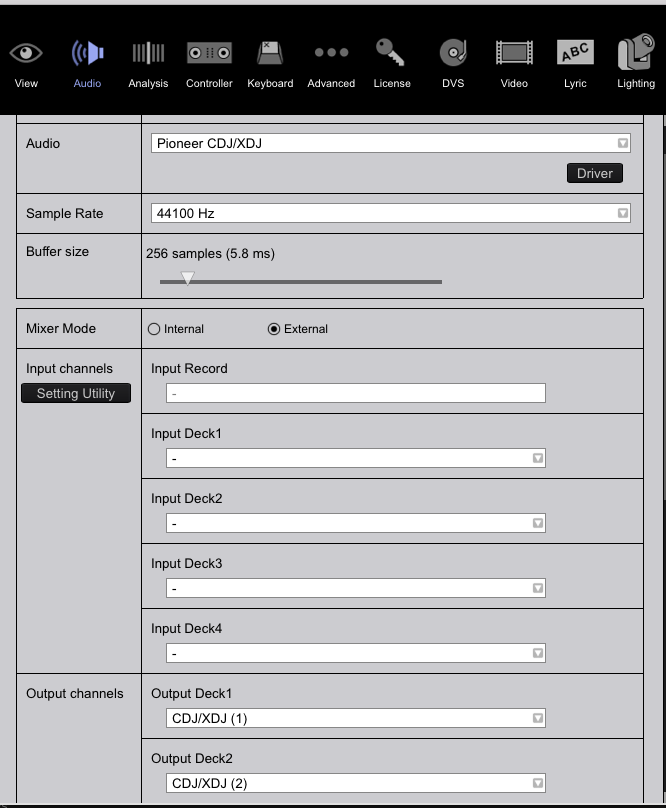
I expect the problem is possibly with your configuration - could you please show the rekordbox audio page so I can see how it's assigned? Also, a screenshot of your Mac's audio devices to see the aggregate would be of help.

Pulse 0 votos
Ações de comentário Permalink
0
Avatar

I'm having the same issue with Rekordbox 5.3. I'm using 2 Pioneer xdj-700s and a xone23 mixer. I set up the aggregate player on my mac and followed the instructions for audio setup as written in your guides. One audio signal is much quieter than the other (i.e. deck 2 plays much louder than deck 1 even though the gains on both channels are the same).

Another huge issue is that I can't get cue to only work in my headphones - when I press cue on either deck, it plays out through the master output!

Here's a screengrab of my audio setup, would appreciate the feedback. Thanks :)

Kathryn McGinnis 0 votos
Ações de comentário Permalink
0
Avatar

One more major issue: when I throw my channel fader down, the track still plays at full -- so I really can't do much of anything with this set up!

Kathryn McGinnis 0 votos
Ações de comentário Permalink
0
Avatar

@Kathryn > In your configuration, you're using the XDJs as an aggregated audio device. The output levels would be the same for each deck and that level on your mixer would be controlled by the channel gain/trim knob -- having them at the same position would only be effective if you were playing the same song on each rekordbox deck, remember - not all tracks are mastered the same and may have different audio levels, requiring different gain be applied.

You mention the track still plays at full when the fader is down -- that would indicate you've got something connected or configured incorrectly somewhere else, but I'm not getting the full picture to know where that might be. Any other information you can provide would be helpful.

Pulse 0 votos
Ações de comentário Permalink
0
Avatar

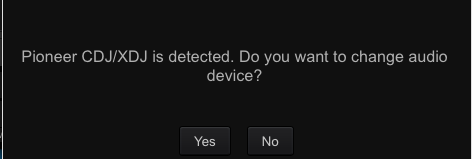
@Pulse - Thank you for your response. I rebooted Rekordbox, the XDJs and my mixer and kept the same settings and it decided to work. This time, the below message appeared. I had rebooted several times last night but I guess the XDJs were never properly detected.


Anyway, thank you for your efforts!


Kathryn McGinnis 0 votos
Ações de comentário Permalink