
Have a feature request or suggestion? Post your idea here!

Publicação

3 seguidores Seguir
0
Avatar

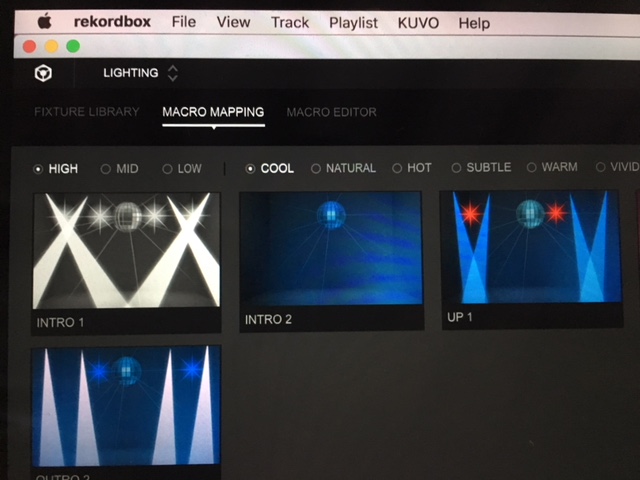
(Lighting) Changing relations between scenes and phrases (using custom scene)

Section 6.3 of the Rekordbox Lighting operation Guide says:

"You can change relation between each phrase and scene by dragging & dropping a scene shown in scene display"

It doesn't seem to work, at least with custom scenes.

Here is the custom scene I created and assigned to the Mood HIGH and the Bank COOL, as the INTRO1 phrase:

Then looking at a song in mood HIGH and bank COOL, with only INTRO 1 phrases, my custom scene does not appear (it seems the original default scene appears):

Any reason why?

Anacapa

Publicação fechada para comentários.

3 comentários

0
Avatar

Dear Sir,

I'm sorry to hear that. It's just a bug.

Currently you can apply a new custom scene when you once change "BANK" to other one, and again, select the it's bank on MACRO EDITOR screen.

(e.g.)

1. load a track on MACRO EDITOR screen.

2. change bank, for example, COOL -> NATURAL -> COOL

Thanks,


Kanta 0 votos
Ações de comentário Permalink
0
Avatar

Sorry for the delay in answering, and thank you very much for your answer, which fully answered my question :)

The solution you propose actually works every time changes in phrases do not correctly translate in changes in scenes.

Anacapa 0 votos
Ações de comentário Permalink
0
Avatar

Is there a default or a way to change Mood/Bank to many songs and/or folder at once instead of trying to individually change thousands of songs?

Most all my songs come back analyzed as "Cool" which only uses white light and does not change colors while using my moving heads 

WAYNE CHAN 0 votos
Ações de comentário Permalink