Have a feature request or suggestion? Post your idea here!

Publicação

4 seguidores Seguir
0
Avatar

Configuracion crossfader

Los faders de canal, se puede configurar a través del menú, me parece fantástico, pero el crossfader no, y tiene un fallo, al no poderse configurar

En la primera posición Tru, está desconectado

En la segunda tiene el 100% en los extremos y el valor menor en el centro aproximadamente el 80%, y al pasar el centro a un lado, se sube de volumen, y según el gráfico de la posición 2 es normal así.

 En la posición tercera, sube casi inmediatamente del 0 al 100% en menos de un milímetro de movimiento, tal como se pone en el gráfico, también es normal y es esa la curva que se debería poder ajustar, para que sea de 0 a 100% en modo inmediato, o no tan inmediato, por ejemplo que llegue al 100% en la posición central

Por ejemplo, se puede aplicar a firmware en el futuro configuración que los demás faders, es decir, con las mismas curvas de corte que en la de los faders, exponencial, lineal y rápida.

En resumen, que empiece a bajar después de pasar el centro del crossfader, y en el otro sentido que no suba, que se mantenga al mismo volumen que en el centro, que se mueva como el resto en todas las mesas de siempre, haciendo la mezcla en el centro, y la bajada de volumen desde el centro hacia el lado, gracias

Ren3martin

Comentário oficial

Avatar

There are only 3 crossfader options on the XDJ-RX2, and this is controlled by hardware - not software:

THRU - the crossfader is disabled

X - a curved slope from each side

SHARP - a hard cut on each end with the volume of the opposite side immediately to 100%

There are no provisions to change this configuration or the slope / curve amounts. Sorry.

Pulse
Ações de comentário Permalink

Publicação fechada para comentários.

10 comentários

0
Avatar

Hi,
I just bought xdj r1,
When x mode is on cross fader and i go all the way to the right or the left
The track go back to the cue point.
Who do i cancel that? So the track continue without going back to the cue?

Another thing is, how do i cancel a cue all together?
Not by making a new cue point.
By not having any...

Thanks

Eyal Hefetz 0 votos
Ações de comentário Permalink
0
Avatar

@Eyal > This comment has nothing to do with the original post; next time please start a new topic.

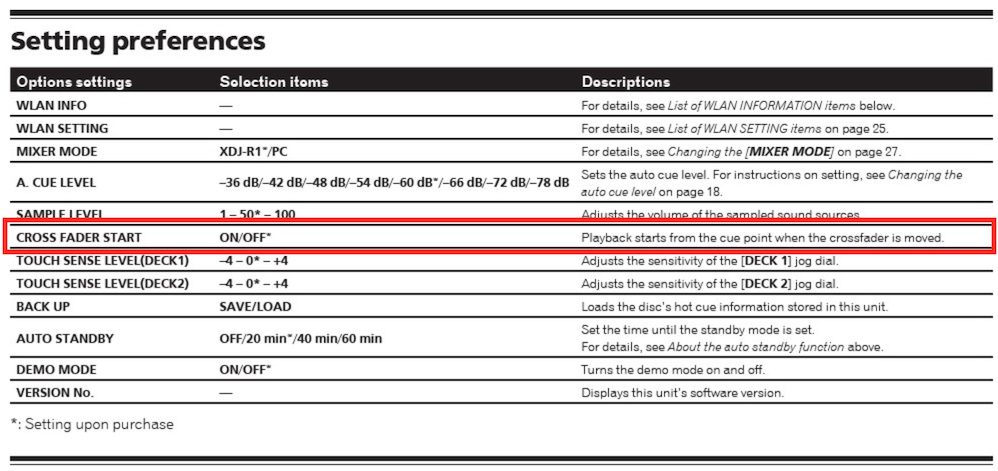
You have enabled the "Cross Fader Start" option in the utility menu:

Go in and change that to "OFF."

Pulse 0 votos
Ações de comentário Permalink
0
Avatar


SHARP: a hard cut on each end with the volume on the opposite side immediately at 100%

There are no provisions to change this configuration or the slope / curve amounts. I am sorry.

I know, it is as I have explained, what I mean is for the future, to be able to add the adjustment that there is via menu / utility, the change of adjustment of the curve of the channels, which could also be applied to the crossfader, would be a great improvement
That could be the SHARP mode, 100%, not so immediate

Is a good suggestion...


Ren3martin 0 votos
Ações de comentário Permalink
0
Avatar

so bad, can´t believe the answer, reversing the crossfader it´s a basic feature you must to add soon please.

DJ Caso 0 votos
Ações de comentário Permalink
0
Avatar

i already spend USD 3.000.00 (Chile) on a RX3, i can´t bealieve reversing the crossfader is not available...  WTF???

DJ Caso 0 votos
Ações de comentário Permalink
0
Avatar

Sorry - this hardware is not designed with that kind of performance in mind, so it was not included.

Pulse 0 votos
Ações de comentário Permalink