Comentário oficial

Ações de comentário

I've watched several tutorials which tell me that if I relocate one file within a folder, rekordbox will prompt me to relocate other files in that folder. This is not happening. Can someone PLEASE offer some insight on how to relocate multiple files with this absolute garbage software. I have like 3200 missing files.
Publicação fechada para comentários.

If you've renamed the files you have to relocate them one by one. Rekordbox can't find the files based on the tags.
If you've only moved the files, you can go to File > Display All Missing Files, make sure all files are selected, click Relocate, locate the first file, and then it should ask if you want to locate other files in the same folder.
I haven't renamed anything. And again, Rekordbox is not prompting me to locate other files in the same folder. I'm following those instructions exactly, and there is no prompt.

The relocation function in rekordbox works pretty well. I did that multiple times with a high number of files when reorganizing my Collection.
You may describe what you have done with the files, that we can have a better understanding what happened.
To work with the mass relocation, you Need to work with missing files:
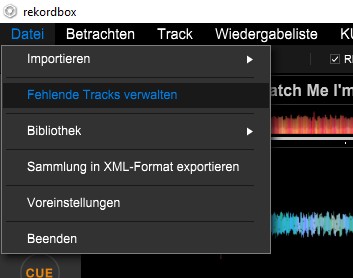
Once the assistant is finished you should get a Pop up with all missing files. They should have exclamation marks in your Collection.
They must be all highlighted.
Scroll to the top of the list and click on the relocate button.
You will be asked to locate the Music file on your Computer for that first entry in the list. Once you select it you will be asked if rekordbox should try to relocate the other files as well. If you confirm it will run through it and hopefully will find all of the other tracks. If not you Need to repeat the process.
This only works properly if you haven't renamed the Music files on your Computer and you haven't added them to the Collection after mocing the files.
In case you added them to the Collection after moving them without relocating them, you cannot locate 1 Music file to 2 entries in the Collection. In that case you probably Need to remove the double entry in the Collection first to be able to relocate.
Okay.
As I said in my original post, I have already watched several tutorials and attempted the procedure of Display All Missing Files -> Find Individual File Within A Folder to generate prompt for Find Other Files In That Folder. I have already tried this. Several times. IT DID NOT WORK, that is why I am posting in this forum. The prompt to locate other files in the same folder DOES NOT APPEAR, in spite of the fact that I have specifically attempted this procedure on files that I KNOW are in folders which contain multiple files.
I have not renamed any of my files. Not one. I emergency moved them to another hard drive because the one which previously housed them had failed. That is the only thing I have done to my files. I put them in a different place.
Does anyone have any insight into this issue?
PLEASE DO NOT REITERATE THE STANDARD PROCEDURE FOR LOCATING MULTIPLE FILES. I HAVE ALREADY TRIED IT. IT DID NOT WORK. THAT IS THE REASON FOR THIS POST.
"I emergency moved them to another hard drive because the one which previously housed them had failed. That is the only thing I have done to my files."
In which case, they're all in a new PARENT directory... eg, they used to be at:
X:\Music\Allthefolders
...and are now at:
Z:\NewHardDrive\Allthefolders
Meaning the only difference is they went from X:\Music to Z:\NewHardDrive, and that would be covered in the "use this same location to relocate the rest of your files" scope of change.
IF THAT IS NOT THE CASE ... did you SELECT ALL the songs in the mass-relocate window?

I have the same problem when moving files. I have two problems with file transfer:
1. When creating a backup copy of "Back up collection" the bar reaches 38%, then the message "Failed to back up the collection" appears. - Such an error appears to me on a desktop computer and on my old laptop.
I am forced to make a backup without saving music files. And here is the problem:
2. Installs the recordbox, transferring all the music to a new laptop. I restore the collections with the "Restore" function ... As you know, exclamation marks [!] Are visible, so I go to "display all missing files", select ALL songs, press RELOCATE, select the first file, give it a new location, and rekordbox does not display the query or give a new location for all lost songs ...
The collection contains 3772 tracks. What should I do?

wow this is almost embarrassing why this info is NOT to find anywhere, as far as i can tell. i found this out myself, almost by accident.
I have my music organised as follows:
E:\Music <---Root folder
--Artists <--- Traditional Folder structure like: \Rammstein\Herzeleid\Seemann.mp3
--HipHop <-- Single files i bought for this genre
--90s
--Techno <--- All my Techno Tracks which i play the most
--Party
--many more
--root.wav <--- the solution, explained later
So when i relocated this, NOTHING did change automatically! i would have had to manuall select every MP3 in each subfolder for each Album, which is with 14'000 tracks a no go...
Solution?
I put a WAV file called root.wav into my Music folder. so when i relocate my entire Library, i can go into the Missing File Dialog-->Relocate and it does this for all Files UNDER this root.wav!!
i find it redicolus that this is not documented.
@matge > Can you give me an example (using at least 2-3 files) to illustrate what your before/after directory structure was?
Absolutely, here goes:
i started off using my default windows Music Folder as the place to store my Music.
C:\users\matge\music
so a Full File Location would be
C:\users\matge\music\Artists\Linkin Park\Meteora\13 - Numb.mp3
so the Folder Linkin Park contained all Albums i own, and those had the Files.
When i only buy a single Track, not a whole Album i sort those by its Genre/Style (or at least the one i associate it in my brain, not what the MP3 or Artist says)
Example:
C:\users\matge\music\HipHop\Dr.Dre - Still Dre.mp3
so on my old Laptop the Folder "music" was my root.
Now when i switched to my new laptop, it didnt find the songs, because i didnt use the same Username, i used DJmatge, so all was flagged [!] now.
Then i discovered this trick, and imported on the new laptop a single WAV File called it root.wav and created the exact path:
C:\users\matge\music\root.wav
When it was imported correctly, being the only file NOT marked with [!] in my library i moved all my files to a USB Memory stick (only for storage, not to play on CDJs obviously).
So the USB key has the Label E:
i copied all music files to the new location, so their path changed from
OLD
C:\users\matge\music\root.wav
C:\users\matge\music\HipHop\Dr.Dre - Still Dre.mp3
C:\users\matge\music\Artists\Linkin Park\Meteora\13 - Numb.mp3
to NEW
E:\music\root.wav
E:\music\HipHop\Dr.Dre - Still Dre.mp3
E:\music\Artists\Linkin Park\Meteora\13 - Numb.mp3
Now here comes the key part: after this copying (which took a long time, since usb keys arent super fast)
I opened up Rekordbox and went to the Display all Missing Files stuff.
now after moving everything, the root.wav is in there too!
so i Relocated the root.wav file, and select it in the new Location on E:
and rekordbox asks if i want to change all of the other aswell, and is smart enough to go through ALL SUB FOLDERS on its own, and just change from C:\users\matge\ to E:\music\
boom. done. (well it took its time to do this^^)
i think i should do a youtube Video to explain this, since that info really needs to get out there!
Its not there yet by the time im writing this, but maybe in the future someone will read this and the video will be there:
https://www.youtube.com/user/gmuend0r
hope this helps!
(P.S. if you have trouble with all this folder stuff, get an IT guy to help you out)
Okay, so the only path change was:
drive:\parent
...and everything from:
\music\...
...remained the same, correct? If so, what you found was not a trick or undocumented work-around.
Yes, that is exactly what it did.
I watched this video back then too, but this didnt work on Windows...
But i'm gonna try to re-create this to make sure, i'll get back to you!
If this works on Windows too, there would be no point to make another Video like yours haha :P
It does work on Windows... I tested it but didn't make the video.
i just recreated it, by simulating a switch back to the old Laptop (and using a copy of my Library, to dont screw it up). I recorded it to have the fottage for a future video and then.... you guessed it, it just worked!
Exactly how you described and showed in your vid...
I can't believe my eyes! No idea why it didnt work back when i needed this... The only thing i can imagine is that it might have been a much older version of Rekordbox that needed my workaround, it was 2 years ago.
But anyway, you were defenetly right, so there is no point making another Video.
Thx for the help!

Hi, I collect my files initially into a temporary location such as \music\new and build my rekordbox library based on that
periodically I physically re-sort my files into more descriptive locations such as
\music\house
\music\hip hop
\music\techno etc
individual file relocation works
batch relocation limits me to searching within the folder in which the 1st file in the list is located - I am ok with this and presume I need to complete the process for every new folder I have created
the question however is can I choose what that first track is for a batch relocate? There are the ordering options (such as track name, artist etc) but what if I want to relocate a certain track, and then for the batch relocate to search through that folder and relocate other tracks in that folder?
its an issue because I have a couple of thousand tracks to relocate.
I have tried selecting my preferred track, then using ctrl+A to select all the other tracks, and then 'relocate' - but it always defaults to the top track in the list.
I hope that's clear!
@Chris > When you select the option to relocate the missing files, just go with what it picks as the first one - point it to the folder where it lives now, then when it asks to use that location for the others, say yes. Obviously if you're only sorting them into one of a handful of folders, it will relocate some, and repeating the process for each of the folders you use will narrow it down each time.
Realistically, I'd personally recommend sorting the music before you import it so you don't have to go through this process, but that's just me.
Fair enough, I thought there might be a way to manually select that first track
I'd love to sort my music as it comes in but the volume of tracks means its not always possible plus I like my new tracks to exist in a new tracks place whilst they are 'new' (and I can import them easily initially as a date). After a few months I like to physically bulk move those tracks into their various folders ( i know, I'm old school..) but obviously maintain the rekordbox playlists etc

