Have a feature request or suggestion? Post your idea here!

Publicação

3 seguidores Seguir
0
Avatar

Rekordbox problem - new laptop

Hi,

My old laptop has died, so bought a new one...

I have all my Rekordbox music on external USB stick, with the old music files now on my old machine.

How can I add new playlists to this USB from my new machine? When I put my USB into my new laptop, Rekordbox doesnt show any of my existing playlists.

Ive done a bit of research and it appears 'rekordbox is export only'', but that doesnt make sense and would mean that every time you get a new computer, you can no longer export playlists to your main USB stick?

For example, let say my music is categorised in (old) Rekordbox by month;

House May 2018

House June 2018

House July 2018


and I have created a playlist of music in Rekordbox on my new machine

House August 2018


How do I get that House August 2018 playlist to sit alongside all my existing playlists on the USB stick?

Is there a way round this?

David W

Publicação fechada para comentários.

8 comentários

0
Avatar

Hi David.

When you move to a new computer, you have to move your rekordbox database to the new machine. To not be caught by an unexpected death of your computer it is key to have a backup of your database and your music files.

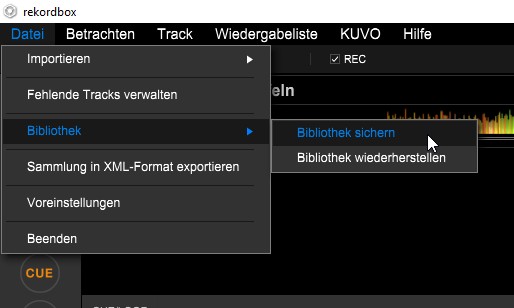
A backup in rekordbox can either be made including the music files or without them. It may depend how large your library is. I am preferring to backup without the music files and have the music copied either to another computer or external drive keeping the same folder structure as on the main rekordbox DB.

When I have to restore on a new machine, I am copying back the music files onto the new computer and restore the rekordbox backup to get my database, cues, playlists etc. back. Afterwards I am running the 'missing files' agent to see if all is ok. If not I might need to relocate the database entries with the mass relocation tool.

If you got an exported USB drive only, you may run into trouble as the music file structure on the exported USB might be completely different as that what you got on the old machine.

Can you let us know what type of backup strategy you were having prior you lst you old laptop? Do you have backups from you rekordbox DB and you music files?
 

Frank Richter 0 votos
Ações de comentário Permalink
0
Avatar

Hi,


thanks for the quick reply


I still have access to all my old music on an external HD :)


What shall I do next?


Its the playlists I need most.


Currently I have;

New laptop with latest rekordbox

USB stick with everything on it (up until last week), ie. No new playlists

External HD with all my music on it.


Where would my playlist files be saved? Solely on the old (dead laptop), or can I import them somehow from USB stick?

David W 0 votos
Ações de comentário Permalink
0
Avatar

Do you have a backup from the rekordbox on the old laptop?

If yes you need to restore it on the new laptop.

If not - by right click on the playlist on the USB you can import the playlist to your collection but I assume it will be a lot of work to bring this back in sync into your original files structure as rekordbox would see them as new tracks. In this case the mass location cannot work and you probably need to eliminate the imported tracks and relocate track by track to the original file.

In that case you may need to wait for Pulse to respond back. Maybe he has some other ideas how to help you.

In regards to you old 'dead' laptop. Is it the HDD which is dead or is it something else? If the HD might be still readable you might be able to extract the rekordbox DB, by taking the old HDD out of the old Laptop and connect it to another computer to read the data from.

Frank Richter 0 votos
Ações de comentário Permalink
0
Avatar

Hi Frank, the old laptop switches off after a few mins (have replaced fan, heatsink paste etc). I can get it on for about 5-10 mins max lol.

Would I be able to just export the playlist without the music files? (i.e. 'backup library without music' and save this as a zip file, then on my new laptop, import it?

Will this then recognise all the existing playlists and music on my USB stick?

Thanks for your help on this. :)

David W 0 votos
Ações de comentário Permalink
0
Avatar

If you can backup your Library in rekordbox without music files nd you got the music files on an external drive already, you can restore it on the new computer. If the music files can be put into the same 'place' as they have been on the old computer, it will recognize them. If they are placed somewhere else and you don't want to restore the old folder structure, you need to reloacte them within rekordbox..

How many Tracks we are talking about roughly?

If your old Laptop ist not running long enough to do the backup from rekordbox you probably are able to grab just the HDD from the old Laptop and connect it as an external drive to the new one. This could help as well to bet your library back.

Frank Richter 0 votos
Ações de comentário Permalink
0
Avatar

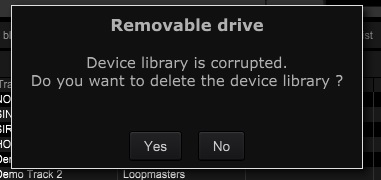
tried that, now I have the problem that this new Rekordbox install thinks my USB library is corrupt?  (Works fine on my CDJs)


David W 0 votos
Ações de comentário Permalink
0
Avatar

Are you trying to backup the exported USB stick?

You should backup your original library from your old computer. Can you explain a bit more in detail what you did?

Frank Richter 0 votos
Ações de comentário Permalink
0
Avatar

Ugh... a mess!

If all your music is stored externally, try and recover this folder from the old computer's drive:

Win 7/8/10: C:\Users\yourusername\AppData\Roaming\Pioneer\rekordbox
OSX: /Users/yourusername/Library/Pioneer/rekordbox

Don't just smash that whole thing onto your new computer, just copy the datafile.edb file into the same folder on your new computer.

If you have changed the username on your new computer, there's additional changes that need to take place to the settings file, so let me know where you get to with this and if your user names are the same or not.

Pulse 0 votos
Ações de comentário Permalink