Have a feature request or suggestion? Post your idea here!

Publicação

5 seguidores Seguir
0
Avatar

XDJ-RX playlists not sorted in alphabetical order

How can i configure my playlists (which are already alphabetically ordered in rekordbox) show up in the same condition in XDJ-RX playlists menu? 

Haju Respondido

Comentário oficial

Avatar

The playlist order themselves can't be sorted on the XDJ-RX, just the contents of the playlist.

If you don't have the sort options within the menu on your device, you may have an outdated firmware or haven't added those sort options to your USB device within rekordbox.

Pulse
Ações de comentário Permalink

Publicação fechada para comentários.

9 comentários

0
Avatar

on the XDJ press the menu button to find the sort options

George

George James 0 votos
Ações de comentário Permalink
0
Avatar

Was about to suggest the 'Menu' button too but when I tried it out on 'Playlists' it only shows 'Delete' options, no 'Sort' option. The 'Sort' option does however work for other sections such as 'Track'.

@George, do you see the sort option on your RX for Playlists?


Infinite 0 votos
Ações de comentário Permalink
0
Avatar

Pressing MENU button does nothing when on "PLAYLIST" folder - same thing when inside "PLAYLIST" folder.

Does the fact that I can see "PLAYLIST" in Active Category under Preferences/CDJ & Device/Category mean anything? It is grey though, it moves up & down with the arrows but still inactive. Could that be a category for Sort options in the next tab?

Is there any other way to trigger a sorting event for the playlist folder in RX?

Haju 0 votos
Ações de comentário Permalink
0
Avatar

not sure what's going on there, I'll take a closer look tonight when I get home, on my RX (mk1) that is set up stand alone reading and playing off USB sticks, when I browse I see my folders and playlists and if I select a playlist and press "menu" the sort option is there. How are using your set up? In RB preferences there's a section/tab that relates to what device to plan to use your files on, is that set correctly?

George

George James 0 votos
Ações de comentário Permalink
0
Avatar

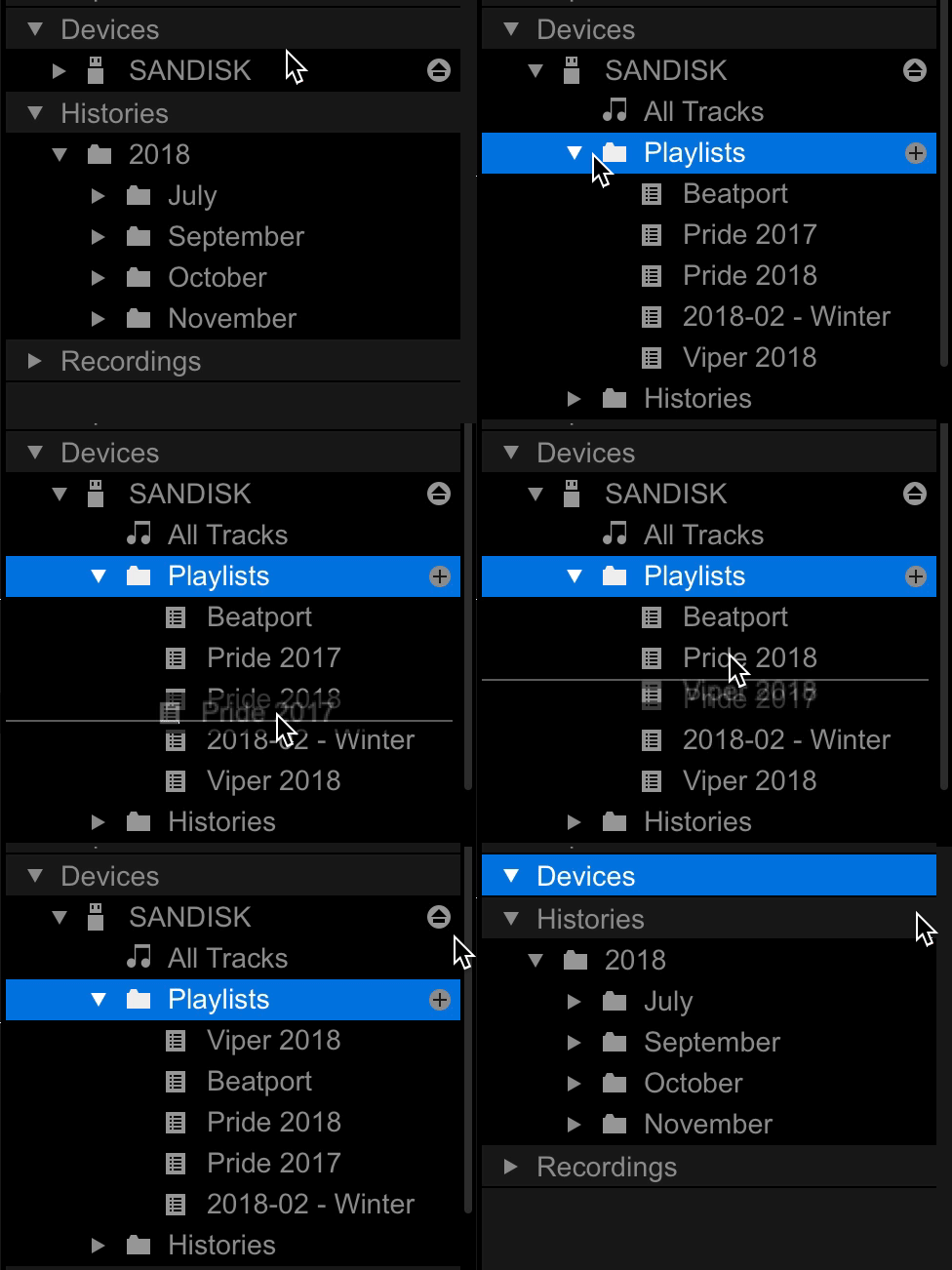
Another option is to sort the USB drive inside Rekordbox. In Rekordbox, Devices, click on your USB drive. Right click and select 'Sort'. You can also drag and drop the playlists on the USB drive if you want to arrange the ordering to your liking.

Infinite 0 votos
Ações de comentário Permalink
0
Avatar

@George: How can i drag and drop playlists on the usb drive? Already sorted them in rekordbox but in the usb drive (Seagate backup plus portable drive 2TB) they still look unsorted by name.


@Pulse: firmware is updated in the latest version.


Another question: my playlists are more than a hundred (121), total tracks around 18.000. I am trying to make a new playlist but these tracks i add are not readable by XDJ-RX, the files are missing. Under Devices/2TB/Playlists, i can see this new playlist and an exclamation on the left side of the tracks and when i try to relocate them (through that same directory), i get the message "File is already in the collection", but there is not*

*found a temporary solution by creating a new folder in the usb drive, transferred some tracks there and re-drag & drop into a playlist. This means now i have the same tracks in the hdd in two different folders.

I have recently updated my library's xml file and using this new xml now. Is that a problem? Could this have caused these missing files? I am a bit confused here, any help would be really appreciated. Thanks a lot for your time.

Haju 0 votos
Ações de comentário Permalink
0
Avatar

@gharri > The playlist order can't be changed automatically, you have to rearrange them within rekordbox by showing the playlists on your device, like so:

Pulse 0 votos
Ações de comentário Permalink
0
Avatar

As for the files already existing in the collection, to find them, show the Location column, sort by that, then find them by the folder/file names. I guarantee they're already in there.

Pulse 0 votos
Ações de comentário Permalink