I have my master database on an external hdd and i have an xdj-rx2.
I import files into Rekordbox to get them into my library and then export playlists to the same device so that I can use them on my rx2 in standalone mode.
Today i imported the latest Glitterbox compilation as a playlist, and then i exported it by right clicking on it, and clicking export playlist and then clicking G:Lacie just like I always have .
The first problem I encountered was that it didn't export all of the tracks in the playlist, only 27 of the 35. When I looked at the export log it looked like the problem may have been that the file names were too long.
I then went into windows explorer to see if they were and edit them down if necessary . It was here I noticed that after exporting it appeared that not only had Rekordbox created a duplicate copy of each file in the folder, but that in each of these files the new file name was the old one but repeated twice.
This is a new phenomenon as rekordbox has never duplicated the actual files before.
I am attaching screenshots of the folder before export with just the original files 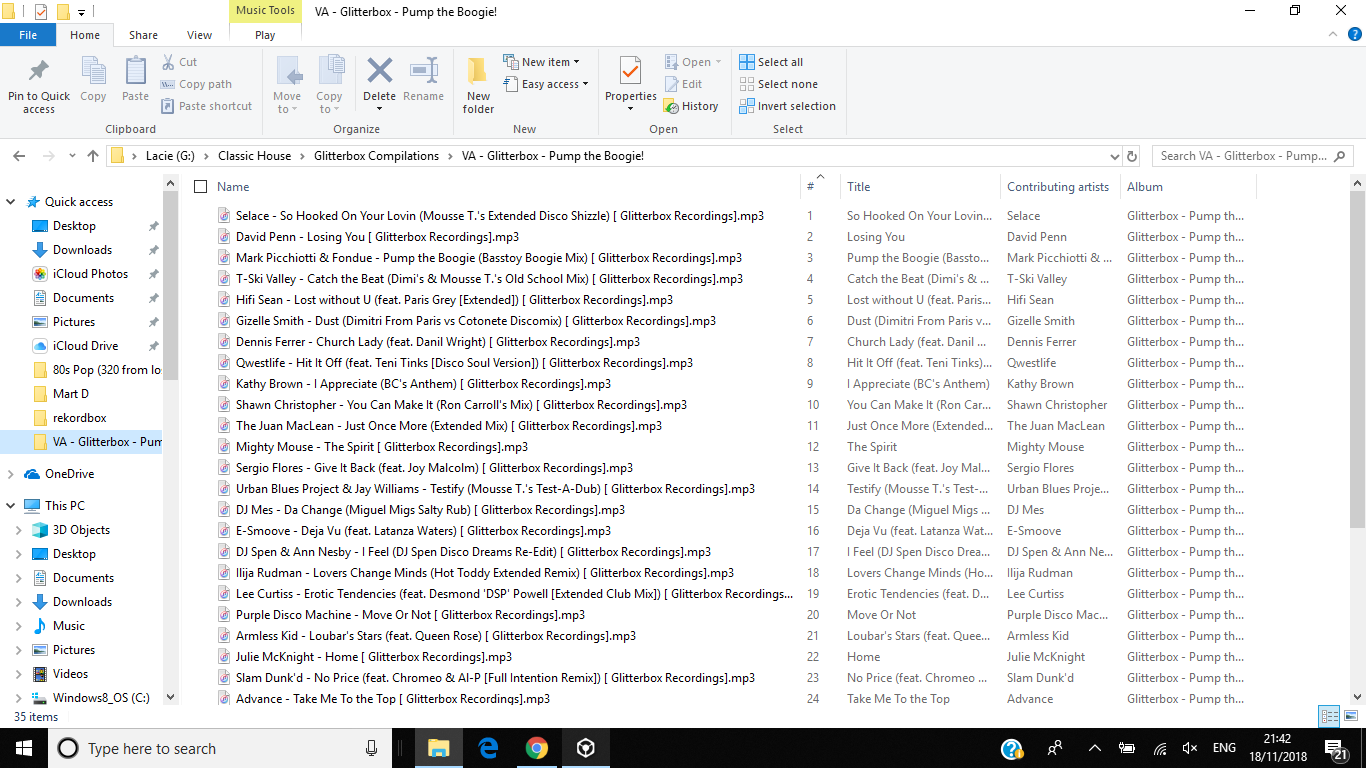
and again after export with them duplicated
My first question is why has Rekordbox started to do this, and my second question is how do i stop it doing it again, as i don't want a duplicate of every single file in my music collection.
I have checked my settings/preferences, and I can't see anything that i could have selected to make rekordbox create duplicates when I exported the playlist. Help!!!
thanks in advance for any help with this
kind regards,
Martin


