Have a feature request or suggestion? Post your idea here!

Publicação

3 seguidores Seguir
0
Avatar

DDJ-RR - not showing under "audio"

I recently purchased the DDJ-RR and tried to set it up on my Macbook, running the latest OS Mojave.

Drivers and firmware are the most recent version, and I also followed the step-by-step guide to re-install the drivers as mentioned in your dedicated form.

After following all these steps, the controller is still not showing under Audio, so as a consequence there is no "master"-output ... which makes my controller useless.I checked this both under Rekordbox and DJAY Pro. Yes, it's responsive (faders, cue, play etc), no, there is no audio-output on the master (master LED's are not lighting up either, so it's not a cable-issue).


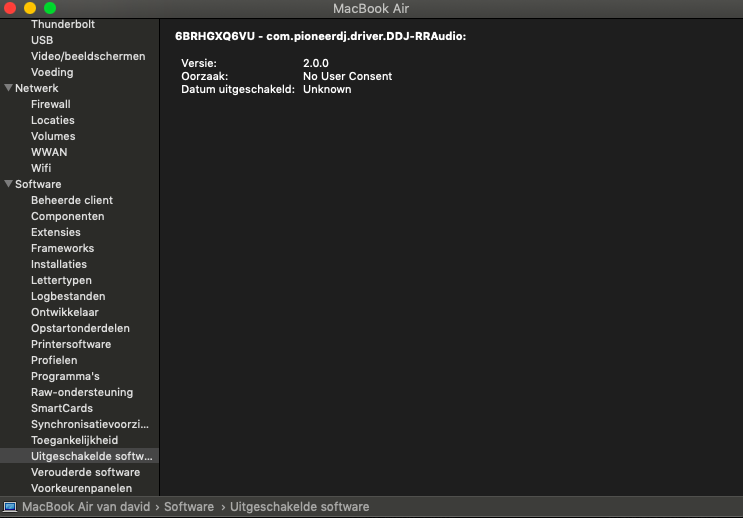
I did notice the following under "disabled software" (even after re-installing the drivers):

I visited your official support-center in my country. Friendly people, however they have no experience with Mac and could not help me :/

I also sent this info via your mail-support (ticket), but no answer after a few days.

To be honest, if I don't get a solution for this issue soon, the controller is unfortunately going back to the reseller.

Hoping to find and answer here ...

David

Comentário oficial

Avatar

Hi David, sorry for our support teams not answering you during the holidays - as you may have seen in the automated reply, many of our regional offices were closed and thus not responding to inquiries during that time.

To answer your question, the issue is likely that you did not allow the driver installation through the OS security. Please try the following:

- download the driver
- open the driver package and run the uninstaller
- reboot your computer
- run the driver installation file
- disable the driver security within the system preferences following these instructions
- reboot
- test to see if the DDJ-RR appears within the Audio Devices

Pulse
Ações de comentário Permalink

Publicação fechada para comentários.

8 comentários

0
Avatar

Problem solved, however it seems like your link "following these instructions" above is not 100% accurate.

Under the latest Mac OS Mojave there is no "allow"-button under "security & privacy", neither is there a third option to allow programs downloaded from any source.

Some googling took me to the following:

This is due to MacOS' Gate keeper.

You can disable it by doing the following:

  1. Open Terminal

  2. Paste : sudo spctl --master-disable

After doing this a 3rd option appeared, allowing programs "from any source"

After this step I uninstalled the drivers, rebooted, and installed the drivers again. 

Then FINALLY the option appeared to "allow" the Pioneer drivers in the "security & privacy"-window. Which I did, and which allowed me to re-direct audio to the controller.

Would have saved me a lot of time if this had been mentioned in the document, and I guess I won't be the only one encountering this problem when installing the drivers on the latest OS Mojave.

Feel free to test this with the latest Mac OS Mojave, and to update your document ...


David 0 votos
Ações de comentário Permalink
0
Avatar

Dear Pioneer! I tried to sell my DDJ RR to someone. But the problem is the sound doesn’t work and the controller works fine! We looked on the website from djaypro and it’s say it is not compatible. Is there anything we can do to fix the problem?

Ricardo Geurtse 0 votos
Ações de comentário Permalink
0
Avatar

Dear pioneer,

Is this also working if he’s using djaypro and it say’s it’s not compatible? Is there a way to fix this problem the DJ controller is working but the audio doesn’t. Any suggestions or do we need to download this application/update

Ricardo Geurtse 0 votos
Ações de comentário Permalink
0
Avatar

The device will not appear within the software if the operating system doesn't recognize it; please ensure the drivers are installed properly first.

Pulse 0 votos
Ações de comentário Permalink
0
Avatar

hello i bought a new xdjrr and i am using macbook catalina and i dont have rekordbox driver this is a big problem for me i want help. Thank you from now

BARISOZEL 0 votos
Ações de comentário Permalink
0
Avatar

@Baris > When you installed the drivers, did you follow the instructions here to allow the driver through the OS security? You may need to uninstall (found in the driver installation package), reboot, reinstall the drivers, allow the security prompt, then you can use the RR without issue.

Pulse 0 votos
Ações de comentário Permalink