Comentário oficial
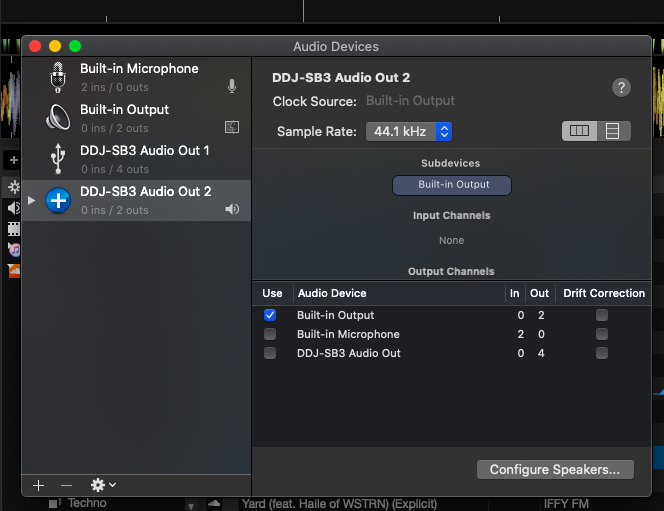
The SB3 is not intended for use as an aggregate device for other software, only as an output for Serato DJ Lite / Pro. Please remove the aggregate device and it should work just fine within Serato.
Hey guys,
Just got my first deck being the SB3 and have been trying to get headphone outputs from it so thet I can listen to a track pre fade. However when I plug them in, there is no output that comes out of it. I am currently using my laptop speakers as my main output. I have checked to see that the headphones are working, that all the gain, trim, cue buttons are selected and at correct levels however the only output is still from my laptop speakers.
Any help would be great

The SB3 is not intended for use as an aggregate device for other software, only as an output for Serato DJ Lite / Pro. Please remove the aggregate device and it should work just fine within Serato.
Publicação fechada para comentários.
I have removed it as an aggregate device and I hear output through my headphones. Is there anyway I can use my main speaker output as my laptop, and then get my pre cue/pre mix input through my headphones or do I need to get seperate speakers?
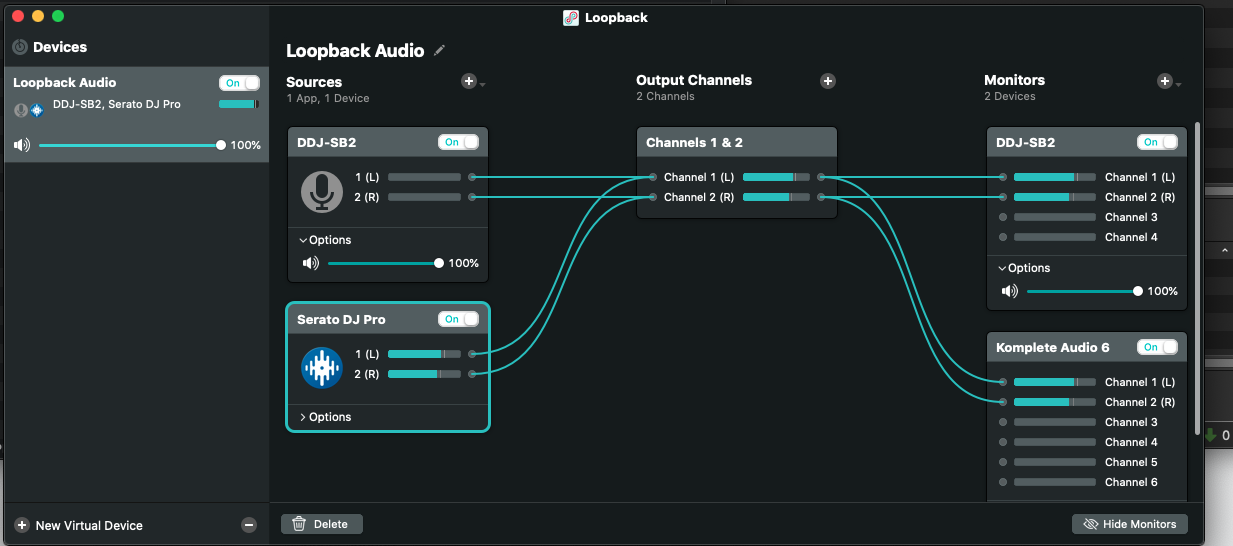
You'd need to either get separate speakers or consider using software like Loopback2 or SoundSiphon that can spy on the audio, create a proper virtual audio cable, and route the audio.
I'm in a similar position. The audio outputs of my Pioneer controller have gotten an RCA plug stuck in there so I'm wondering until I can repair them can I use USB audio. I have gotten audio working as an aggregate device but the cue doesn't work. I have gone ahead and gotten Loopback 2 but I just wanted to ask where should the virtual cable route the audio? Apologies if this is off the scope of Pioneer support.

Sorted it ! It was actually way easier than expected ! Here is my diagram for anyone that needs this ! I'm back in business :D