Have a feature request or suggestion? Post your idea here!

Publicação

3 seguidores Seguir
0
Avatar

Transition from v5 to v6

This quote from your FAQ has me worried:

"The libraries of ver. 5 and ver. 6 don't sync. So, imported tracks and information such as cue points in one version won't be reflected in the other version."

Does this mean if I transition from V5 to V6, I have to spent days again setting cue points on all my (>1000) tracks??

Also see here:

"For users of version 5 who are wondering about upgrading, Pioneer DJ have said the libraries don't sync so "information such as cue points in one version won't be reflected in the other version". That could be a dealbreaker for many."

Mikey Respondido

Comentário oficial

Avatar

You misunderstood -- the migration of importing your rekordbox database from 5 to 6 works just fine, but once you are using 6, any changes you make within 6 are not reflected back to 5. Likewise, if you use rb5 again, and make any changes there, they are not reflected in the database of version 6.

Pulse
Ações de comentário Permalink

Publicação fechada para comentários.

9 comentários

0
Avatar

Thanks for the quick response. You might want to correct DJMag then, they 'misunderstood' as well...

Mikey 0 votos
Ações de comentário Permalink
0
Avatar

I read the post and watched the video, we'll get ahold of them to update that info.

Pulse 0 votos
Ações de comentário Permalink
0
Avatar

I didn't convert my library upon initial startup of RB6.
I manually imported my folders and analyzed them.

I  no longer have any cue points or hot cues or beat grid info in v6.

Is it not possible now to transfer cue point & hot cues & beat grid info from v5 to v6?

Shªun_N 0 votos
Ações de comentário Permalink
0
Avatar

You would need to import the library; they can only be converted by bringing the library from 5 to 6.

Pulse 0 votos
Ações de comentário Permalink
0
Avatar

This won't analyze all my tracks again though will it..?

Shªun_N 0 votos
Ações de comentário Permalink
0
Avatar

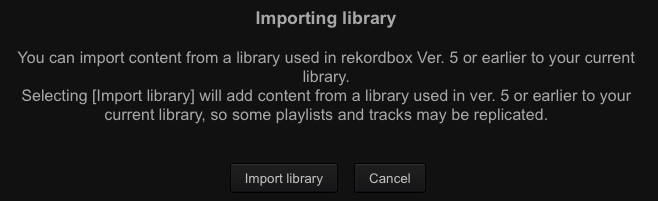
I see this message;

Does this mean I might get duplicate tracks?
If this is the case, I'm not going to risk it - I will beat grid and cue all my tracks again.

If rekordbox had a "find duplicates" setting there would be no issue.

Shªun_N 0 votos
Ações de comentário Permalink
0
Avatar

Ah yes, I forgot that they can now "add" instead of "replacing" the database.

The other way to sort it and find the duplicates would be to sort by import date.

Pulse 0 votos
Ações de comentário Permalink