
Check that the DDJ-400 is NOT selected as your default audio device within Windows or Mac and try again.
Ações de comentário

Hello
I am new to this DJ setup and need some help if possible?
So please bare with me
1. Installed reckordbox and followed all the instructions - unable to hear sound from headphones.
2. Followed the correct settings but still nothing
Can anybody help
Publicação fechada para comentários.
Check that the DDJ-400 is NOT selected as your default audio device within Windows or Mac and try again.
I've tried that and still no joy :(
Default audio - Intel Display Audio
Preferences
Audio: DDJ-400 WASAPI
Output channels
Master Output: DDJ-400 WASAPR MASTER
Headphones Output: DDJ-400 WASAPI: PHONES
IS THIS CORRECT?

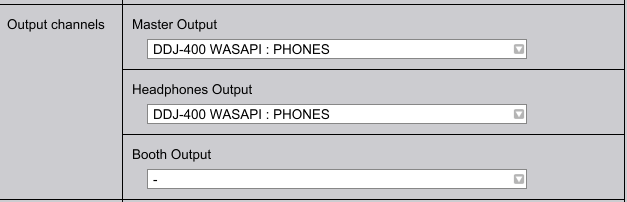
What you typed is correct, but your screenshot is not -- it shows PHONES for both ourputs.
I’ve amended and still not working - any other suggestions
Is there someone I can speak with?
Hi!
Can you tell me what is working? Where is the audio coming out? Does the master output work? Master cueing? Channel cueing? I'll need a bit more information pelase.
The units boots via USB connection lights coming on etc
No audio comes out from the headphone jack or PC.
Is there a support center i can call to resolve? This has become a very frustrating process
@David > Did you press the channel or master CUE button to assign the audio to the headphones, turned up the volume for the headphones, and made sure the headphone mix knob is in the correct position?

