Have a feature request or suggestion? Post your idea here!

Publicação

4 seguidores Seguir
0
Avatar

DDJ-200 audio leaks, cue problems

Hi there,

I recently got DDJ-200 and Ive been using it with rekordbox software on my laptop. I've had the same issue a lot of people having. With the usage of splitter cable splitting a gear4 speaker and headphones, the audio from headphones leak into master output while cueing. In fact master button on the controller is completely useless since the audio is coming from both headphones and speakers regardless.

Here are the audio settings on rekordbox,


I have looked up various threads on various forums but none seem to find solution for this problem.I've come to conclude that its not splitter cable problem but rather the sound driver problem. It is unfortunate that DDJ-200 doesn't have its own software/drivers. My laptop's own driver is Realtek High Definition Audio. I've found a temporary solution which lasted for few days. I have uninstalled the driver and installed an already existing alternative drivel model which is called ''High Definition Audio Device''. This solution came to an end when there were problems with the master output.  As I said I've tried many solutions presented on this website such as setting the outputs manually (didn't work since that required me to disable mono-splitter) or disabling system effects configuration (since this driver does not provide the enhancements tab). Hopefully someone could bring a solution to this :) Thanks!

For extra info my laptop is hp OMEN 15-dc0029na and software is rekordbox 6.0.1 

DTK Respondido

Comentário oficial

Avatar

@DTK > As you noted, the majority of these issues are how the audio device is managing the left and right channels through the Windows output. You might want to check the Windows sound settings. The DDJ-200 doesn't have an audio interface because it's a lower-price unit than the DDJ-400.

@Archie > Your ticket was answered within 24h, so I"m not sure why you're complaining here? Please don't threadjack.


Pulse
Ações de comentário Permalink

Publicação fechada para comentários.

6 comentários

0
Avatar

Hello mate I’m having the same problem but on a Mac book, pioneer have been awful so far in terms of their customer service as many other people are having the same problem but none of their customer service team are replying, hope they can and help resolve the issue :)

Archie Pickin 0 votos
Ações de comentário Permalink
0
Avatar

Hello again I replied and still waiting for another reply, thanks

Archie Pickin 0 votos
Ações de comentário Permalink
0
Avatar

It's in their inbox in Japan; thank you for your patience.

Pulse 0 votos
Ações de comentário Permalink
0
Avatar

@Pulse Thank you for your quick response! Checking windows sound settings was one of the first things I did, its on default and there are no options to change output, maybe I am missing something :). I’ve checked HP Audio Control app and it had a multistreaming option which enabled different audio sources on different speaker sets, enabling that also didn’t work.

DTK 0 votos
Ações de comentário Permalink
0
Avatar

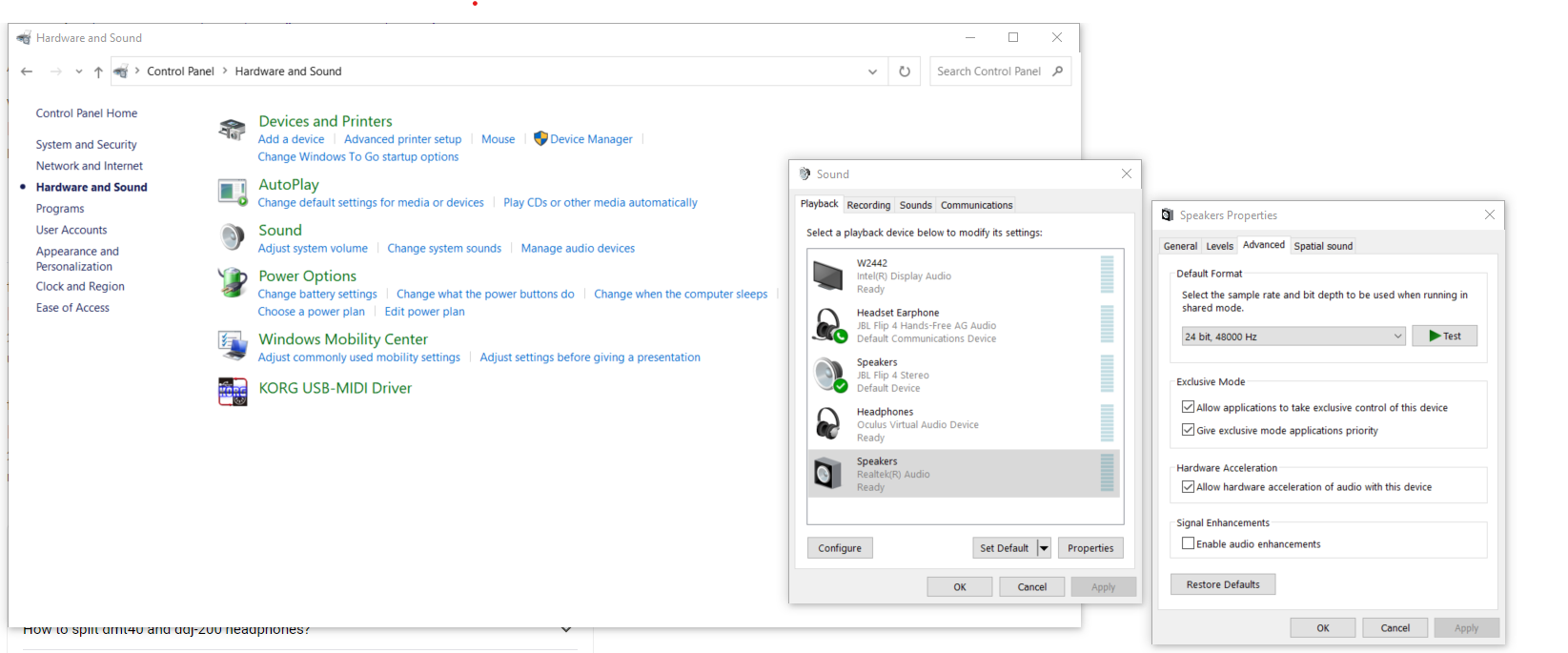
Under the heading "signal enhancements" in the speaker properties under "advanced" tab, I just had to untick the box that said "Enable audio enhancements" (see attached picture) and it fixed the problem for me

TJ 0 votos
Ações de comentário Permalink