Did you follow the instruction ?
https://pdj-ecom-cdn.azureedge.net/-/media/pioneerdj/downloads/firmwares/mixers/djm-450/djm-450_updatemanual_e_v100.pdf
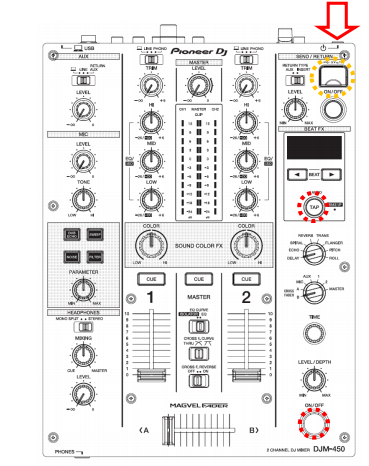
You're pressing the on/off of the send return. It is said on/off from the fx section.
Hello,
i have Problems with Firmware update 1.03, according to the instructions you have to press FX (On/Off) and the tap button to get into the update menu, the only place where i get in is the limiter menu.
Somebody help me, please!
Post is closed for comments.
Did you follow the instruction ?
https://pdj-ecom-cdn.azureedge.net/-/media/pioneerdj/downloads/firmwares/mixers/djm-450/djm-450_updatemanual_e_v100.pdf
You're pressing the on/off of the send return. It is said on/off from the fx section.
OK finally got it! :-)
Thank you!!
Hi, still not getting it right. Please help
@DeepFrequency > What isn't working -- putting the mixer into update mode or applying the update from the USB drive?
I managed to update the firmware. 🙂 Thank you for the response. Does updating mixer firmware make a big difference?
Depends on what version you previously had installed and what features / fixes were added!
I had 1.01, updated it to 1.06.
Hello.
I have Problems wtih Firmware update 1.04 and 1.06, reaction of djm450 after inserting flash drive. here at the link.
Flash drive is formatted and contains only the update file.
https://drive.google.com/open?id=1tLuLyDY-OUBUlTbGnnIBT_mltXT-WZAS
@Mate > You didn't put the DJM into firmware update mode properly - you need to press and hold the buttons WHILE pressing the power-on button.
I tried what you recommended with several flash drives but it didn't change. Is it possible that the djm 450 usb port is faulty?