Have a feature request or suggestion? Post your idea here!

Post

3 followers Follow
0
Avatar

DJM 450 (Firmware Update)

 Hello,

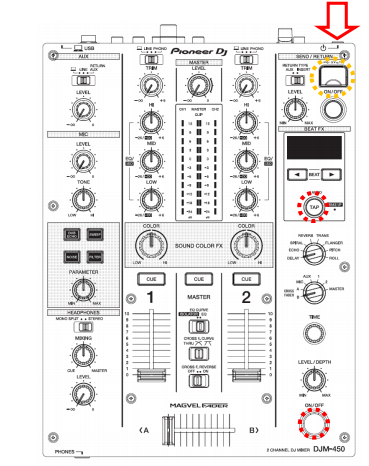
i have Problems with Firmware update 1.03, according to the instructions you have to press FX (On/Off) and the tap button to get into the update menu, the only place where i get in is the limiter menu.


Somebody help me, please!


Maniak

Post is closed for comments.

10 comments

0
Avatar

@DeepFrequency > What isn't working -- putting the mixer into update mode or applying the update from the USB drive?

Pulse 0 votes
Comment actions Permalink
0
Avatar

I managed to update the firmware. 🙂 Thank you for the response. Does updating mixer firmware make a big difference?

DeepFrequency 0 votes
Comment actions Permalink
0
Avatar

Depends on what version you previously had installed and what features / fixes were added!

Pulse 0 votes
Comment actions Permalink
0
Avatar

@Mate > You didn't put the DJM into firmware update mode properly - you need to press and hold the buttons WHILE pressing the power-on button.

Pulse 0 votes
Comment actions Permalink
0
Avatar

I tried what you recommended with several flash drives but it didn't change. Is it possible that the djm 450 usb port is faulty?

Máté Prim 0 votes
Comment actions Permalink