
Official comment

Hello Antonio,
Will you please follow the instructions from the link below?
If you still have any issues or concerns, please let us know.
Thanks,
CRM, Pioneer DJ
Comment actions
Hello Antonio,
Will you please follow the instructions from the link below?
If you still have any issues or concerns, please let us know.
Thanks,
CRM, Pioneer DJ
Post is closed for comments.

hola, yo tengo el mismo problema con los drivers de mi RB pero en mi mac. que puedo hacer?

@Emilio > What you may try doing is open the Audio MIDI and find the DDJ-RB:
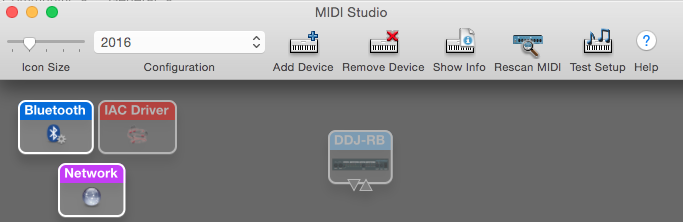
Click on it, then click Remove Device, restart the computer, then download the drivers here. If you're using Sierra you want to get the El Cap drivers. Be sure to install them without the RB connected, then restart the computer, and open rekordbox.
ya realice esos pasos, y sigo teniendo el problema que el mac no lo toma al ddj-rb. me sale el icono con un signo de pregunta, como si estuviese la instalacion incompleta
@Emilio > Did the driver installation process complete? Which version of OS X are you using?
si si se completo, y despues de la instalacion reinicio el equipo, luego abro rekordbox, conecto el ddj-rb y lo mismo no lo toma, no toma la placa de audio del controlador. la version que tengo en estos momentos es OS X el capitan 10.11.6
Can you please try using a different USB cable and the other USB port on your Mac?

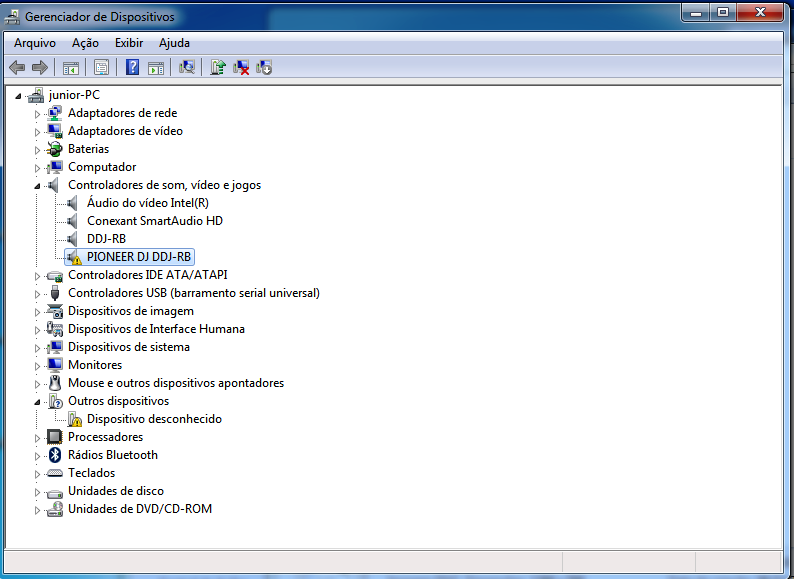
No windows 7, reinicie o computador, fique apertando F8 e escolha "Desabilitar imposição de assinatura de drivers"
On Windows 7, restart the computer, keep pressing F8 e choose "Disable Driver Signature Enforcement"
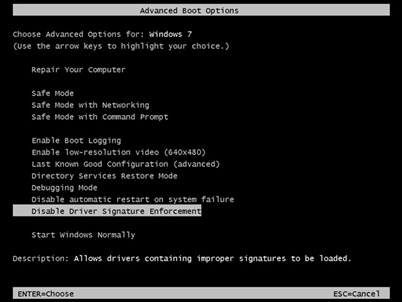
That ^^ only works one time. Next time you restart the computer, you'll need to do it again.
ya solucione el problema, tuve q restaurar el OS X de mi mac. ya instale los driver de mi ddj-rb y anda perfecto. muchas gracias x la ayuda. saludos.
Important information if you are using Windows 10:


