Have a feature request or suggestion? Post your idea here!

Post

2 followers Follow
0
Avatar

Mixlr - Headphones don't play the Cue with DDJ-400 on Mac - El Capitan

Good evening

I'm having a hard time getting any sound out of my headphones when I'm playing to Mixlr. I went through the very detailed and seemingly fruitful steps here - https://forums.pioneerdj.com/hc/en-us/community/posts/208001726-DDJ-RR-DDJ-RX-with-Mixlr-or-LiveStream-NO-MASTER-OUTPUT-MAX-El-CAPITAN-HELP - but still no luck. Please help me Pioneer DJ, you're my only hope.

Jarrett Murphy

Official comment

Avatar

Here's what you need to do...

1) Open Mixlr, click Select Source under Any Input. Click to Install Mixlr AudioLink. Go through the installation process.

2) Make sure you click that link at the end of the installer to allow it access to the Mic within the System Preferences > Security & Privacy.

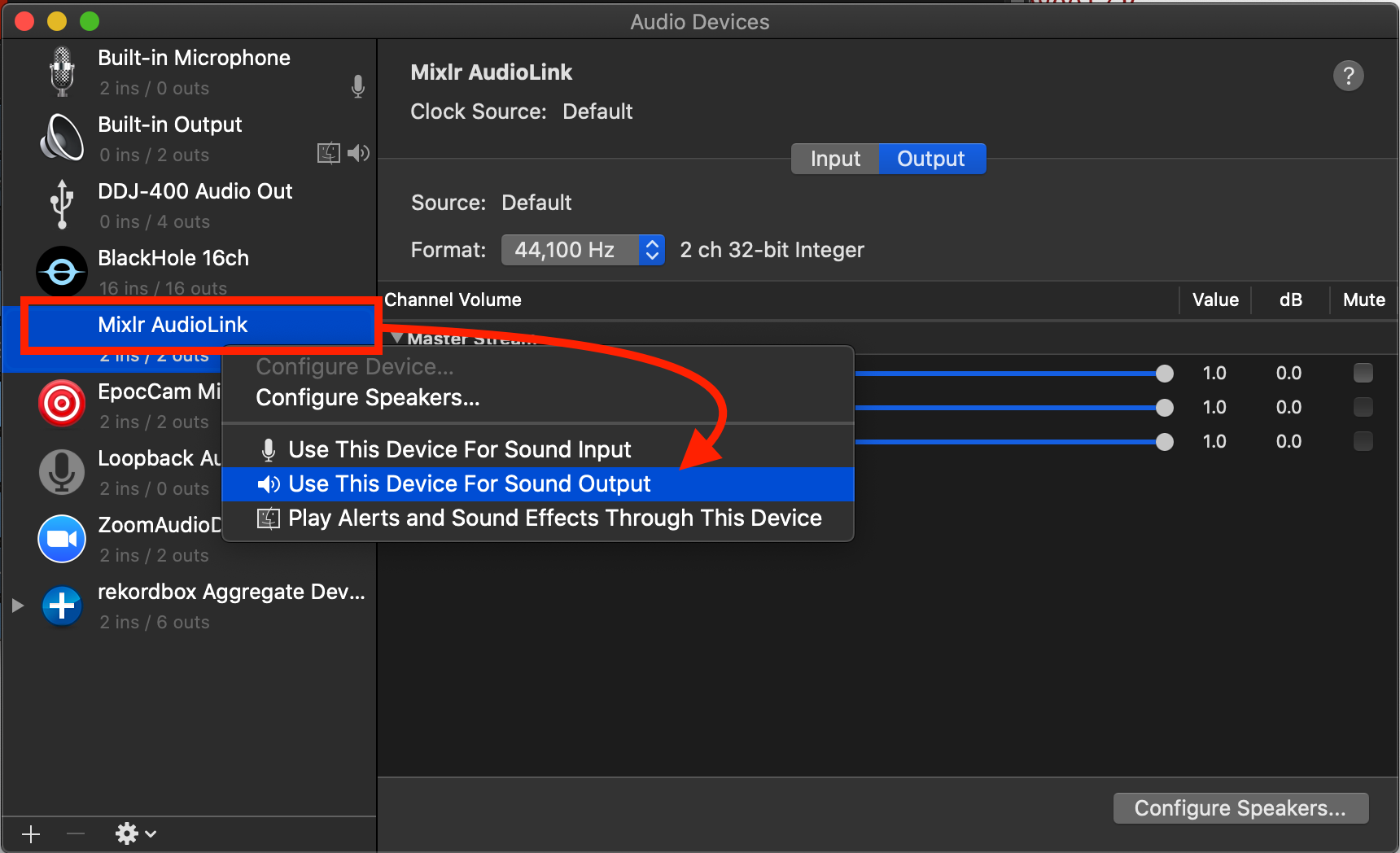
3) Open the Audio MIDI Settings application to the Audio Devices window, right-click on Mixlr AudioLink and click Use This Device For Sound Output:
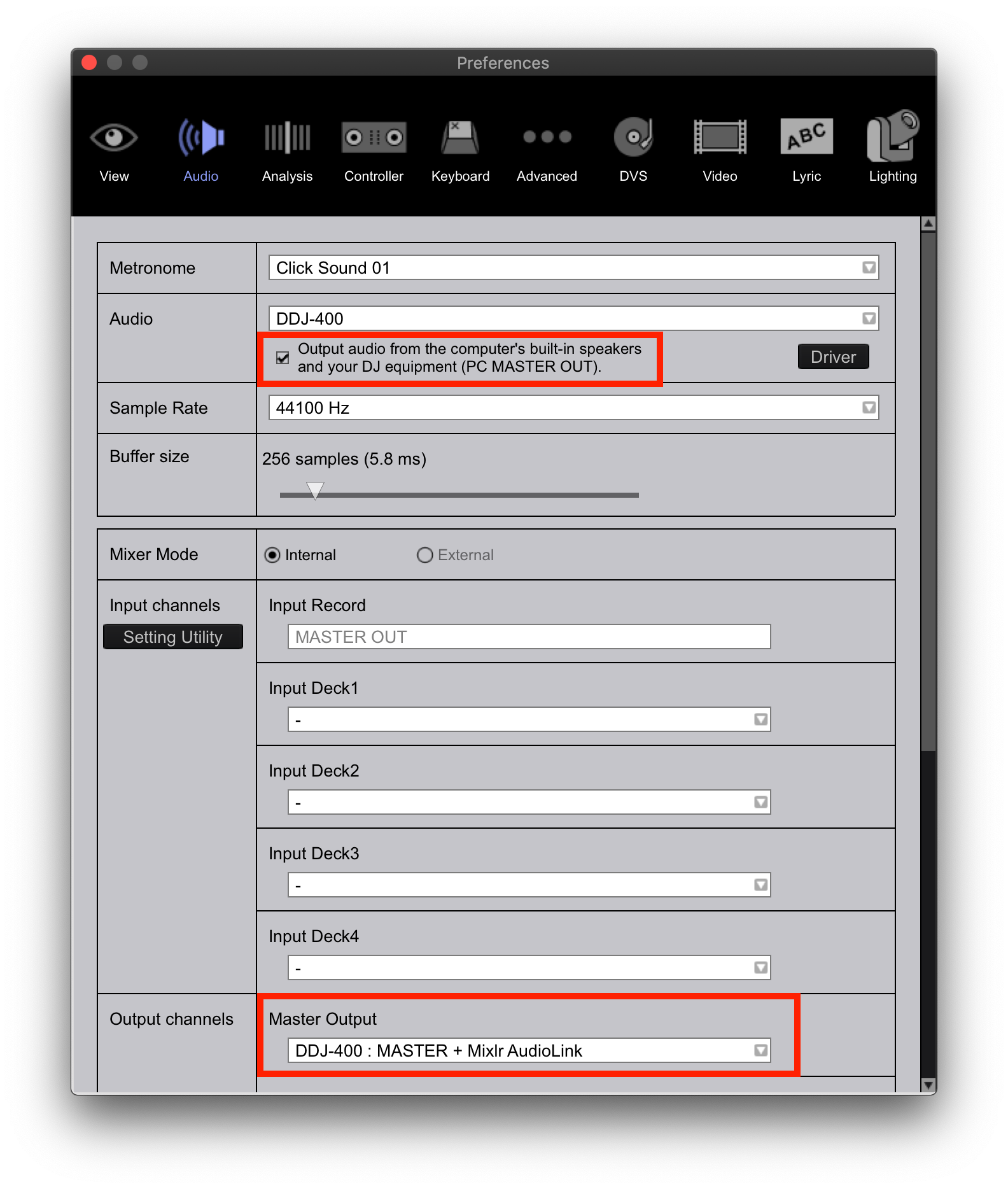
4) In rekordbox, open the preferences and enable the PC Master Output, verify that the DDJ-400 MASTER and Mixlr AudioLink are selected in the master output. You can scroll to verify that the DDJ-400 PHONES is also set for the headphone output:
5) Go back to Mixlr and click Reload Devices at the bottom of that Any Input channel, then select the Mixlr AudioLink as the input.

Presto.

Pulse
Comment actions Permalink

Post is closed for comments.

6 comments

0
Avatar

Nice Star Wars reference. ;)

Try naming the multi-output device as "400+MIXLR" or something that doesn't contain the word "DDJ-400" and see if that helps.

Pulse 0 votes
Comment actions Permalink
0
Avatar

Haha thanks! I renamed it "DDJ and Mixlr" - still nothing from the headphones :/

Jarrett Murphy 0 votes
Comment actions Permalink
0
Avatar

Excellent, I can hear through the headphones now. This is so much better, thank you so much! There is a bit of a lag between the sound output and the beat grid, do you know of a way to fix that too?

Jarrett Murphy 0 votes
Comment actions Permalink
0
Avatar

So long as you're not sending the audio to a home stereo receiver or other speaker with audio processing, there would be no delay.

Pulse 0 votes
Comment actions Permalink
0
Avatar

Cool, I think it's a Mixlr issue anyway. Thank you so much again, this is a load off my mind!

Jarrett Murphy 0 votes
Comment actions Permalink