Have a feature request or suggestion? Post your idea here!

投稿

3フォロワー フォローする
0
Avatar

DDJ–RR: Sound output from computer audio through Booth (TRS)

Hey all,

I'm trying to get audio from my computer (Spotify, Youtube, etc.) to my speakers via the TRS (Booth) outputs. I'd been able to do this in the past with the RCA (Master) outputs, but can't figure it out with this setup.

Any help would be greatly appreciated!

Joe Crook

正式なコメント

Avatar

Okay - confirmed... it's pretty simple and this will work with almost any Pioneer DJ equipment:

1) Install Voicemeeter Banana.

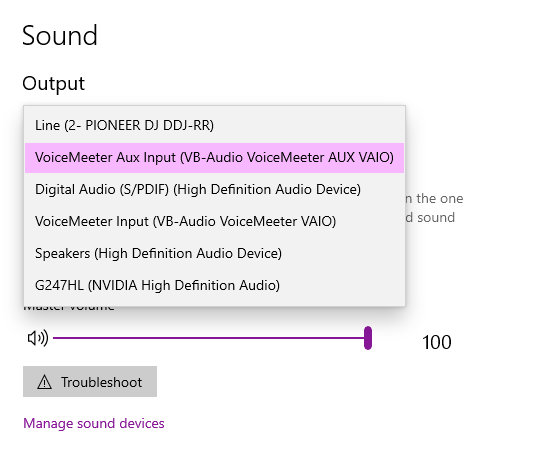
2) Open the Windows sound configuration and select the Speakers (VB-Audio VoiceMeeter VAIO) device, and set the volume to 100:

Close that window.

3) Open Voicemeeter Banana from the Start menu and configure the following:

  • At the top-right, click the A1 item and select the Pioneer DJ controller you want to use for output
  • If you also want to use your internal speakers or another output, select it on A2 beside it.
  • In the Master Section click the mode selection box (defaults to Normal Mode) for the first channel until it shows Stereo Repeat
  • Under the Virtual Inputs on the left item (Voicemeeter VAIO), enable the selected outputs for A1 and A2 where applicable.
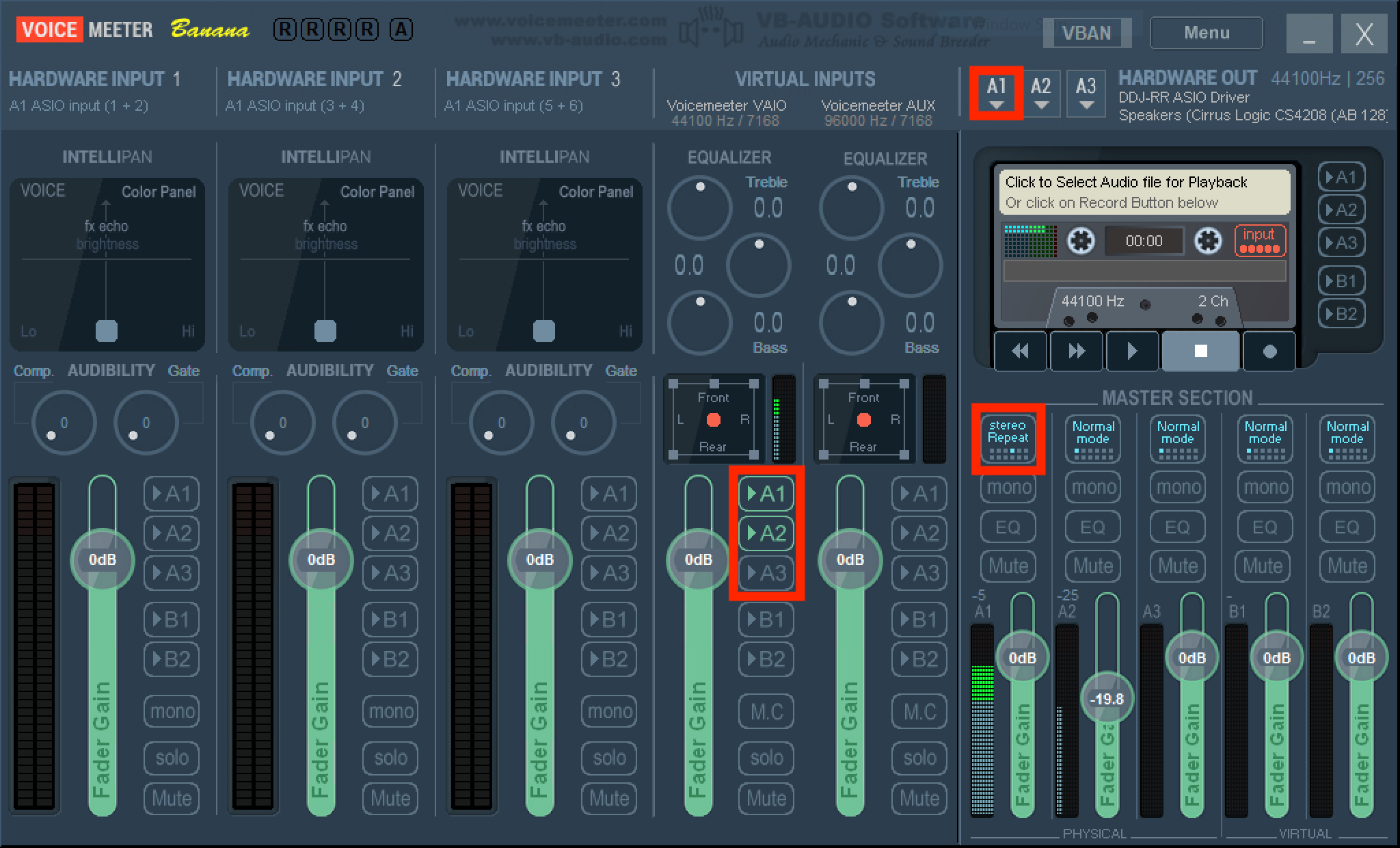
4) With audio playing anywhere in your system (not a DJ application which might select the audio device for you), you'll now see activity on the master meter on the RR; dial up the booth output and you'll also have audio output.

Pulse
コメントアクション パーマリンク

投稿コメントは受け付けていません。

16件のコメント

0
Avatar

Sorry, unless you're using software that can specifically target the booth output of the DDJ-RR, only the master output can be used by applications such as Spotify or your web browser without additional tools.

Pulse 0 票
コメントアクション パーマリンク
0
Avatar

What would the application be? and how can I get things like spotify and my web browser to play through the master output?


Thomas Mackie 0 票
コメントアクション パーマリンク
0
Avatar

Through the master, just go and assign the RR as the audio device for your system sounds. The process differs for Mac or PC, if you can't figure it out, let me know.

Pulse 0 票
コメントアクション パーマリンク
0
Avatar

Hi, sorry I'm having trouble assigning my controller as an audio device in windows 10. I have a pc with quarter inch jack monitors, and am trying to output my PC's sound to them. Is that something that is doable? I would also like to try using the RR as an audio interface if possible too. 

Thanks for all the help!

Thomas Mackie 0 票
コメントアクション パーマリンク
0
Avatar

I'll have to fire up my Windows to check for sure, but I'm 99% confident this can be done with Voicemeeter Banana. I'll get in there and make some instructions for you.

Pulse 0 票
コメントアクション パーマリンク
0
Avatar

Exited to get this to work, but I don't seem to have the speakers Voicemeter  device, only inputs. I assume it would need to be some kind of output device? 

Thomas Mackie 0 票
コメントアクション パーマリンク
0
Avatar

@Thomas > So long as you're using the VAIO (not the AUX VAIO), that's correct ... and yes, it's an input because you're outputting from the system > VAIO input which is then routed to something else (OBS).

Pulse 0 票
コメントアクション パーマリンク
0
Avatar

It worked!! thanks a lot for your help, delighted with the functionality! as a final question is it possible to also configure the mic input on the DDJ-RR to work with voicemeter?

Thomas Mackie 0 票
コメントアクション パーマリンク
0
Avatar

Unfortunately not since (if I recall correctly) the mic on the RR is direct-to-hardware; it does not return as an input to the software. You could add a mic as an input to OBS directly.

Pulse 0 票
コメントアクション パーマリンク
0
Avatar

Hi again, I have recently switched to a mac computer, is it possible to replicate the same function as on windows? 


Thanks in advance!

Thomas Mackie 0 票
コメントアクション パーマリンク
0
Avatar

Hi, I downloaded blackhole, but I'm confused, the instructions seem to refer to using OBS which I never needed to do with the original setup? all I am looking to do is have the audio from my mac routed through the booth output of my DDJ-RR, will this help me do that? 

Thomas Mackie 0 票
コメントアクション パーマリンク
0
Avatar

Ah, my bad, sorry - scrolled up in this old topic, saw Voicemeeter and said "This must be a broadcasting question!"

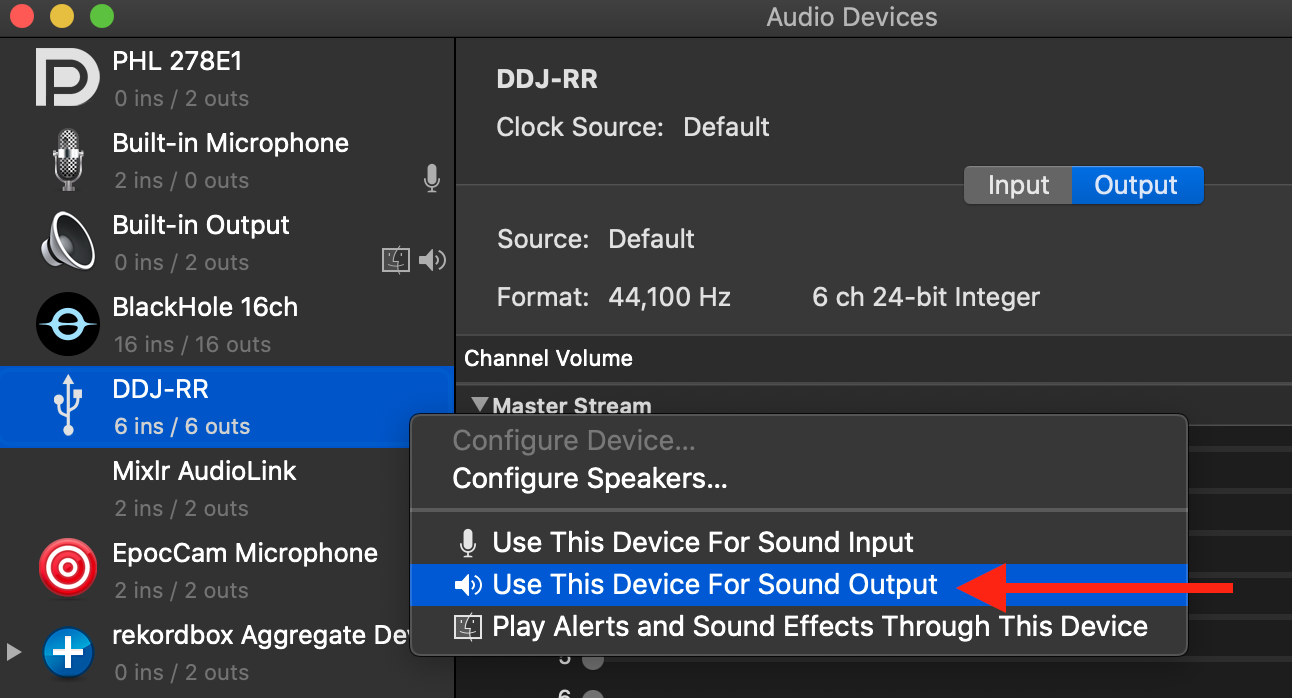
1) Open Audio MIDI Settings, right-click and set the output:

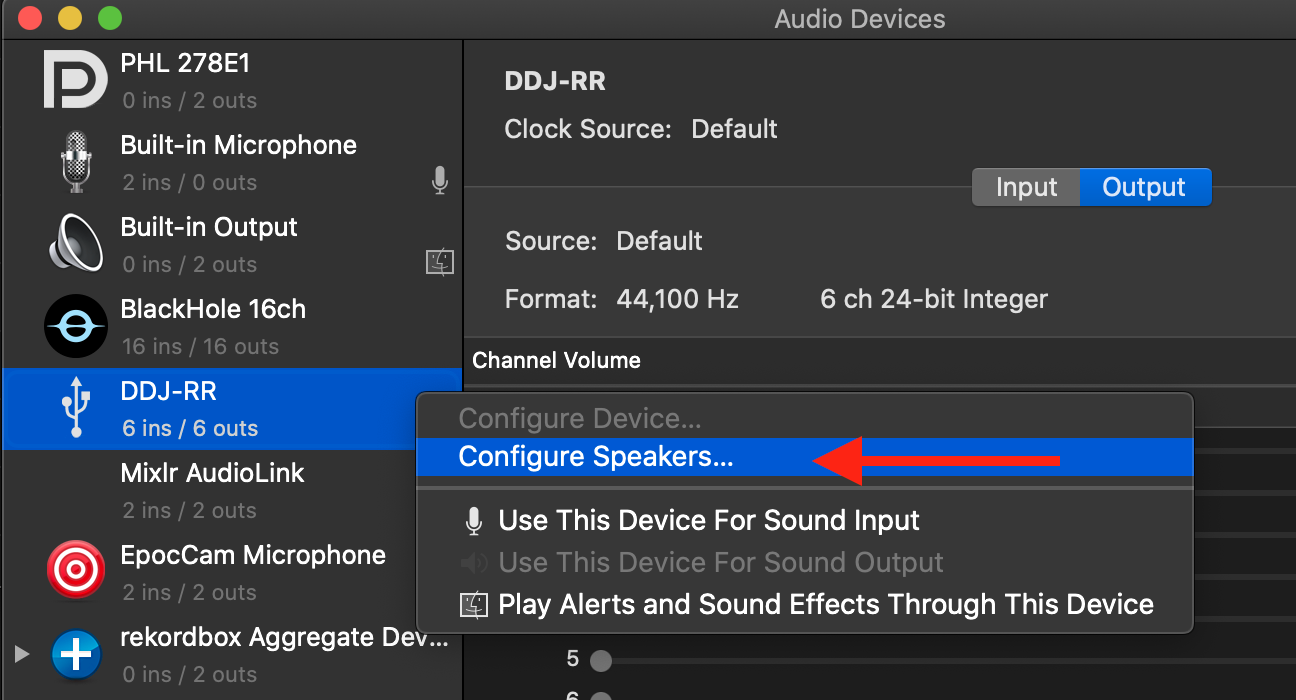
2) Right-click again and configure the specific outputs:

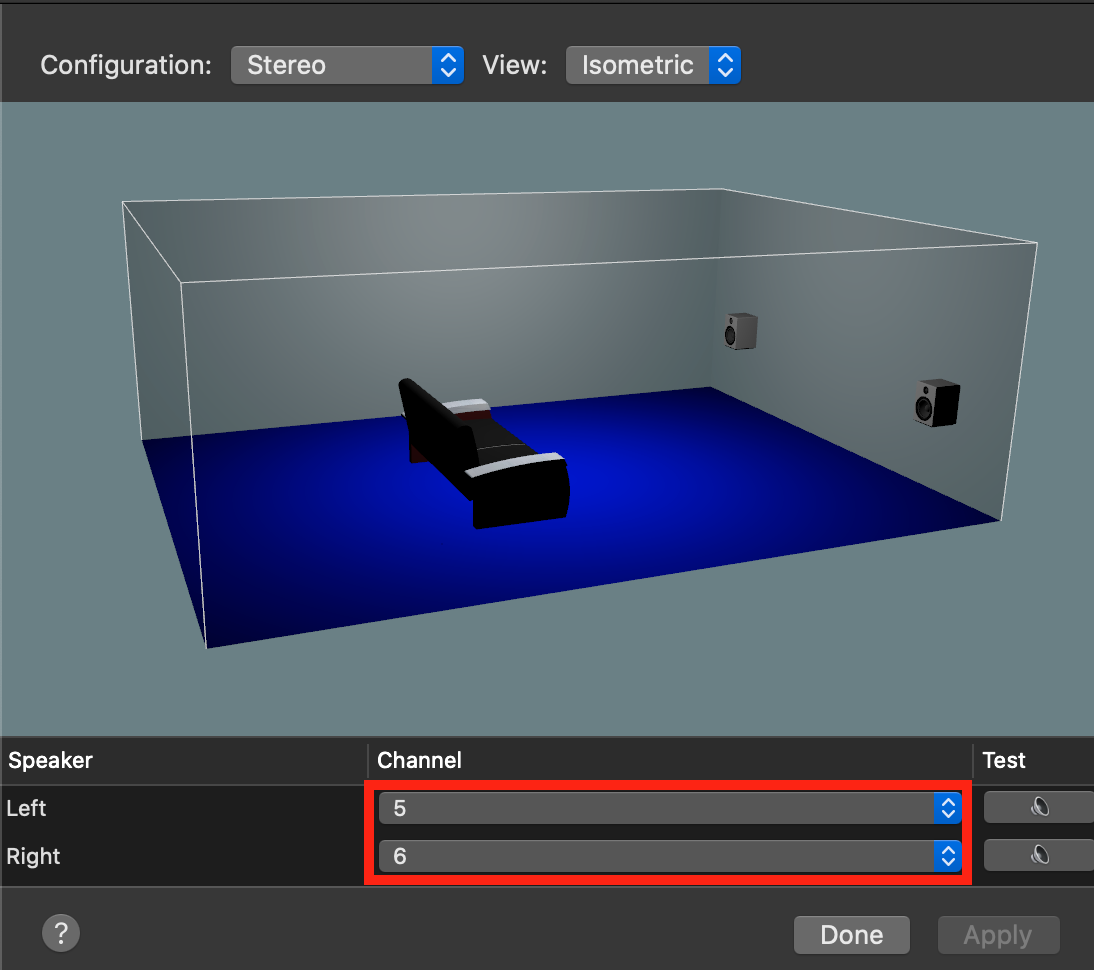
3) ...by setting these to 5/6, the outputs for the BOOTH from the RR:

Pulse 0 票
コメントアクション パーマリンク