Comentário oficial

@Andrew > See this new video I just recorded as I have had several similar questions recently.
Ações de comentário

The controller does not control anything. I have a Macbook Pro running Yosemite. I’ve tried all of the troubleshooting points in the manual with no luck. Rekordbox seems to be recognising the DDJ-RB, as when I plug the unit in, the Audio in rekordbox’s preferences changes from ‘Built-in Output’ to ‘DDJ-RB’. The laptop’s Audio MIDI Setup shows the DDJ-RB in both the audio and MIDI windows fine. I get sound from the DDJ-RB’s headphone port and RCA out when rekordbox is playing.
When switched on, the ’Hot Cue’ button lights up red and ‘FX’ and the two ‘Beat’ buttons light up blue, and that’s it (it does the flashing lights thing when plugged in and also after it’s been idle for a while). When pressing all the buttons, the light of the ‘Master Cue’ goes on and off on the unit, and the ‘Sampler’ button lights up when pressed, but no change on rekordbox.
I’ve tried both USB ports (they work with other devices) and have the latest driver and firmware. Any help would be much appreciated.
@Andrew > See this new video I just recorded as I have had several similar questions recently.
Publicação fechada para comentários.
Hello Pulse,
Thanks a lot for your reply and the link.
I've made sure all of the drivers and firmware are the latest and correct. In my 'Audio' tab in rekordbox preferences, I don't get a box with the 'Control Device Information' as per your video.
I've tried 3 USB cables, all the USB ports, no hub. It shows up as normal in the Audio MIDI Setup, and I did that "New configuration..." thing, but it didn't help. The DDJ-RB shows up on my 'System Information', and I have tried rebooting and re-installing the driver. Also tried reinstalling rekordbox.
Still only audio and no control.
Anyone else able to help, or is there someone I can contact regarding this matter?
The controller has just been sitting there unused since I bought it, as it doesn't control the software.
@Andrew > If you open the MIDI panel and click the DEFAULT button at the top right, does it work after that?
Do you mean in rekordbox preferences or Audio MIDI Setup? I can't see the DEFAULT option at the top right in either.
I noticed that the MIDI signals are recognised in ableton and the pads work as MIDI notes, so there definitely is communication happening.
Sorry, no - in the MIDI configuration panel of rekordbox:
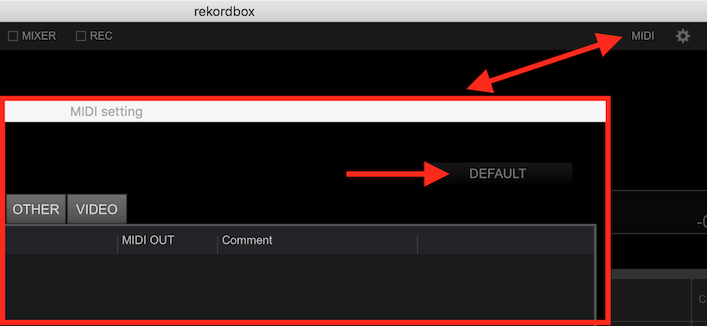
I can't see that on mine:

Not in the View menu either:
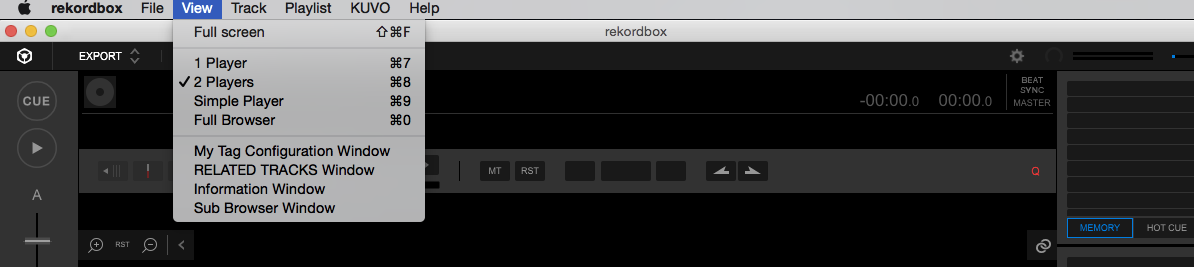
Ah... you didn't realize you're in EXPORT mode! You need to be in PERFORMANCE mode! Click the drop-down at the top left and ENJOY! :D
(And added clarification; you shouldn't need to do anything else.)
That was it. I knew it would be something glaringly obvious! Interesting that it defaults to that mode.
Thanks a lot for your help Pulse!
Good thing - I was about to direct you to a ticket! I was scrambling for ideas! lol


