Have a feature request or suggestion? Post your idea here!

Publicação

5 seguidores Seguir
0
Avatar

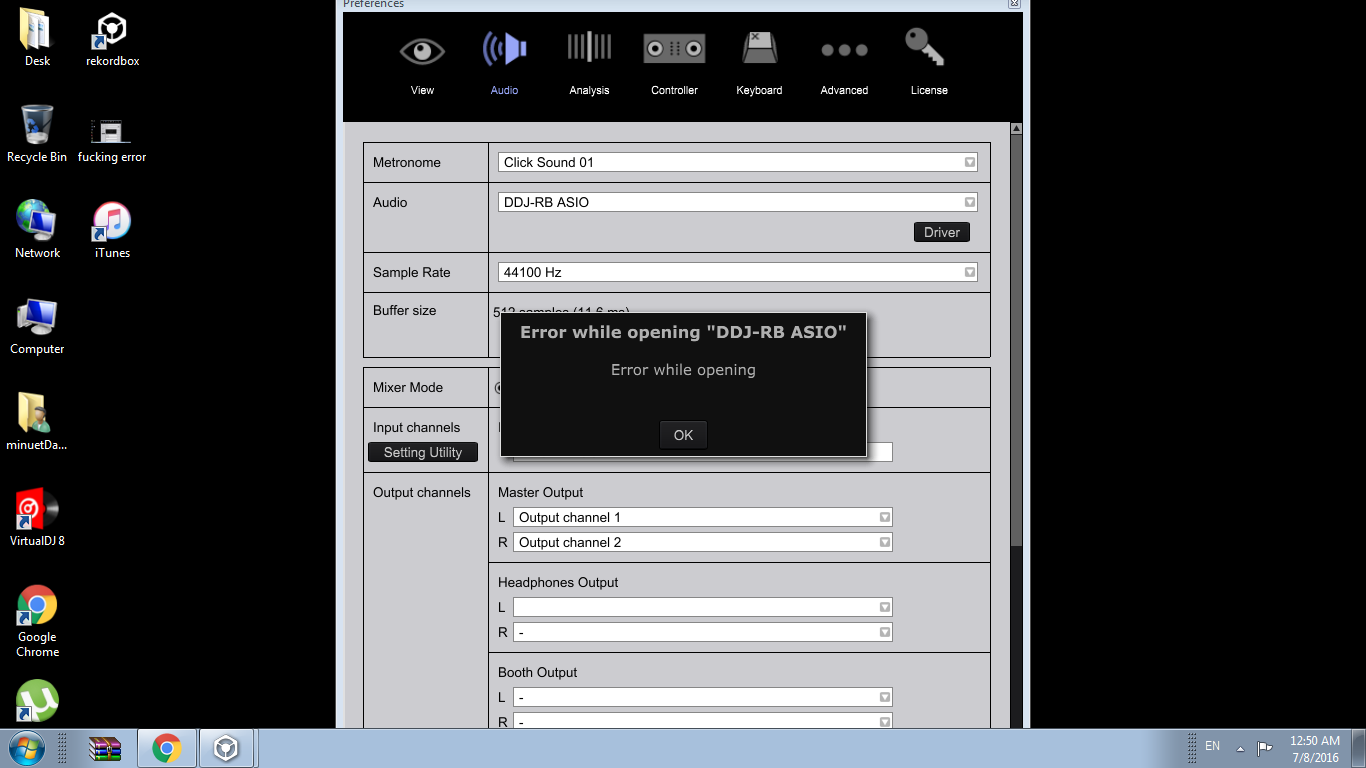
DDJ RB Audio Error in RekordBox 4.1.2

Hello, 

Yesterday my DDJ-RB arrived, since yesterday i have the Error: Error while opening. when i want to select audio DDJ RB ASIO.

I tried everything! Update de firmware, reinstalled the driver 10 times... rebooted the laptop. Nothing! My PC says always that the console driver is not installed properly i got a Sony Vaio i3 2.3 GHZ dual core 4GB ddram.

Could someone help me ?

Grațian M. Denis Respondido

Comentário oficial

Avatar

@peter > It's not the RB that's faulty.

Use the following steps:

  1. Unplug your RB
  2. Uninstall your RB driver
  3. Restart your PC
  4. Run any Windows updates you may not yet have installed
  5. SHUT DOWN (not restart) your PC
  6. Install the RB driver
  7. Restart your PC
  8. Open rekordbox
  9. Connect your RB
  10. Check the preferences
Pulse
Ações de comentário Permalink

Publicação fechada para comentários.

13 comentários

0
Avatar

... Yes, maybe Pulse could help :)...

Grațian M. Denis 0 votos
Ações de comentário Permalink
0
Avatar

@Gratian > Did you install the drivers for the RB prior to updating to rekordbox 4.1.2?

Pulse 0 votos
Ações de comentário Permalink
0
Avatar

There are two things you can try: one is to try renaming the rekordbox3.settings file in this folder:

C:\Users\<yourusername>\AppData\Roaming\Pioneer\rekordbox\

Quit rekordbox, open that folder, rename the file to rekordbox3.settings.old

The other is to install ASIO4ALL and then switch to that as your driver, then back to the DDJ-RB driver.

Pulse 0 votos
Ações de comentário Permalink
0
Avatar

Tried first option i am going to try the second one :)! Thank you a lot

Grațian M. Denis 0 votos
Ações de comentário Permalink
0
Avatar

I have the same issue. Tried both option to fix it. It´s not working further. Please fix this soon! Otherwise I bring DDJ-RB back to store as faulty!

peter müller 0 votos
Ações de comentário Permalink
0
Avatar

Hi Pulse

Thanks for your answer! After hours of testing it´s working now! Heureka!

I tried your tips you mentioned before. Installed Asio4all and uninstalled again. It didn´t help. After I installed all driver and Rekordbox again after uninstalling them. I renamed setting file and opened Rekordbox again. After I while I didn´t not know when, I could select "DD-RB Asio" as driver and it worked without any error message! Heureka again! Thanks to this forum. It´s not really satisfying after buying a new product and have this workload. But what can I say, fortunately I can work now with my new device.Thanks!

peter müller 0 votos
Ações de comentário Permalink
0
Avatar

@Peter > I'm glad to hear it's working and I'm sorry for the frustration! These things have become so technical in the last few years, it's no longer the good ol' days of throwing on a record or CD and having only a couple of ways things could screw-up. :)

Enjoy the RB, it's a fun little unit!

Pulse 0 votos
Ações de comentário Permalink
0
Avatar

Yes I know. Think it´s in way the error of Windows. In Windows there are many more devices and possible configurations. All have to work. With Apple there is one manufacturer. But i love this "degrees of freedom" in Windows. So we have to live with. Thanks Pulse, now I can work with my DDJ-RB! :) 

peter müller 0 votos
Ações de comentário Permalink
0
Avatar

How do you find and rename the rekordbox3.settings folder in Windows 7? I don't have app data folder

Thomas Pugh 0 votos
Ações de comentário Permalink
0
Avatar

Typically we recommend users post a new topic when they have an issue, rather than piggybacking on what is most commonly not an "identical" issue. But since you're here...

As noted above, the folder location of the rekordbox3.settings file in the C:\Users\<yourusername>\AppData\Roaming\Pioneer\rekordbox\ folder. If that folder isn't visible, you need to show hidden folders.


Pulse 0 votos
Ações de comentário Permalink