Have a feature request or suggestion? Post your idea here!

Publicação

4 seguidores Seguir
1
Avatar

DJM 900NXS ASIO Windows support limitations beyond the 64 bit driver release!

Dear Pioneer,


I am again finding myself irritated and angered about the way in which you have chosen to implement your Drivers on the Windows Platform (I do not have a mac to see if it's a cross platform choice you make for us)

I am speaking of the way in which you have not exposed all the channels to Windows directly and instead have given us this useless single Line in/out:

As you can see in the image the NI Audio 8 DJ that I have had for a very long time exposes all 4 stereo channels to Windows for use by any program. Fine normal scenarios included don't really use my DJM for listening to youtube videos etc.

However it has just come up that Traktor has joined the Ableton Link world of programs and so I thought I may as well give it a go and see what it can do...

To my dismay your driver won't allow more than 1 program to access it at a time: I'm no idiot with my computing and I know exactly why this is the case so I trundle over to that image above and I open the properties and I move to the advanced tab, which looks like this:
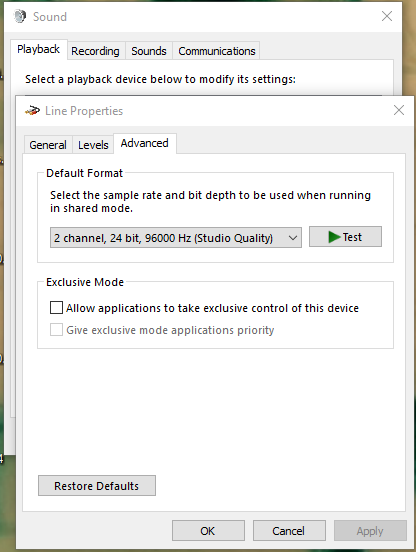
And I untick the "Allow applications to take exclusive control of this device" box. But I am aware this is futile, but I humour you none-the-less: on the Audio 8 you must do this for all 4 I/O's (8 in total between the Playback and Recording tabs). 

Guess what, didn't work! And it's your fault, so Fix it!


Now I'll explain why it should be so great:


With Ableton (or anything else) locked to the BPM of the DJ set, and with 4 stereo channels in both directions it should be feasible to run all audio from traktor through 4 stereo channels in ableton and layer ableton effects like inserted sends on the same channel (no other fader or channel or send/return activation required) Similarly you could then dedicate some synths/loops and the whatnot to specific mixer channel and use traktor on 2 and ableton on the other 2. All of this would be on the fly choices you could make during a gig and not have to worry; just by removing exclusive mode in Windows on all I/O manually!

And yes, I have tested this on the Audio 8, and you can indeed send ableton and traktor down the same channel... Problem with this is: wires... 8 pairs and actually off the mixer you can't send the channels back to ableton by phono cables, on USB that's not the case as you know with your mixer channel audio goes both ways so you can record seperate channels if you want to of your mix, except you can't attach it to another program.... bah!


I expect this won't be sorted for a really long time in true Pioneer style it took you 2 or 3 years to release a driver update for this mixer, but here's hoping you actually care how people want to use their equipment at some point.

Robbie

Robbie Ennoia-Abstrkt Miller Respondido

Comentário oficial

Avatar

I'll say it again in the kindest, simplest way possible.

Our drivers are not designed that way. ASIO is designed for multiple channels of audio. WASAPI is not. Having multiple sets of WASAPI drivers is not very functional as most applications don't allow for the use of, or recognize, multiple audio devices / drivers simultaneously.

Maybe if you considered using some software rewiring (read: virtual audio devices) to send your signal from Traktor to Ableton, you wouldn't be in such a fit about how our hardware / drivers work.

Pulse
Ações de comentário Permalink

Publicação fechada para comentários.

8 comentários

0
Avatar

post of the year that !!!! will get ignored again i have had months of banging my head against a brick wall !!!!!!

John Arrowsmith 0 votos
Ações de comentário Permalink
0
Avatar

Yeah thats my only real issue here with DJM-900 NXS2  !!! Definitley a real bummer.

Chris Leipold 0 votos
Ações de comentário Permalink
0
Avatar

<sigh>

@Robbie > The DJM drivers are ASIO-based; Windows only shows standard WDM and WASAPI type drivers, which are stereo pairs. That's why you see the Audio8 broken into several different "devices."

If you want to use your DJM with Windows for sending music from iTunes, no problem, it does that. If you want to use it with a more advanced audio application, such as Ableton Live, it will use the ASIO drivers and allow access to ALL of the channels for in/out.

If you'd like to ask a question as to what it is you need to do, I'll be happy to give you instructions on how to do it.

@John > You're not helping.

Pulse 0 votos
Ações de comentário Permalink
0
Avatar

@pulse

You obviously haven't understood what I'm complaining about and it has nothing to do with wishing to use the ASIO driver and all ins/outs in ableton or iTunes or any other program on its own...

My complaint is that you cannot access the the ASIO driver by 2 programs running @ the same time on the same machine...

This only becomes doable on my audio 8 by unticking that box for all 4 stereo ins and outs: that's 8 tick boxes in total.

If you don't do this then the 2nd program refuses to open the audio device ASIO or otherwise as it is only allowed to be "exclusively" used by 1 prog at a time.

Please don't insult my intelligence by offering instructions on how to use ableton or other programs with ASIO devices I've been doing this for over 20 years and you're the only company that I've ever come across that restricts the use of your devices by its users with excuses like "we don't think you need that feature".

Simply put u have a soundcard that has 8 stereo pairs of audio and I can't use them unless u say so...

Fix it!

Robbie Ennoia-Abstrkt Miller 0 votos
Ações de comentário Permalink
0
Avatar

ASIO is not designed to be shared by multiple applications, and I'm sorry our drivers aren't configured to allow that.

Pulse 0 votos
Ações de comentário Permalink
0
Avatar

Ok so that's the typical response i would expect you to give which again doesn't really cut the mustard...


However, I've had some time today to think this through and it struck me that seeing as your MIDI CLOCK outputs on the USB regardless of the MIDI start/stop button being pressed I guessed you would have the same logic with the soundcard. I was right. So here is the half hearted response you should have given me in the first place (if you knew your equipment properly).

Pioneer DJM series soundcards have 8 channels of Audio in 2 directions via USB.

The input selector switch is just that, an input selector.

Anything which travels through a channel will travel back to any connected USB device regardless of source switch selection.

If you connect a DJM USB to a computer and allow Ableton to have the ASIO driver and then use either CDJ/XDJ drivers for Traktor or any other DJ software then the audio from these programs will be returned to ableton on the corresponding input channel.

So long as you have 4 Players or a 4 stereo pair soundcard you can use all 4 decks from any program to achieve loop through to Ableton or any other program for that matter.

The only limitation left here is you cannot send from ableton down the same channel as the audio source and so it becomes a send, but you can change the input switch to allow for other features of ableton to come down those channels when they are not running from another program.


I have made of a video of this and uploaded it to Youtube so anyone who reads this can see it working:

https://youtu.be/xWXg00cMl0k

Now this doesn't mean ignore my orginal point, you still need to make the WASAPI expose all the channels so we don't have to carry a 2nd card or have 4 physical decks to run remix decks through, but for now at least it has not been made impossible.

Robbie

Robbie Ennoia-Abstrkt Miller 0 votos
Ações de comentário Permalink