Dear Pioneer,
I am again finding myself irritated and angered about the way in which you have chosen to implement your Drivers on the Windows Platform (I do not have a mac to see if it's a cross platform choice you make for us)
I am speaking of the way in which you have not exposed all the channels to Windows directly and instead have given us this useless single Line in/out:

As you can see in the image the NI Audio 8 DJ that I have had for a very long time exposes all 4 stereo channels to Windows for use by any program. Fine normal scenarios included don't really use my DJM for listening to youtube videos etc.
However it has just come up that Traktor has joined the Ableton Link world of programs and so I thought I may as well give it a go and see what it can do...
To my dismay your driver won't allow more than 1 program to access it at a time: I'm no idiot with my computing and I know exactly why this is the case so I trundle over to that image above and I open the properties and I move to the advanced tab, which looks like this:
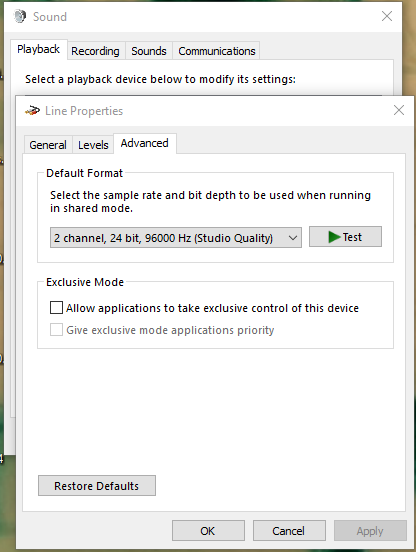
And I untick the "Allow applications to take exclusive control of this device" box. But I am aware this is futile, but I humour you none-the-less: on the Audio 8 you must do this for all 4 I/O's (8 in total between the Playback and Recording tabs).
Guess what, didn't work! And it's your fault, so Fix it!
Now I'll explain why it should be so great:
With Ableton (or anything else) locked to the BPM of the DJ set, and with 4 stereo channels in both directions it should be feasible to run all audio from traktor through 4 stereo channels in ableton and layer ableton effects like inserted sends on the same channel (no other fader or channel or send/return activation required) Similarly you could then dedicate some synths/loops and the whatnot to specific mixer channel and use traktor on 2 and ableton on the other 2. All of this would be on the fly choices you could make during a gig and not have to worry; just by removing exclusive mode in Windows on all I/O manually!
And yes, I have tested this on the Audio 8, and you can indeed send ableton and traktor down the same channel... Problem with this is: wires... 8 pairs and actually off the mixer you can't send the channels back to ableton by phono cables, on USB that's not the case as you know with your mixer channel audio goes both ways so you can record seperate channels if you want to of your mix, except you can't attach it to another program.... bah!
I expect this won't be sorted for a really long time in true Pioneer style it took you 2 or 3 years to release a driver update for this mixer, but here's hoping you actually care how people want to use their equipment at some point.
Robbie


