Have a feature request or suggestion? Post your idea here!

Publicação

6 seguidores Seguir
0
Avatar

Related Tracks not working

Ever since the update from 5 to 5.2 the related tracks window stopped working.

Nothing is showing up anymore and the options menu for configuration doesn't even show up anymore when i hit the wheel icon.


Am i missing something or is it just broken for now ?


Thanks

dfg dfg

Comentário oficial

Avatar

I assume you guys are talking about the Related tracks at the right. Did you hit this button at top right to apply a criteria?
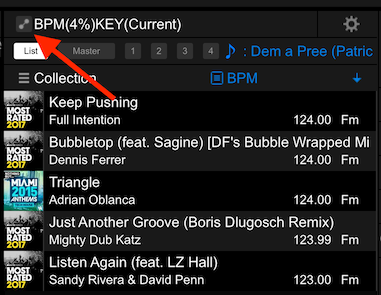
You can use any of the criteria for which you've created a list (under the Related Tracks function at the left). If you haven't, and it's blank, clicking the gear will do nothing and no tracks will be displayed.

Pulse
Ações de comentário Permalink

Publicação fechada para comentários.

7 comentários

1
Avatar

I haven't been able to use the Related tracks function for almost two years, it's fucking ridiculous.

The Related Tracks window shows absolutley nothing no mather how much I configure it and change the criteria. That also means the Match Track function becomes useless as it would appear in the Related Tracks windows.

Joao Silva 1 voto
Ações de comentário Permalink
0
Avatar

I recently upgraded from 5.0 to 5.2.2 and it works in the Tree view only if you have tracks in the standard key notation (not in camelot).   The right side pop-in window doesn't work at all for me but I suspect it has something to do with the settings button not being able to pop up and allowing me to change the related search settings.

djphasim 0 votos
Ações de comentário Permalink
0
Avatar

Yep. I figured it out after setting it up on the left panel. Thanks.

djphasim 0 votos
Ações de comentário Permalink
0
Avatar

Got it too work as well too now, but I'm pretty sure i had tried that before... Oh well, as long as it doesnt break again!

Joao Silva 0 votos
Ações de comentário Permalink
0
Avatar

As far as I can tell the suggested tracks won't read camelot notation from mixed in key. I just re-analyzed a track to the standard key notation and boom the related tracks list populated immediately. Its a crappy fix but it's a fix. I'd much rather use camelot. Rekordbox plz help plz help

Nick Meyer 0 votos
Ações de comentário Permalink
0
Avatar

I know that the issue of the original poster isn't the same as those that posted later but I can confirm the behaviour of Cammelot keys being ignored.

Related (including key) ignores the value in the Key field if it the Camelot. I hope they integrate Camelot in some way.

I don't use related tracks yet but was planning to in the future when mixing on the fly. 

Ves 0 votos
Ações de comentário Permalink